
Studio Freelance Upgrade 2024 to 2026: 777 CAD in Canada! Sorry, I cannot afford it

So, we now know the price for the upgrade from Studio FL 2024 to FL 2026: 777 CAD in Canada! And it is even not the FL plus version!
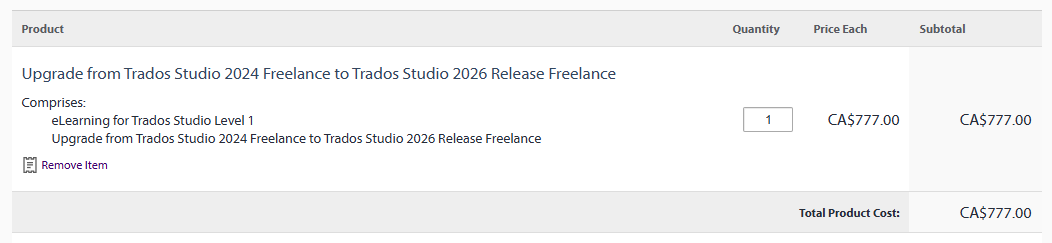
Screenshot showing the upgrade from Trados Studio 2024 Freelance to Trados Studio 2026 Release Freelance priced at CA$777.00, with quantity set to 1 and total cost of CA$777.00.

As translation agencies (including RWS!) put more and more pressure on freelance translators and force them to lower their rates, as most of us have an annual revenue comparable to the revenue they had 20 years ago despite an inflation over 50% since then, as post-edition threatens the future of our profession and our income, Studio prices explode! They do not merely follow the inflation, they explode!

They will explain there was inflation, increasing wages, increasing costs of development, the transition to 64 bits (finally!), the cloud, AI, etc., but the fact is RWS is totally disconnected from translators' realities. If RWS developpers' wages increase, it's not the case for their end users.

With post-edition, AI, and so on, which do not really allow to save time in real life (as long as you want to preserve a professional quality) but are essentially used to push us to lower our rates, agency rates decreased from .20 CAD to .12 CAD/word or less in Canada, and I receive everyday ridiculous proposals from European agencies round .065 €! How could we invest 777 CAD just for an upgrade, that will not really change our lives (since most of us do not use advanced features), and will be to be renewed within 2 years? 

I'm sad, since I purchased all and every version of Studio since its inception in spring 2009 (and other versions of Trados before), I'm sad since, as many here, I've beeen waiting for a 64-bits version for years, but I cannot afford the price of that upgrade. Which, once again, is even not for the FL Plus version.

Studio 2024 has still some minor issues (less and less, fortunately), but I will continue with it. Actually, I don't care of new features like the cloud, AI, etc. that do not bring any added value to my daily practice and, ironically, mainly contribute to the pressure agencies put on our rates. I do not know how many of us really use those new/advanced features in real life. It's like giving us a Formula 1 to make deliveries in downtown! I don't need that, I just need a reliable version of Studio, with the features I actually need and use.

So, Studio 
2024 will be fine for me for the years to come. 

Sorry for RWS developpers, who no doubt made a great job.
And sorry for those who will not appreciate my opinion.
But I cannot afford it. 


Removed AI Suggestion
[edited by: Philippe Riondel at 1:23 PM (GMT 1) on 26 Jun 2026]

emoji
Parents
  •  

    Thank you for your feedback.  We agree that the pressures on freelance translators over the last years are very real, while expectations and technology demands continue to grow which is one of the reasons we now offer a subscription license model for Freelance licenses. 

    Moving to a subscription model does bring some practical advantages compared to the traditional paid-upgrade cycle. With an active subscription, you are always on the latest version of Studio, without needing to purchase major upgrades every couple of years. That means continued access to new compatibility updates, improvements, fixes, and evolving features as the industry changes, while also avoiding the risk of working on an increasingly outdated version over time. 

    It’s also important to clarify that there are no functionality differences between the Freelance subscription and the perpetual Freelance license.  Users still have access to the same core Studio capabilities and features they rely on every day. 

    In addition, the subscription offering provides more flexibility in terms of payment options, allowing users to choose between monthly or annual payments depending on what works best for their business and budgeting preferences. The annual subscriptions also includes support, which gives users additional peace of mind and direct assistance when needed. 

    It’s also worth noting that if you already own a perpetual license, you keep it. Moving to subscription does not take away the license you previously purchased. Your Studio 2024 perpetual license remains yours permanently, and you can continue using it for as long as it meets your needs. 

    For users who prefer to stay with Studio 2024, that is still a perfectly reasonable choice. But for those who want continuous updates, ongoing compatibility, and predictable access to the newest version without repeated upgrade purchases, subscription can make sense financially over the longer term.

    emoji
Reply
  •  

    Thank you for your feedback.  We agree that the pressures on freelance translators over the last years are very real, while expectations and technology demands continue to grow which is one of the reasons we now offer a subscription license model for Freelance licenses. 

    Moving to a subscription model does bring some practical advantages compared to the traditional paid-upgrade cycle. With an active subscription, you are always on the latest version of Studio, without needing to purchase major upgrades every couple of years. That means continued access to new compatibility updates, improvements, fixes, and evolving features as the industry changes, while also avoiding the risk of working on an increasingly outdated version over time. 

    It’s also important to clarify that there are no functionality differences between the Freelance subscription and the perpetual Freelance license.  Users still have access to the same core Studio capabilities and features they rely on every day. 

    In addition, the subscription offering provides more flexibility in terms of payment options, allowing users to choose between monthly or annual payments depending on what works best for their business and budgeting preferences. The annual subscriptions also includes support, which gives users additional peace of mind and direct assistance when needed. 

    It’s also worth noting that if you already own a perpetual license, you keep it. Moving to subscription does not take away the license you previously purchased. Your Studio 2024 perpetual license remains yours permanently, and you can continue using it for as long as it meets your needs. 

    For users who prefer to stay with Studio 2024, that is still a perfectly reasonable choice. But for those who want continuous updates, ongoing compatibility, and predictable access to the newest version without repeated upgrade purchases, subscription can make sense financially over the longer term.

    emoji
Children
No Data