Is RWS no longer selling permanent licences for Trados Studio (2026)?

I'm a bit confused about the pricing for the new Trados Studio 2026. There's a bunch of stuff on the website about subscriptions, but I don't want a subscription. I think this would be the only one I would be interested in (see below).
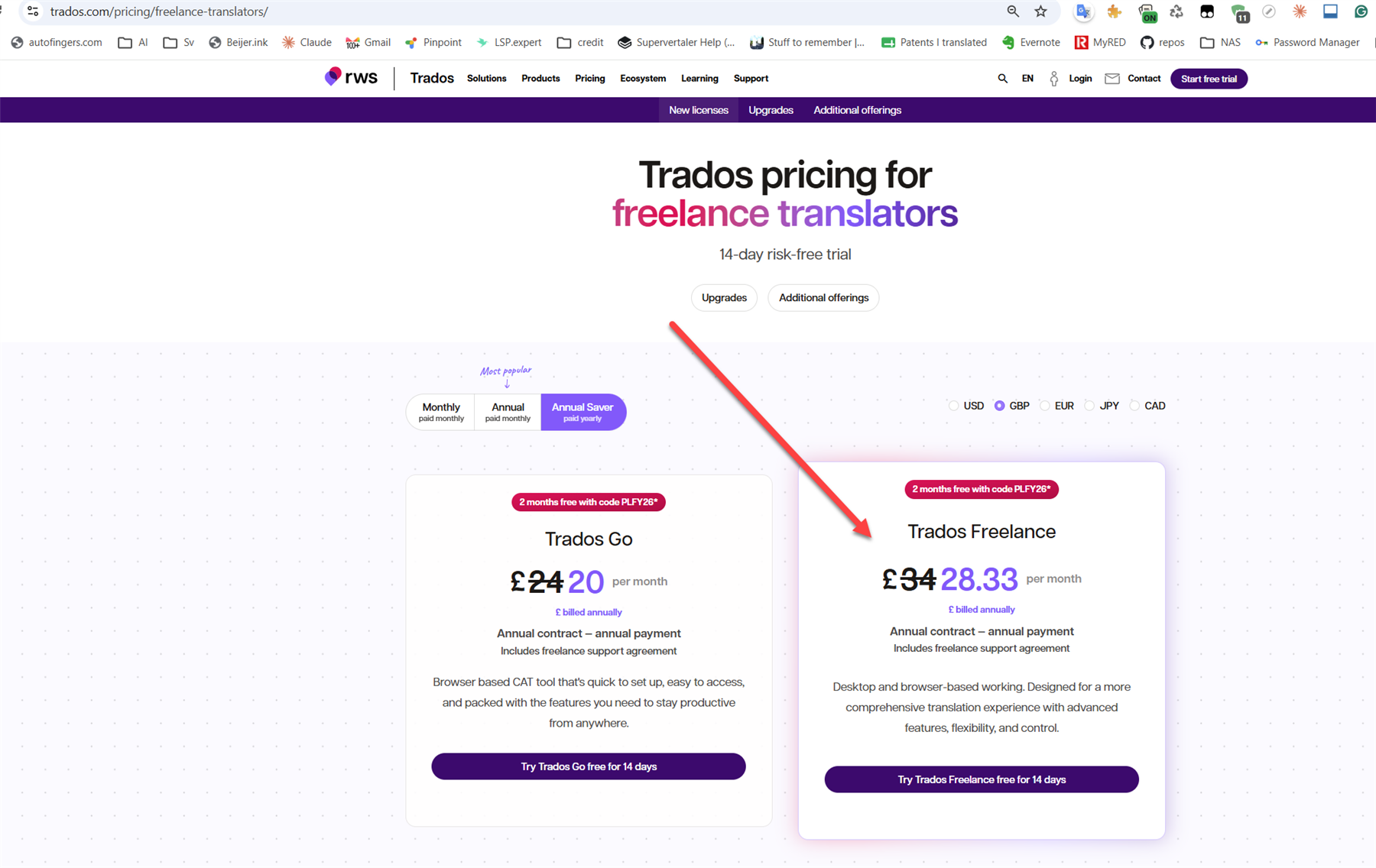
Screenshot of the Trados pricing page for freelance translators, showing options for Trados Go and Trados Freelance with monthly and annual pricing details.

For context:

Going back in time:

  • on 16-Jul-2024, I paid £534.00 to "Upgrade from Trados Studio 2022 Freelance Plus to Trados Studio 2024 Freelance Plus"
  • on 04-May-2022, I paid £168 to "Upgrade from Trados Studio 2021 Freelance Plus to Trados Studio 2022 Freelance Plus"
  • on 24-Sep-2020, I paid £235.95, to "Upgrade from Trados Studio 2019 Freelance Plus to Trados Studio 2021 Freelance Plus"
  • on 04-Sep-2018, I paid £397.78, for "Level 1 Desktop - Support and Maintenance Agreement - 1 Year"
  • on 04-Oct-2017, I paid £303.07, for "Level 1 Desktop - Support and Maintenance Agreement - 1 Year"
  • on 22-Aug-2016, I paid £168.51, for "Level 2 Desktop - Support and Maintenance Agreement - 1 Year"
  • on 18-Aug-2016, I paid £147.60, to "Upgrade from SDL Trados Studio 2015 Freelance Plus to SDL Trados Studio 2017 Freelance Plus"
  • on 29-Mar-2016, I paid £547.35, for "SDL Trados Studio 2015 Freelance Plus + SDL AutoSuggest Creator Add-On"

---

prices include VAT

That's £2,502.26 paid to RWS/SDL since 2016. Over roughly 8 years, that averages about £313/year.

Dropping the Support & Maintenance Agreements (which I no longer buy!) brings my effective Trados spend down to roughly £160–200/year.

On the current pricing page, £28.33 per month works out to £339.96 per year, which is a lot of money. Especially because I also need to keep my stupid memoQ up to date.

Is RWS no longer selling permanent licences? Or will they become available once Trados Studio 2026 is officially launched?


Generated Image Alt-Text
[edited by: RWS Community AI at 9:49 PM (GMT 1) on 25 Jun 2026]
emoji
Parents
  • Hello,

    Thank you for sharing your detailed history and concerns regarding Trados Studio pricing and licensing options. Let me clarify the situation for you.

    1. **Perpetual Licenses for Trados Studio 2026**: RWS has not officially discontinued perpetual licenses for Trados Studio. However, the focus on subscription-based pricing models has increased, as seen on the pricing page you referenced. This shift aligns with industry trends to offer more flexibility and cloud-based features. That said, perpetual licenses are typically made available alongside subscriptions, especially for users who prefer a one-time purchase model.

    2. **Availability of Perpetual Licenses**: If perpetual licenses are not currently visible on the pricing page, it is possible that they will be made available closer to or after the official launch of Trados Studio 2026. Historically, RWS has offered both options to cater to different user preferences.

    3. **Cost Comparison**: Based on your calculations, your historical spend on perpetual licenses and upgrades averages around £160–200 per year. The subscription model, at £28.33 per month (or £339.96 annually), is indeed higher. However, subscriptions often include additional benefits, such as seamless cloud integration and automatic

    emoji
  • In point 3 it ends teasingly with "automatic" - automatic what? Translation? Backups? Upgrades? 

    emoji
  • Hi  - with a subscription license you are always on the latest version of Trados Studio without the need to purchase an upgrade.  It's one of the key benefits of a subscription over a perpetual license.  Also with the Annual plans Support is also included within the subscription price.

    emoji
  • Hi  + ,

    Something that isn't mentioned on the pricing page, and that is important when deciding whether to opt for a subscription or a permanent licence, is how many computers you can run the subscription-based licence on. A sensible default would be two, if you ask me.

    The current Trados Studio "Plus" extra pricing for one additional desktop computer is way too high. By way of comparison, memoQ effectively lets you install it on as many computers as you want. There's no need to be that generous, but I think two computers would be a nice gesture of goodwill. Many of us have one main work computer and a laptop.

    emoji
  •  A subscription license is for one named user and you receive 2 activations – 1 x desktop activation and 1 x cloud/browser activation. 

    By creating cloud projects either from the desktop or the browser any project you create will synch between the cloud and desktop enabling you to access your work from any device

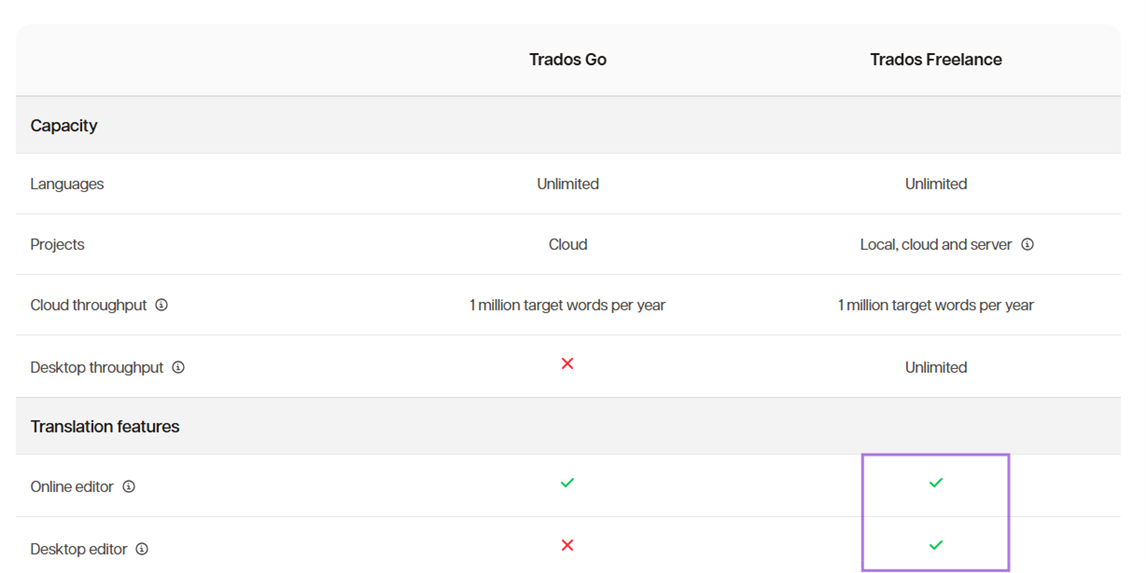
    Comparison table showing Trados Go and Trados Freelance features. Trados Go supports unlimited languages, cloud projects, and 1 million target words per year. Trados Freelance supports unlimited languages, local, cloud, and server projects, unlimited desktop throughput, and both online and desktop editors. 

    emoji


    Generated Image Alt-Text
    [edited by: RWS Community AI at 3:09 PM (GMT 1) on 29 Jun 2026]
Reply Children
  • Thanks, Frances, but that's not quite what I need. I haven't really used cloud projects much yet.

    My main work laptop has Trados Studio 2024 installed on it. I also have a MacBook, on which I run Trados Studio 2024 inside Parallels. I would like to be able to run both of these without messing around with deactivating licences. That's why I currently have a "Plus" licence for 2024.

    With memoQ, something like this is simple. They allow you to use quite a few variants of your licence key, so you can easily do something like this for the price of a single licence.        

    I suppose I could play around with Cloud Projects, but I'm not sure I'll be able to achieve what I am used to. I dipped my toe into cloud projects and resources a while back, but I wasn't particularly impressed, I remember. I'll try again, though. Maybe it has improved by now.     

    emoji
  •  - This is a perfect example.  With the subscription license you can run the desktop version on your Windows laptop and use the browser access on your MacBook where you would no longer need to run inside parallels.  As long as either from the desktop or the cloud you create cloud projects your projects will sync between the desktop and the cloud so you can easily pick up work from either the desktop or the cloud where you left off.

    I understand MemoQ have the same model with their subscription licenses as ourselves in that you can run individual memoQ translator pro subscription on a maximum of two computers concurrently.  Ours is just slightly different in that you have 1 x desktop activation and 1 x browser activation.

    There have been significant updates to cloud projects over time, so I'd encourage you to take a look at it again.

    emoji