Freelance literature translator: Is trados even for me?

I've been testing Trados studios for a month now, and frankly, I'm underwhelmed. I'm a freelance literature translator, and as of now, the only good thing that comes out of it for me is the user interface, which is slightly more comfortable than translating from page to page.

Are there any literature translators here using Trados studios?

As of now, it has only made life harder for me.

It starts with input: I usually translate from pdf master prints (so the pages look like the pages in a printed book); it's a hell of a lot of work to clean them up, and about a quarter of the time, the segments still don't match up with the sentences or are broken by page numbers. Combining segments is a pain (having to press Ctrl.+enter for every single line).

Similarly, the shortcut for accepting a translation needs both hands, which slows me down extremely.

Trados hides the structure of the text: I can't see paragraphs. Often, that makes it hard to understand who is speaking in dialogue.

After translating a few hundred pages, I still get only very few matches, and the ones I get are useless - okay, it's great that Trados can confidently translate "Chapter 5". But really, it's not such a great help. Even worse, matches for short sentences like "Come on!" or "I don't know" are usually presented as 100% confident, but in context, most of the time they are just wrong. And when I change them, next time trados doesn't offer me a list of possible matches (which would actually be useful), but instead only the last translation I used. Again, this is worse then useless. As is offering me partial matches - changing them is more trouble then just translating the sentence myself.

Worst of all is trados insisting on formatting the output like the original file. I don't want any formatting in the output. I just want text. The formatting gets in the way and creates mistakes downstream. But if there's a way to tell trados that I just want text output, and that I want paragraph control, I can't find it.

Basically, I'm wondering if I don't understand trados at all, or if I should just get rid of it and warn all literary translators away from it.


Removed AI Suggestion
[edited by: Jakob Schmidt at 10:44 AM (GMT 1) on 13 May 2026]

emoji
  • Probability score: 0.6  

    Question improvement suggestion: To improve your question, consider specifying the exact version of Trados Studio you are using and any specific features or settings you have tried adjusting to enhance your experience with literary translation.  

    In the meantime, based on the information you have provided, here is a suggested answer to your question:  

    Hello,  

    It sounds like you're facing some significant challenges with Trados Studio as a freelance literature translator. While Trados Studio is a powerful CAT tool, it may not always align perfectly with the unique needs of literary translation, which often requires a more nuanced and creative approach. Here are some suggestions that might help improve your experience:  

    **Step 1: Explore Paragraph Segmentation**  

    Consider using the "Paragraph Segmentation" feature in Trados Studio. This allows you to work with entire paragraphs rather than individual sentences, which can help maintain the flow of the text and make it easier to manage dialogue and context. You can set this up in the Translation Memory settings under Language Resources.  

    **Step 2: Adjust File Type Settings**  

    Since you're translating from PDF files, ensure that you have the correct file type settings configured. Trados Studio can struggle with PDFs, especially if they are scanned. If possible, try converting your PDFs to Word format using Microsoft Word or a third-party tool before importing them into Trados. This can help reduce formatting issues and make the text easier to work with.  

    **Step 3: Customize Keyboard Shortcuts**  

    If the keyboard shortcuts are slowing you down, consider customizing them to better suit your workflow. You can adjust the shortcuts in the settings to make accepting translations and other actions more efficient.  

    **Step 4: Use the T-Window Tool**  

    If you haven't already, explore the T-Window tool available in the RWS AppStore. This tool allows you to translate directly from other applications while leveraging your Translation Memories, which can streamline your process significantly.  

    **Step 5: Provide Feedback to RWS**  

    If you find that certain features are not meeting your needs, consider providing feedback to RWS. They often take user feedback into account for future updates and improvements.  

    Ultimately, while Trados Studio offers many advantages, it may not be the best fit for every type of translation work, especially literary translation. If you continue to find it unhelpful, it might be worth exploring other tools that are more tailored to your specific needs.  

    I hope this answer addressed your question. If not, please reject the answer, add the question improvement suggestion information, and click the RWS Community AI checkbox on the right to try again.  

    RWS Community AI

    emoji
  •  

    Not a literature translator here, but here is my two cents:

    I usually translate from pdf master prints (so the pages look like the pages in a printed book); it's a hell of a lot of work to clean them up, and about a quarter of the time, the segments still don't match up with the sentences or are broken by page numbers. Combining segments is a pain (having to press Ctrl.+enter for every single line).

    PDF files lost information at the very moment of their creation in order to win other advantages. Although Trados Studio can open PDF files, the best procedure is to use other tool to clean the PDF file, such as Microsoft Word (I guess you know that Trados Studio created a Word file which is the format you are translating right now, and eventually you'll get a translated Word file). A tool like Word is ideal for joining paragraphs. Trados Studio can join paragraphs, yeah, but it is another kind of beast and definitely not intended to implement many edits. En Microsoft Word there are even free VBA macros to help you go faster when joining paragraphs.

    the shortcut for accepting a translation needs both hands, which slows me down extremely.

    Some translators find useful the ENTER key for confirming segments. You can search for more posts here in this forum to know how.

    Trados hides the structure of the text: I can't see paragraphs.

    Open the Preview panel and you'll see the structure. The Preview tab be in the right part of Trados Studio and you can unpin it to move it where best suits you, even to a second screen, so you have more space for Trados Studio.

    After translating a few hundred pages, I still get only very few matches

    Yeah, this is what I'd say in literature translation.

    And when I change them, next time trados doesn't offer me a list of possible matches (which would actually be useful), but instead only the last translation I used.

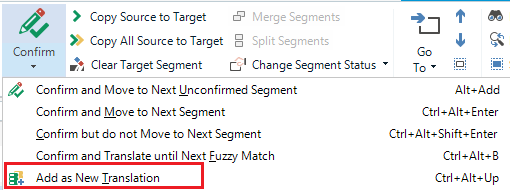
    Instead of confirming this kind of segments you can use Add as New Translation. In this way, the old translation is not deleted from your translation memory and next time it'll be offered as a possible translation:

    Add as New Translation highlighted

    Worst of all is trados insisting on formatting the output like the original file. I don't want any formatting in the output. I just want text. The formatting gets in the way and creates mistakes downstream. But if there's a way to tell trados that I just want text output, and that I want paragraph control, I can't find it.

    What formatting you refer to? If it's in the PDF, that formatting will be in the automatically generated Word file that Trados Studio creates for you. In the cleaning phase mentioned above, you could have cleaned the formatting you don't need. BTW, the conversion PDF > DOCX may create a useless soup of tags everywhere. Again, an editing tool such as Microsoft Word is ideal prior the translation itself. A preparation step before the translation itself is generally advisable, but with PDFs as a source files this step is a must. Last, sometimes clients give the original file itself (such as a DOCX file) and you avoid the formatting issues and the carriage returns issues.

    Summarising, I think you did use Trados Studio in the default-factory mode, but as a powerful and complex tool, there is a learning curve and there are capabilities you could have taken advantage of.

    I remember having read a post about CAT tools for literature translators, not sure if it was Trados Studio. I'll try to find it (it was ages ago) and share it with you. https://multifarious.filkin.com/2013/01/10/translating-literature/ 

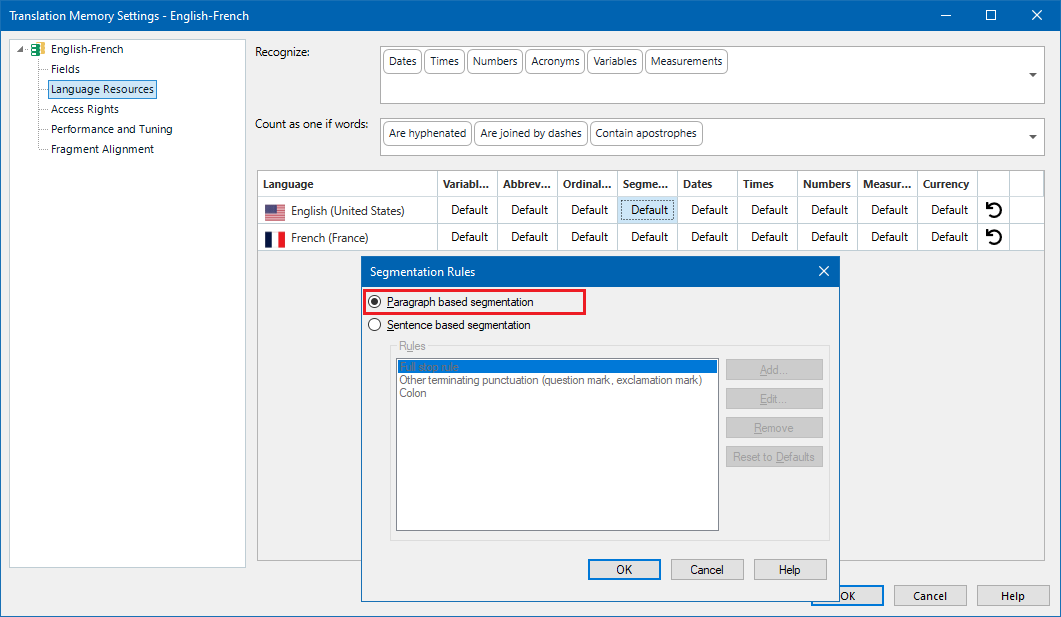
    I know that the translation memory can be set to segment paragraphs, not sentences, and this may be more useful in your case:

    Trados Studio Translation Memory Settings window showing segmentation rules with 'Paragraph based segmentation' selected and highlighted in red.

    Some literature translators can share their experience here.

    emoji


    Generated Image Alt-Text
    [edited by: RWS Community AI at 8:36 AM (GMT 1) on 14 May 2026]
  • First of all thank you very much for taking the time! A lot of your advice sounds like it might be helpful (I already did the cleanup and used a word file as an input for trados, but my cleanup of the 400pp file wasn't actually that clean ...). Paragraph based segmentation might make sense, and "Add as new translation" is exactly what I was looking for!

    In the end, I'm not sure if the software will actually do anything for me that makes all the work going into preparing the files for it and checking the output worthwile; since I have no interest in integrating machine translation (and am actually contractually bound not to make significant use of AI translation tools), maybe there's not a lot that trados can do for me. But at the very least, your advice has given me some more things I can experiment with that might be help to streamline my work.

    emoji
  • Paragraph based segmentation might make sense, and "Add as new translation" is exactly what I was looking for!

    Hi  

    Since Trados was originally designed to facilitate translation of repetitive or similar texts, its use for literature is limited. We once did the translation of a non-fiction book in Trados even though it had only a few repetitions, but we found it most helpful to be able to filter on terms in the source text in order to check our translation for consistency. The options can be found on the Review tab in the Display Filter section.

    Another option that might help you is to display fuzzy matches even if Trados found a 100% match. The setting is called Search for fuzzy matches even if exact match found, it can be found in Project Settings > Language Pairs > All Language Pairs > Translation Memory and ... > Search .

    Good luck with your work!

    HTH

    Annette (from Manfred's account)

    emoji