
Access to path Autosave is denied

Hi,

I just installed Studio Freelance 2019 on a new PC, and when I try to save a project in Studio I get an error message saying that "access to path C://...Autosave... is denied". Not sure why it mentions C: since the project is opened from G:, which I downloaded the file to. I'm using Windows 11 and I use Google Drive. I have uninstalled OneDrive, so that shouldn't be the problem. I attach a screen shot of the error message (in Swedish).

I'd be grateful for any help!
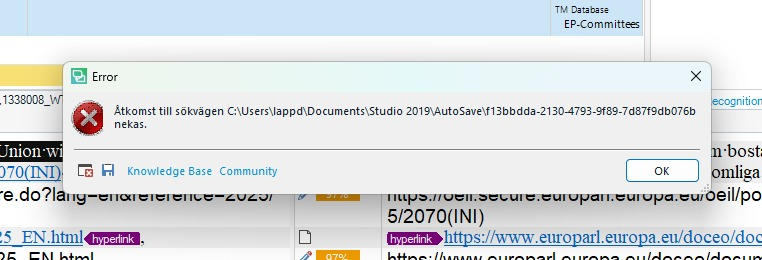

Error message in Swedish stating 'Access to path C:UsersappdDocumentsStudio 2019AutoSavef13bbdda-2130-4793-9f89-7d87f9db076b is denied' with OK button.


Generated Image Alt-Text
[edited by: RWS Community AI at 8:12 AM (GMT 0) on 5 Mar 2026]
emoji
Parents
  • Hi  

    The easiest solution: switch off the auto save in Trados. File -> Options -> Editor.

    Other solution is to deactivate synchronization of OneDrive.

    Best solution: move the Documents folder to another location, preferably not on drive C:\
    Open Windows Explorer, right click the Documents folder, select Preferences (in German: Eigenschaften) or press ALT+ENTER  and go to Path tab. Select "Move" (verschieben) and chose another location. This should solve the problem.

    Kind regards,

    Ana Sabo | RWS Group

    ___________________
    Design your own training!

    You've done the courses and still need to go a little further, or still not clear? 
    Tell us what you need in our Community Solutions Hub

    emoji
Reply
  • Hi  

    The easiest solution: switch off the auto save in Trados. File -> Options -> Editor.

    Other solution is to deactivate synchronization of OneDrive.

    Best solution: move the Documents folder to another location, preferably not on drive C:\
    Open Windows Explorer, right click the Documents folder, select Preferences (in German: Eigenschaften) or press ALT+ENTER  and go to Path tab. Select "Move" (verschieben) and chose another location. This should solve the problem.

    Kind regards,

    Ana Sabo | RWS Group

    ___________________
    Design your own training!

    You've done the courses and still need to go a little further, or still not clear? 
    Tell us what you need in our Community Solutions Hub

    emoji
Children
No Data