
Incomplete import into TM?

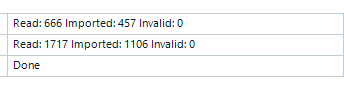
Screenshot showing Trados Studio import summary with 'Read: 666 Imported: 457 Invalid: 0' and 'Read: 1717 Imported: 1106 Invalid: 0' followed by 'Done'.

This screenshot was taken after I imported 2 sdlxliff files into an empty TM. How should this be interpreted? Why is the number of TUs imported not the same as the number of TUs read? If none are invalid, what happened to those that were read but not imported? How do I make all of the TUs go into the TM?

Many thanks in advance,

Charlotte


Removed AI Suggestion
[edited by: Charlotte Sjögren at 12:51 PM (GMT 0) on 9 Dec 2025]

emoji
Parents
  • Hi  ,

    We often experience the same - I think is is simply a matter of repetitions. Identical segments will all be read, but only be imported once. To check that everything has been imported, open the sdlxliff file in Trados, append the TM you used for import to your project and click some segments. You should see every translation in your TM.

    Reindexing the TM (or performing a TM upgrade from Project Settings) would also be recommended. 

    Hope that helps.

    Best regards

    Annette (from Manfred's account)

    emoji
Reply
  • Hi  ,

    We often experience the same - I think is is simply a matter of repetitions. Identical segments will all be read, but only be imported once. To check that everything has been imported, open the sdlxliff file in Trados, append the TM you used for import to your project and click some segments. You should see every translation in your TM.

    Reindexing the TM (or performing a TM upgrade from Project Settings) would also be recommended. 

    Hope that helps.

    Best regards

    Annette (from Manfred's account)

    emoji
Children

