
Trados Studio icon on Windows 11 taskbar is not the correct one

Since I started using Studio 2024, I have this wrong icon on my taskbar.

I waited he next release, but it is still there if Studio has not been launched.
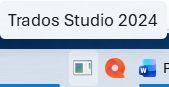
Taskbar showing Trados Studio 2024 with an incorrect generic icon before launching the application.

I can see the correct one icon only after launching Trados Stuido

Taskbar showing the correct Trados Studio icon with an 'S' after launching the application.


Removed AI Suggestion
[edited by: Paul Patruno at 3:52 PM (GMT 0) on 20 Nov 2025]

emoji
Parents
  •  

    Right click the wrong icon, then remove it from the task bar. Right click the correct icon and fix it on the task bar. Then move the icon to the desired location.

    _________________________________________________________

    When asking for help here, please be as accurate as possible. Please always remember to give the exact version of product used and all possible error messages received. The better you describe your problem, the better help you will get.

    Want to learn more about Trados Studio? Visit the Community Hub. Have a good idea to make Trados Studio better? Publish it here.

    emoji
Reply
  •  

    Right click the wrong icon, then remove it from the task bar. Right click the correct icon and fix it on the task bar. Then move the icon to the desired location.

    _________________________________________________________

    When asking for help here, please be as accurate as possible. Please always remember to give the exact version of product used and all possible error messages received. The better you describe your problem, the better help you will get.

    Want to learn more about Trados Studio? Visit the Community Hub. Have a good idea to make Trados Studio better? Publish it here.

    emoji
Children
No Data