
Unable to save file as "Save target as", Trados 2022 version

Hello team,

i've been trying to use Save Target As on my workbook XLIFF, but it saves as a Word document, not in the original IDML format.

Could someone tell me how I can save the file without needing to import the reviewed file again in Trados or re-use the TM? (The file was reviewed externally.)

Thank you so much in advance.
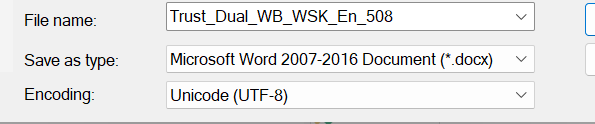
Save As dialog showing file name as Trust_Dual_WB_WSK_En_508, save as type set to Microsoft Word 2007-2016 Document (*.docx), and encoding set to Unicode (UTF-8).


Generated Image Alt-Text
[edited by: RWS Community AI at 9:21 AM (GMT 1) on 16 Sep 2025]

emoji
Parents
  •  

    If it tries to save as a word file then the source must have been Word and not IDML.  You mention reviewed file and this makes me think you have taken a bilingual word file that was created from your project for review in Word, and opened it in Trados Studio as a translatable file... or something like that.

    Perhaps you can explain exactly what you have done starting with the original project you created from the IDML.  It may be you are just not working with the review file in the right way.

    Paul Filkin | RWS

    Design your own training!
    You've done the courses and still need to go a little further, or still not clear? 
    Tell us what you need in our Community Solutions Hub

    emoji
Reply
  •  

    If it tries to save as a word file then the source must have been Word and not IDML.  You mention reviewed file and this makes me think you have taken a bilingual word file that was created from your project for review in Word, and opened it in Trados Studio as a translatable file... or something like that.

    Perhaps you can explain exactly what you have done starting with the original project you created from the IDML.  It may be you are just not working with the review file in the right way.

    Paul Filkin | RWS

    Design your own training!
    You've done the courses and still need to go a little further, or still not clear? 
    Tell us what you need in our Community Solutions Hub

    emoji
Children
No Data
