Issue With Generating Xliffs After Re-Installation

Hi,

I have recently activated my Trados licence on a new computer and am having trouble using the TMs I have. I get the error message 'An item with the same key has already been added'

I need help with  this urgently as I have a big project that I need to launch asap.

Many thanks.

emoji
Parents
  • Probability score: 0.6  

    Question improvement suggestion: Please provide the exact version of Trados Studio you are using, as well as any recent changes made to your system or software that might be relevant to the issue.  

    In the meantime, based on the information you have provided, here is a suggested answer to your question:  

    Hello,  

    It sounds like you're encountering a common issue when working with Translation Memories (TMs) in Trados Studio after a re-installation. The error message 'An item with the same key has already been added' typically indicates that there may be duplicate entries in your TMs or plugins. Here are some steps you can take to resolve this issue:  

    **Step 1:** Check for Duplicate Plugins  

    1. Close Trados Studio.  

    2. Open the SDL Plugin Management tool.  

    3. Look for any duplicate plugins installed.  

    4. Uninstall one of the duplicate instances.  

    5. Reopen Trados Studio and check if the error persists.  

    **Step 2:** Recreate the Project  

    1. Go to the Projects view and create a New Local Project.  

    2. Use the same source file as in the original project.  

    3. Add the translation memory used in the original project during the Translation Resources step.  

    4. Click Finish to create the project.  

    5. During the batch task pre-translate step, the saved segments in the TM will be used to translate the original source file.  

    **Step 3:** Check TM for Corruption  

    If the issue persists, it may be worth checking if your TM is corrupted. You can use the SDL TM repair add-in to fix it.  

    **Step 4:** Restart Trados Studio  

    Sometimes, simply restarting the application can resolve temporary issues. Save your work, close Trados Studio, and then reopen it.  

    If these steps do not resolve the issue, please provide the exact version of Trados Studio you are using and any recent changes made to your system or software. This information will help in diagnosing the problem more effectively.  

    I hope this answer addressed your question. If not, please reject the answer, add the question improvement suggestion information, and click the RWS Community AI checkbox on the right to try again.  

    RWS Community AI

    emoji
  • I am trying to create a project using Word source files in Studio 2019. I am trying to use TMs I have but I get the error message I detailed earlier. i.e. an item with the same key has already been added. I get the message at the end of the process - stage 9 preparation. 

    There's no save function on the error message, so I can't share it. I have just successfully created another project using different TMs so it seems to specific to these TMs. 

    emoji
  •  

    Can you share a screenshot of the error message so we can see where it's being surfaced?

    Paul Filkin | RWS

    Design your own training!
    You've done the courses and still need to go a little further, or still not clear? 
    Tell us what you need in our Community Solutions Hub

    emoji
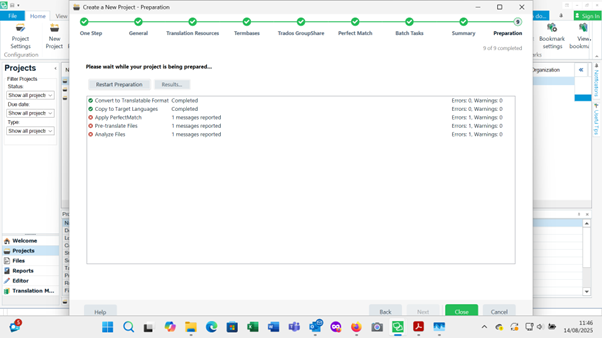
  • Sure, here you go. Trados Studio interface showing the 'Create a New Project - Preparation' screen with progress steps at the top and a list of tasks with statuses, errors, and warnings displayed.

    emoji


    Generated Image Alt-Text
    [edited by: RWS Community AI at 10:48 AM (GMT 1) on 14 Aug 2025]
  •  

    Can you click on "messages reported" to activate that line and then "Results"?

    Paul Filkin | RWS

    Design your own training!
    You've done the courses and still need to go a little further, or still not clear? 
    Tell us what you need in our Community Solutions Hub

    emoji
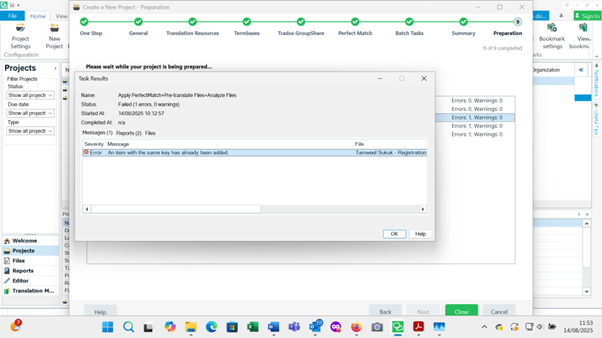
  • Sure, here you go. Trados Studio interface showing a task preparation error. Error message reads: 'An item with the same key has already been added.' Status is 'Failed (error, Overwriting)'.

    emoji


    Generated Image Alt-Text
    [edited by: RWS Community AI at 10:54 AM (GMT 1) on 14 Aug 2025]
  •  

    ok - and now what do you see when you click on the "Reports" and "Files" tabs?

    Paul Filkin | RWS

    Design your own training!
    You've done the courses and still need to go a little further, or still not clear? 
    Tell us what you need in our Community Solutions Hub

    emoji
  • I'm having trouble uploading the images of the Reports and files tabs

    emoji
  • emoji
  •  

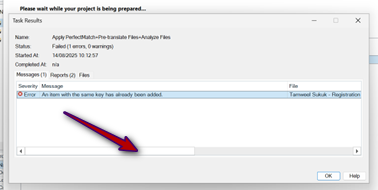
    ok - my bad.  I think the place you need to look is scroll right here:

    Task Results window in Trados Studio showing an error message: 'An item with the same key has already been added.' A red arrow points to the error details section.

    Sorry for the small images but you are only giving me very small screenshots.  Have you tried simply copy/pasting the images in?  I never upload them!

    So, scroll across to the right and there may be a link to the error file.  That's what I'm looking for as it should give us a lot more information to help identify where your problem is coming from.

    Paul Filkin | RWS

    Design your own training!
    You've done the courses and still need to go a little further, or still not clear? 
    Tell us what you need in our Community Solutions Hub

    emoji


    Generated Image Alt-Text
    [edited by: RWS Community AI at 2:42 PM (GMT 1) on 14 Aug 2025]
  • Unfortunately, I keep trying to copy and paste the screenshots but I get an error message saying that I can't do it. The same with uploading a Word doc with the images embedded.

    When I click on the exception tab it states that an item with the same key has already been added. The origin is Apply PerfectMatch+Pre-translate files +Analyze Files

    Does that help?

    emoji
Reply Children