Line wrap error by the all upper case word “NO.”

The source lagugage identifies the upper case word "NO." as an end sign of one sentence. However, it is normal when it comes to lower case "No.". I have to merge the split parts into one sentence manually. The ducument is messed up by many upper case titles. Is there any settings to change that kind of line wrap rule? 

Please Advise.

Thank You.

emoji
Parents
  •  

    I guess the issue is with NO. , which splits, segments, right?

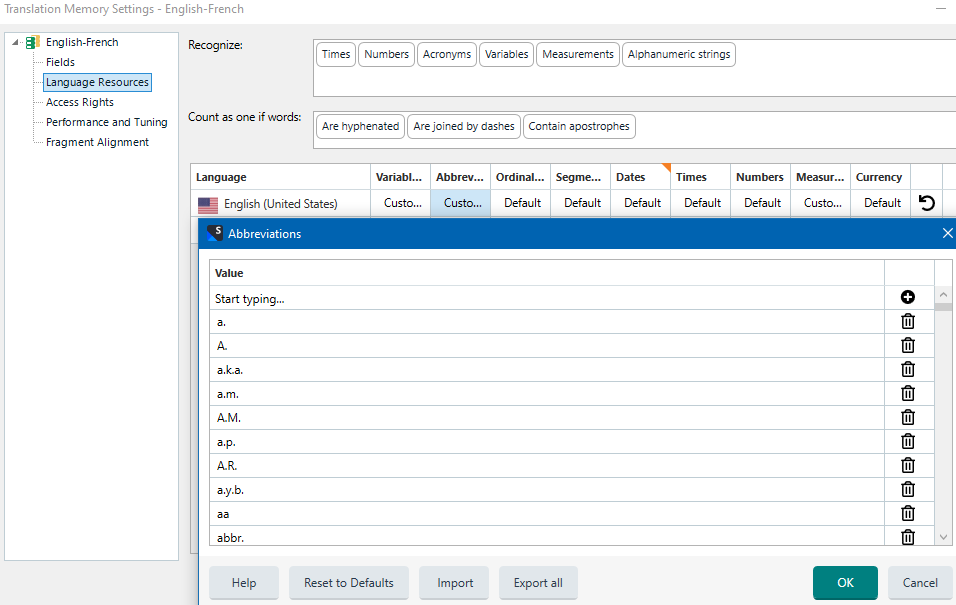
    If so, open the Language Resources of your TM, then the source abbreviations and add NO. as an abbreviation.

    Trados Studio Translation Memory Settings window showing Language Resources tab with Abbreviations list for English (United States).

    Click the OK button twice. Then you may need to upgrade your TM to remove the little orange triangle on the TM icon.

    Reopen the source file, and your NO. strings should be treated as abbreviations and part of the sentence.

    emoji


    Generated Image Alt-Text
    [edited by: RWS Community AI at 11:46 AM (GMT 1) on 14 Aug 2025]
Reply
  •  

    I guess the issue is with NO. , which splits, segments, right?

    If so, open the Language Resources of your TM, then the source abbreviations and add NO. as an abbreviation.

    Trados Studio Translation Memory Settings window showing Language Resources tab with Abbreviations list for English (United States).

    Click the OK button twice. Then you may need to upgrade your TM to remove the little orange triangle on the TM icon.

    Reopen the source file, and your NO. strings should be treated as abbreviations and part of the sentence.

    emoji


    Generated Image Alt-Text
    [edited by: RWS Community AI at 11:46 AM (GMT 1) on 14 Aug 2025]
Children