autopropagation does not work!

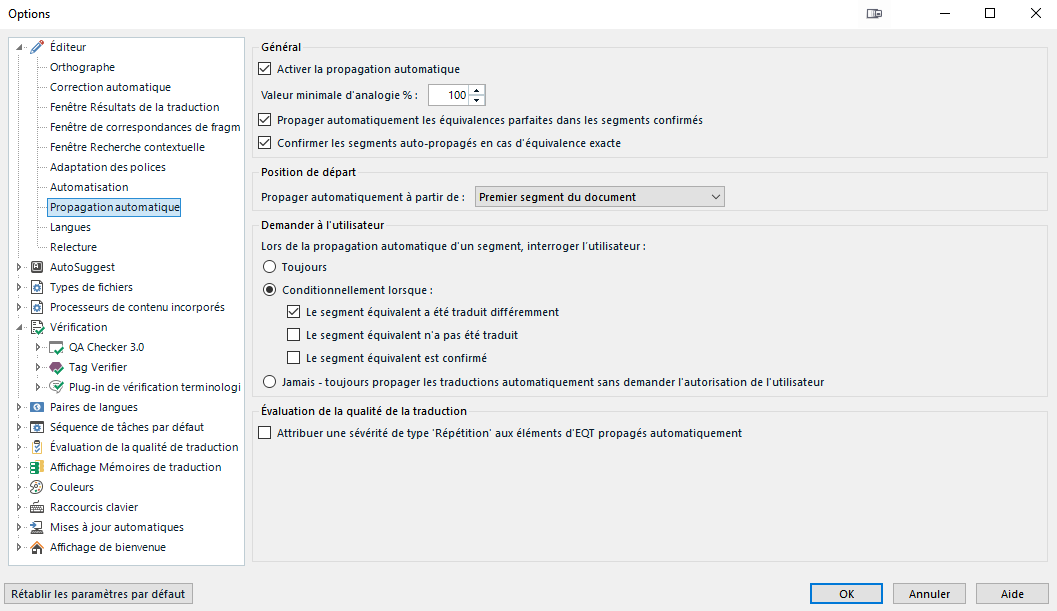
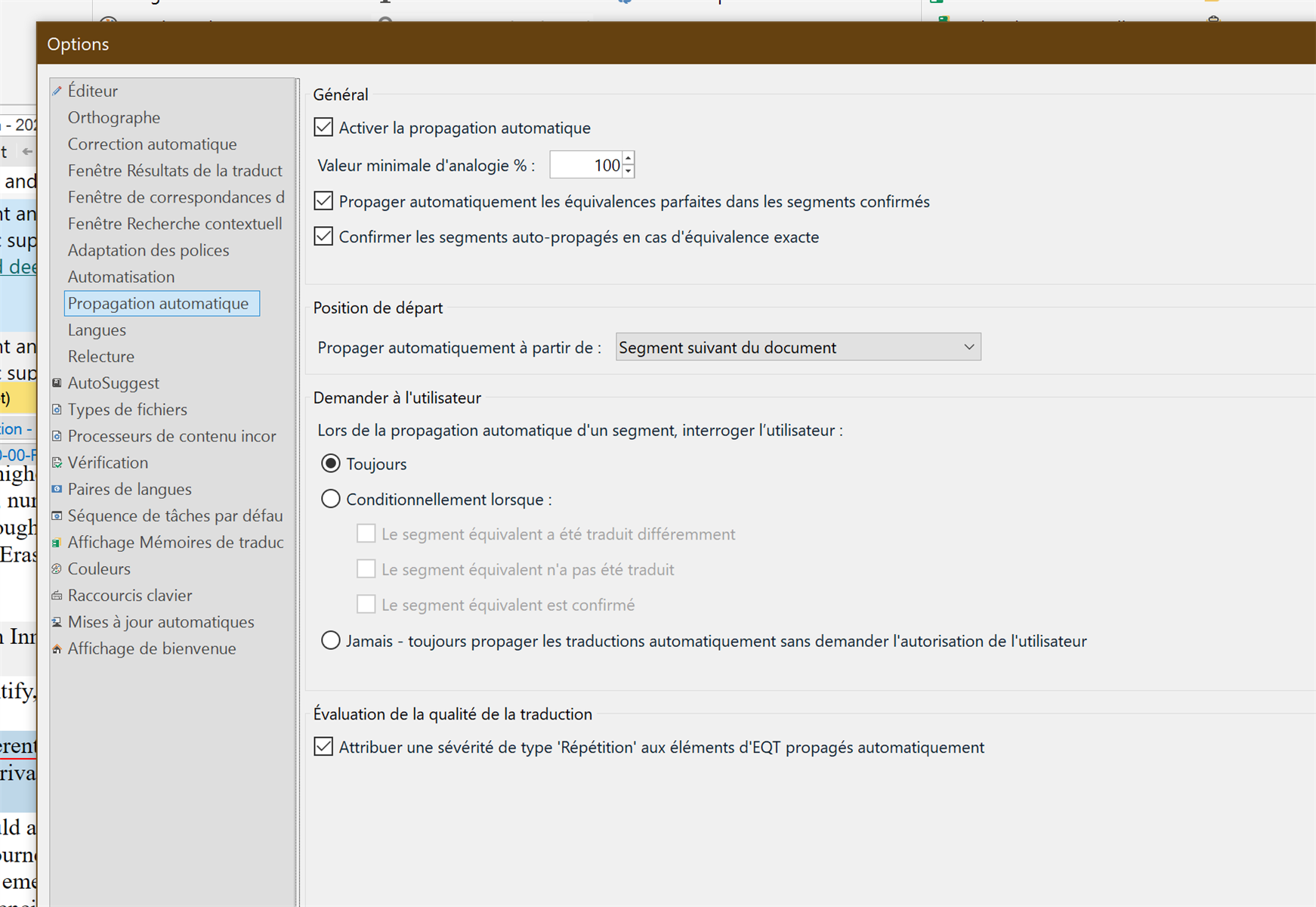
I have a huge document to deliver in a week. Although I have set up my options, the autopropagation does not work! I have no idea why. I have gone to "editor" autopropagation" and tickedthe boxes... Nothing...Trados Studio options window showing the 'Propagation automatique' settings with checkboxes for enabling auto-propagation and related options, all selected.


Generated Image Alt-Text
[edited by: RWS Community AI at 2:28 PM (GMT 1) on 13 Aug 2025]

emoji
Parents Reply Children
  • I am sorry : I did all this, it does not work...I do not understand...I will put another screen shot

    emoji
  •  

    Unfortunately I have no clue, why it does not work. Maybe you download a trial of 2024 and try with it? I am a Windows user and do not encounter so many problems as Mac users do. This really might be related to the way you use Studio.

    _________________________________________________________

    When asking for help here, please be as accurate as possible. Please always remember to give the exact version of product used and all possible error messages received. The better you describe your problem, the better help you will get.

    Want to learn more about Trados Studio? Visit the Community Hub. Have a good idea to make Trados Studio better? Publish it here.

    emoji
  • The file has DEEPL draft translation. See I have translated segment 332 and it does not propagate it to the next one...Maybe it is because I have already a draft translation...My Windows partition is completely separated from my Mac side. No interference...

    Screenshot of Trados Studio showing segment 332 translated into English and French, with segment 333 highlighted in blue but not propagated despite having a draft translation.

    emoji


    Generated Image Alt-Text
    [edited by: RWS Community AI at 3:15 PM (GMT 1) on 13 Aug 2025]
  •  

    In your settings you've chose to overwrite even confirmed segments, but the NMT segments might interfere. You might try to remove the NMT from segments you know as repetitions and try then.

    Other possibility is to export frequent segments and unknown segments in separate files, translate these and use the resulting TM to quickly pretranslate the whole file then.

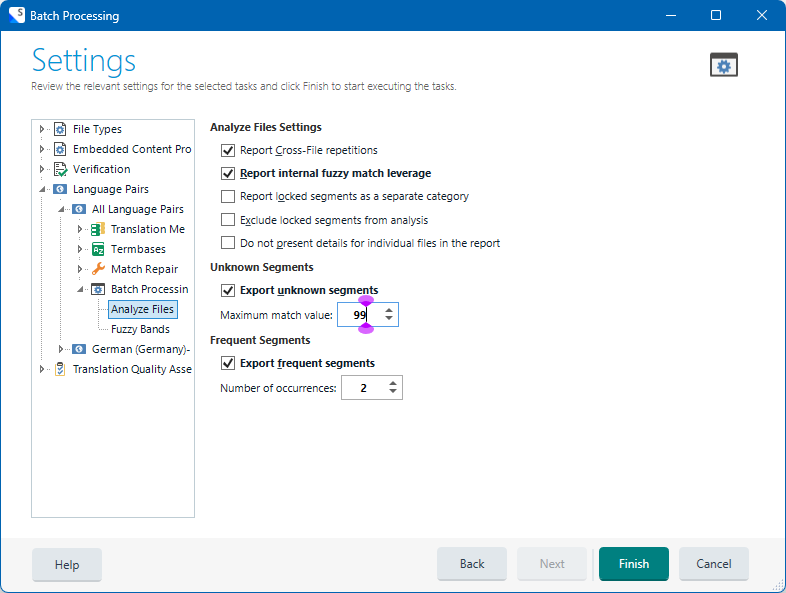
    To do so, run Analysis task on the file with these settings:

    Trados Studio Batch Processing settings window showing options for Analyze Files, including Export unknown segments with a maximum match value of 99 and Export frequent segments with occurrences set to 2.

    You Windows might well be separated from Mac, but this is still a virtual machine, not a hardware like in "normal" Windows machines. This may cause problems. Trados Studio is a WIndows application, designed and tested on Windows hardware. Using a Mac for it is your own risk.

    _________________________________________________________

    When asking for help here, please be as accurate as possible. Please always remember to give the exact version of product used and all possible error messages received. The better you describe your problem, the better help you will get.

    Want to learn more about Trados Studio? Visit the Community Hub. Have a good idea to make Trados Studio better? Publish it here.

    emoji


    Generated Image Alt-Text
    [edited by: RWS Community AI at 3:30 PM (GMT 1) on 13 Aug 2025]

  • OK then you should say this to any potential buyer of TRADOS and recommend him/her NOT to emulate it on a Mac!! Because I read that there would be no problem! Now I have to buy a new computer just because of this!!

    emoji
  •  

    I would say this to any Mac user. Nonetheless, there are numerous Mac user with no problems with Trados Studio. So why your program does not work is a mystery to me. Not having any experience with TS on Mac, but having big experience with the same software on Windows and not having any problems you or others describe, I come to the conclusion, that not only the software, but also the hardware might be a problem.

    Did you try to empty some NMT segments and check if the autopropagation does work?

    Again, I do not state that Mac is guilty. I can only tell, that Windows environment in Mac is a non-native environment. This is emulation. As the animals put in Zoo and not running free on the Savanna. I am not IT specialist, but from over 30 years of experience I know one: the least experiments you do with your Windows PC, the better your programs run. So I do not install anything else but essential work software on my PC. And I use Windows on Windows hardware. This is only a question of habit and preference, but paid for me over the years.

    _________________________________________________________

    When asking for help here, please be as accurate as possible. Please always remember to give the exact version of product used and all possible error messages received. The better you describe your problem, the better help you will get.

    Want to learn more about Trados Studio? Visit the Community Hub. Have a good idea to make Trados Studio better? Publish it here.

    emoji
  •   

    Sorry to interrupt...

    Marie-Pierre,

    Segment 332 will not auto-propagate to segment 333, if that is what you mean. They have different source content.

    In the Windows version, having draft translations present will not prevent auto-propagation of segments with identical source text. Also, recognised variables (numbers, etc., will also be auto-propagated correctly.

    I work in Review mode mostly, proofreading translations, and I use the following settings:

    Trados Studio options window showing 'Propagation automatique' settings with checkboxes for auto-propagation, confirmation, and user prompts, along with translation quality evaluation options.

    Withn these settings, auto-propagation never normally fails to overstrike translated NMT / AT / confirmed segments.

    I've never used Trados on a Mac environment so I hope this helps. Grin

    Meilleures amitiés,

    Ali

    emoji


    Generated Image Alt-Text
    [edited by: RWS Community AI at 3:56 PM (GMT 1) on 13 Aug 2025]
  • Thank you for your reply...Yes it is probably Windows taking revenge because I have been cursing Windows and this ***BG$$$ guy over the last 30 years, saying how much I hate them :=) Mac is so much better

    emoji
  • Sorry to interrupt again, I hope again that this will be helpful... Blush


    Voici un lien à des infos à propos de la propagation automatique, qui pourraient peut-être aider...

    Propagation automatique Trados 2022

    La page d'entrée à la documentation Trados 2022 pourrait aussi servir...

    Documentation Trados 2022 en français

    Il y a un engin de recherche.

    Ah, there's also a few articles on Trados on MAC... Wink

    Trados et MAC

    Ali Smiley

    emoji
  • Hi again  

    I agree with   that there are numerous users who have no trouble working with Trados on Mac.

    I remember when Mac documentation had to be converted for Windows to be translated on a PC. Great fun!

    Mac-using colleagues said that once you've worked on a Mac, you never want to go back to Windows. At least, where design work is concerned.

    It would be lovely if someone who is experienced with Trados on Mac would kindly offer you advice. There are lots who, I'm sure, would be pleased to help.

    Come on somebody?

    Have a lovely evening one and all!

    Ali Smiley

    emoji