No tmx suggestions while translating.

Hi,

sorry for my English, German is my first foreign language.

I have some serious difficulties after switching from 2021 to 2024 version of Trados Studio. I conduct freelance translations for CJUE and with each text to be translated I receive a bundle of tmx-files with many suggestions and proposals of pretranslated text. Now, in 2024 version, I add this files to a TM I created for this purpose and add this TM to my translation project. But when I open the document to be translated I don't see any suggestions that expect from the imported tmx-files.

I would be grateful for any hint.

Best,

Norbert 

emoji
  • Probability score: 0.6  

    Question improvement suggestion: Provide specific details about the TMX files being used, including their format and any error messages encountered during the import process.  

    In the meantime, based on the information you have provided, here is a suggested answer to your question:  

    Hello Norbert,  

    Thank you for reaching out! It sounds like you're experiencing some challenges with TMX file imports in Trados Studio 2024. Here are some steps you can take to troubleshoot the issue:  

    **Step 1:** Verify TMX File Format  

    Ensure that the TMX files you are trying to import are in a compatible format. Trados Studio supports TMX files, but if they are from an older version or have a different structure, it may cause issues. You can open the TMX file in a text editor and check for the `o-tmf` attribute. It should be set to `o-tmf="SDL TM8 Format"`. If it’s different, change it accordingly.  

    **Step 2:** Import TMX Files Individually  

    Try importing the TMX files one at a time instead of in bulk. This can help identify if a specific file is causing the issue.  

    **Step 3:** Check TM Visibility  

    Make sure that the target TM is visible in the Translation Memories view. If it’s not, you may need to add it again to your project settings.  

    **Step 4:** Edit TMX Files  

    If you still face issues, consider opening the TMX file in a text editor and running a search and replace to remove any problematic tags or segments. For example, search for `<br />` and replace it with nothing, then save the file and try importing again.  

    **Step 5:** Restart Trados Studio  

    Sometimes, simply restarting Trados Studio can resolve temporary glitches. Save your work, close the application, and reopen it to see if the issue persists.  

    If these steps do not resolve the issue, please provide more details about the TMX files and any error messages you encounter. This will help in diagnosing the problem further.  

    I hope this answer addressed your question. If not, please reject the answer, add the question improvement suggestion information, and click the RWS Community AI checkbox on the right to try again.  

    RWS Community AI

    emoji
  •   

    A good start would be to validate that the TM you added the TMX files to is actually the one you are using for your project.  Worth checking the paths and ensure they are the same.

    If they are then perhaps open the TM in the TM Maintenance View and make sure that the things you believe should be in there, and match the sentences in the document you're translating, are actually there.

    Basic stuff I know... but often it's good to start with the obvious and rule them out before looking for more complex solutions to a problem.

    Paul Filkin | RWS

    Design your own training!
    You've done the courses and still need to go a little further, or still not clear? 
    Tell us what you need in our Community Solutions Hub

    emoji
  • No, they are not visible. In fact in all my TMs from 2021 I can see only about 50 rows. There should be thousands of them. What am I supposed to do? And why should the user waste his time for such things. RWS offers an update, RWS should care for a smooth change. It is not a freeware software.

    emoji
  •  

    In fact in all my TMs from 2021 I can see only about 50 rows. There should be thousands of them.

    Perhaps you need to click to the next page or select the option to show more than 50 TUs at a time?

    Trados Studio interface showing the Home tab with options like Open, New, Import, Export, and a highlighted arrow pointing to the Pagination section with TUs per Page set to 50.

    Paul Filkin | RWS

    Design your own training!
    You've done the courses and still need to go a little further, or still not clear? 
    Tell us what you need in our Community Solutions Hub

    emoji


    Generated Image Alt-Text
    [edited by: RWS Community AI at 9:57 AM (GMT 1) on 14 Jul 2025]
  • OK, thanks, now I can see all the entries. But my basic problem is still the same. I avtivate the TM for a project and there are no suggestions from the TM.

    emoji
  •   

    ok - so now can you check that the path to the TM you just checked is exactly the same as the path to the TM you added to your project settings?  So hover like this:

    Translation Memories window showing the path to the TM file 'it-ro.sdltm' in the Studio 2024 folder.

    Then in your Project Settings:

    Project Settings window displaying the TM file 'it-ro.sdltm' with language pairs Italian to Romanian and its file path.

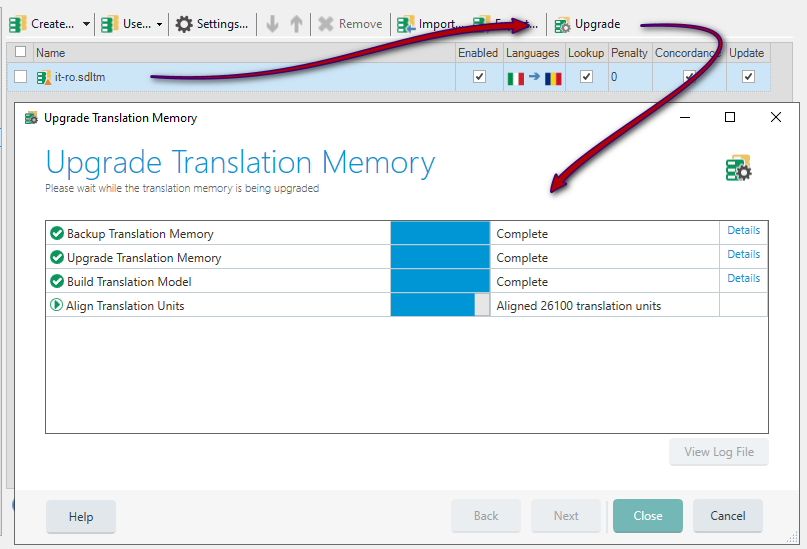
    You'll also note I have a small orange triangle on the TM icon.  If you have this it might be worth running the upgrade on the TM so it's properly indexed for use:

    Upgrade Translation Memory window showing progress with tasks like Backup, Upgrade, Build Translation Model, and Align Translation Units marked as Complete.

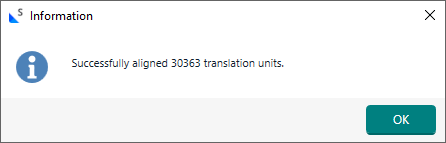
    Doesn't take too long... just ran it on this TM which had around 30k TUs.  So not large, and took a couple of minutes:

    Information dialog box stating 'Successfully aligned 30363 translation units' with an OK button.

    And now the triangle is gone:

    Project Settings window under Language Pairs showing the TM file 'it-ro.sdltm' with enabled settings and language pairs Italian to Romanian.

    Might help if everything else checks out.

    Paul Filkin | RWS

    Design your own training!
    You've done the courses and still need to go a little further, or still not clear? 
    Tell us what you need in our Community Solutions Hub

    emoji


    Generated Image Alt-Text
    [edited by: RWS Community AI at 10:15 AM (GMT 1) on 14 Jul 2025]
  • I have already upgraded all my TMs, the path is the same, no expected output.

    emoji
  •  

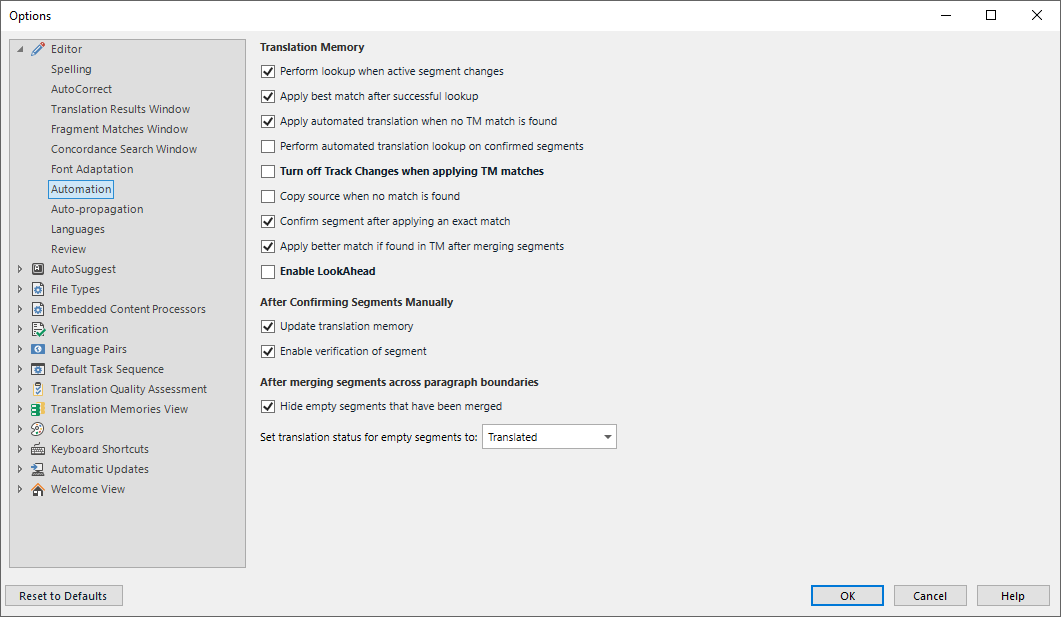
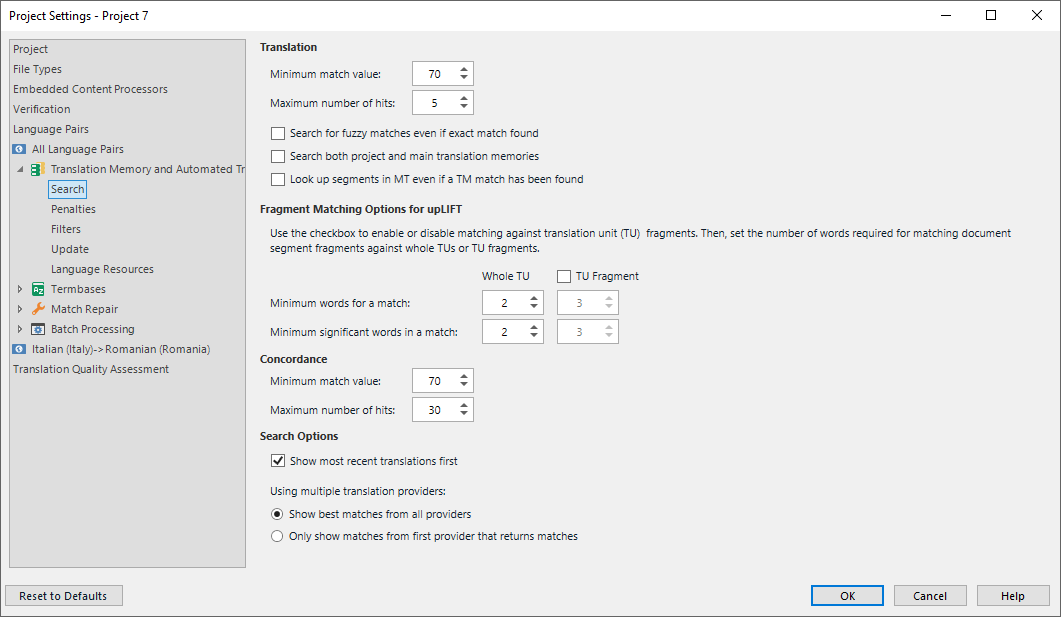
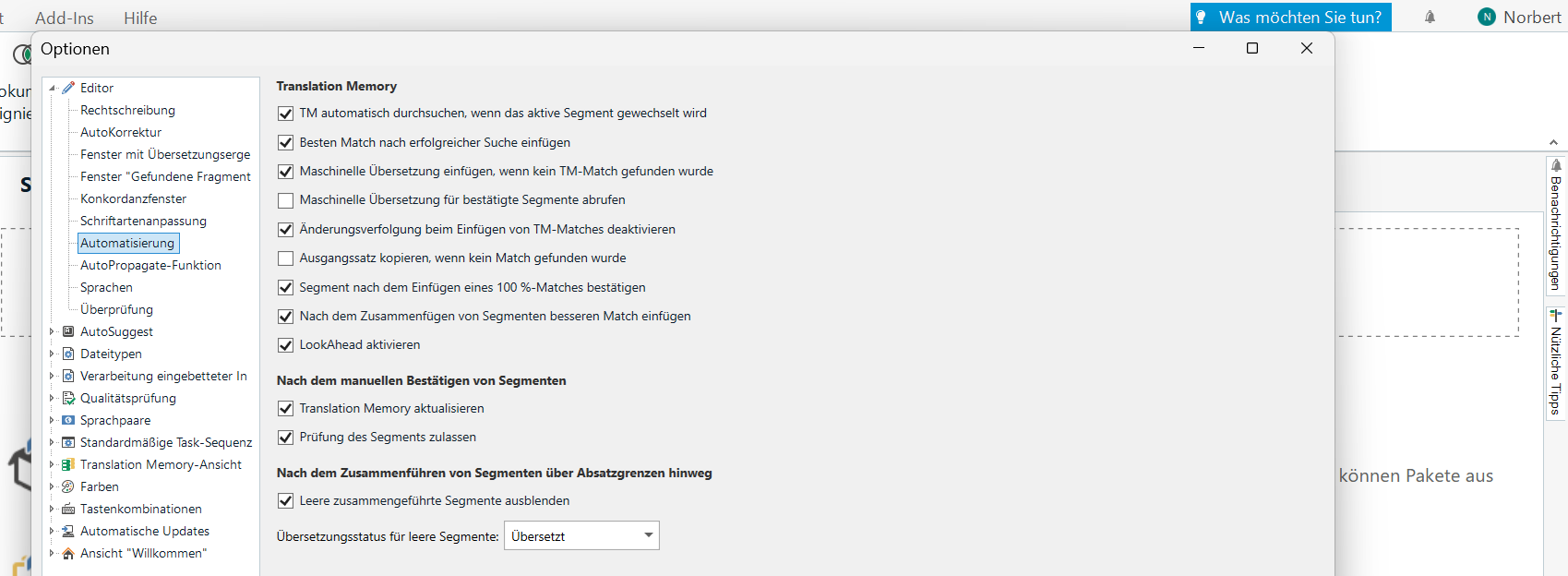
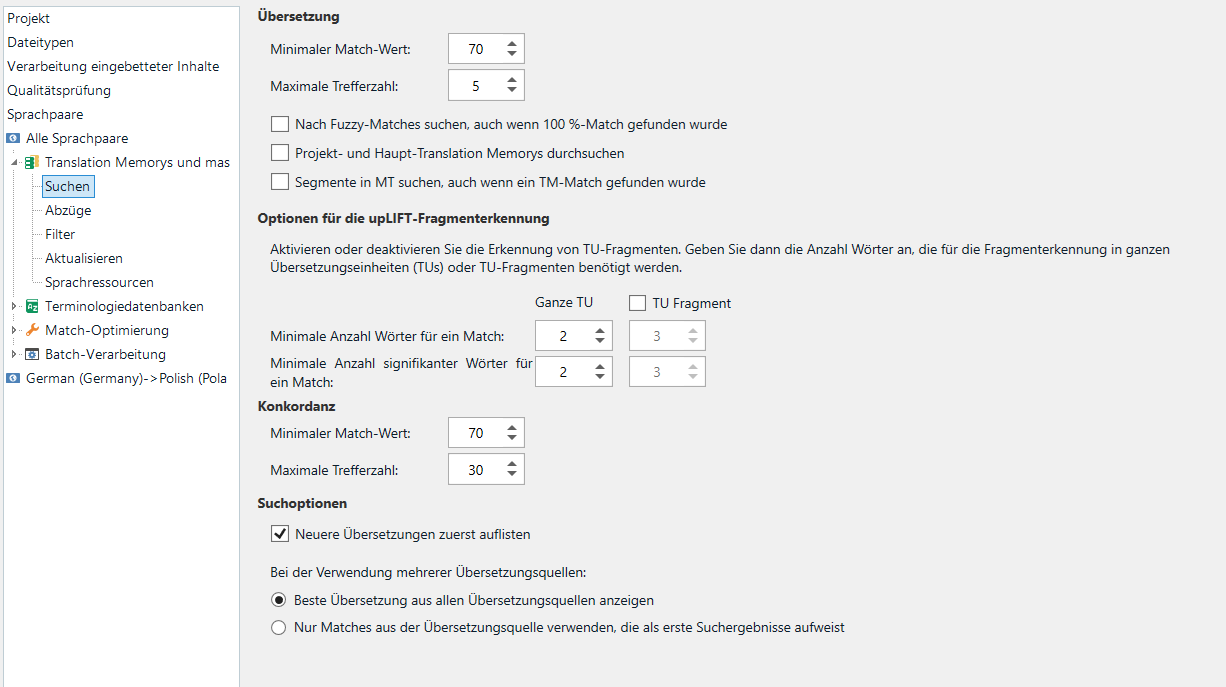
    Then you seem to be doing every perfectly. Maybe you can share a little more info such as your settings?

    Trados Studio options window showing Translation Memory settings, including options like 'Perform lookup when active segment changes' and 'Enable LookAhead'.

    Trados Studio Project Settings window displaying Translation and Search options, including minimum match value, fuzzy match search, and upLIFT fragment matching settings.

    Maybe show us the segment you expect to see a match for, and also show the same thing in your TM?

    I am running out of guesses given I cannot see anything related to your setup and so far you're just telling us that nothing works.

    Paul Filkin | RWS

    Design your own training!
    You've done the courses and still need to go a little further, or still not clear? 
    Tell us what you need in our Community Solutions Hub

    emoji


    Generated Image Alt-Text
    [edited by: RWS Community AI at 10:30 AM (GMT 1) on 14 Jul 2025]
  • Here some screenshots, I hope they will help You to help me:

    Trados Studio options window showing Translation Memory settings with various checkboxes and options for automation.

    Trados Studio settings window displaying translation memory search options, match values, and uplift fragment recognition settings.

    Here the proposals from the TM CVRIA (2) - I loaded them from tmx files I had got from CJUE:

    Trados Studio translation memory proposals showing German to Polish translations with two segments and their corresponding translations.

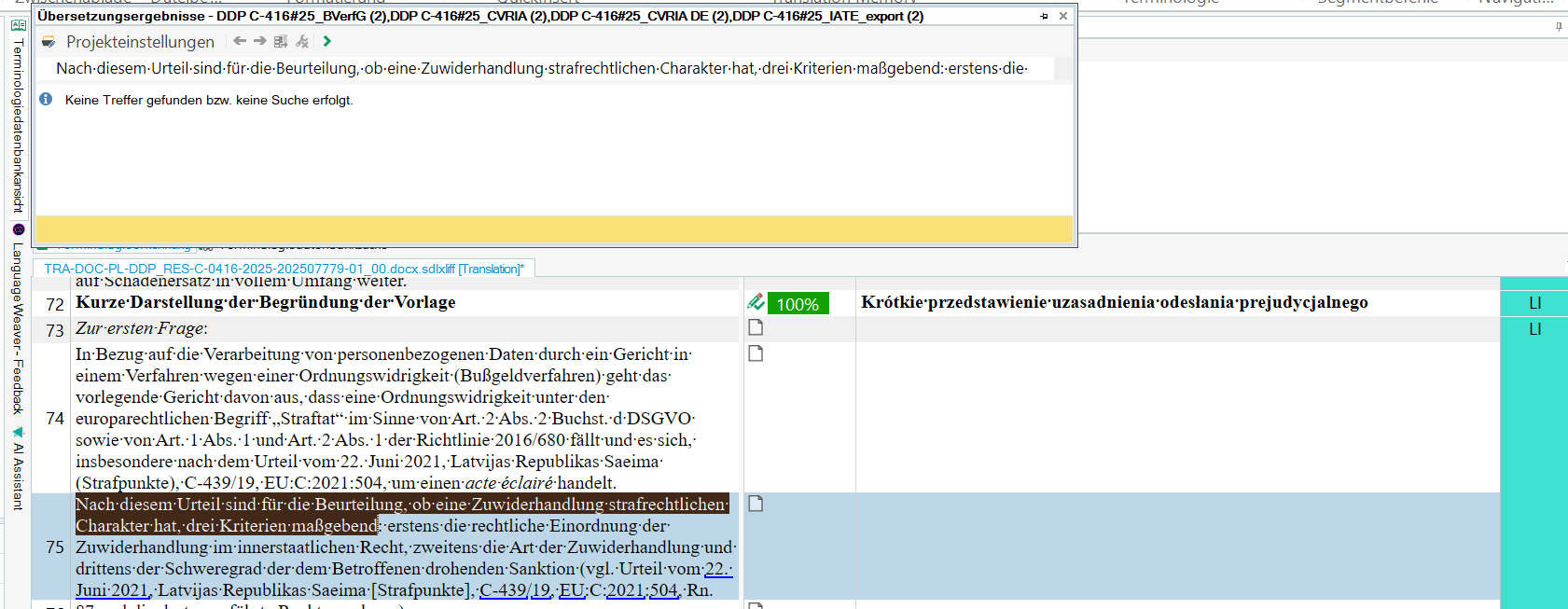
    Here the problem - no suggestions based on the activated TM:

    Trados Studio editor window showing no translation suggestions found for a specific segment, with highlighted text and project settings visible.

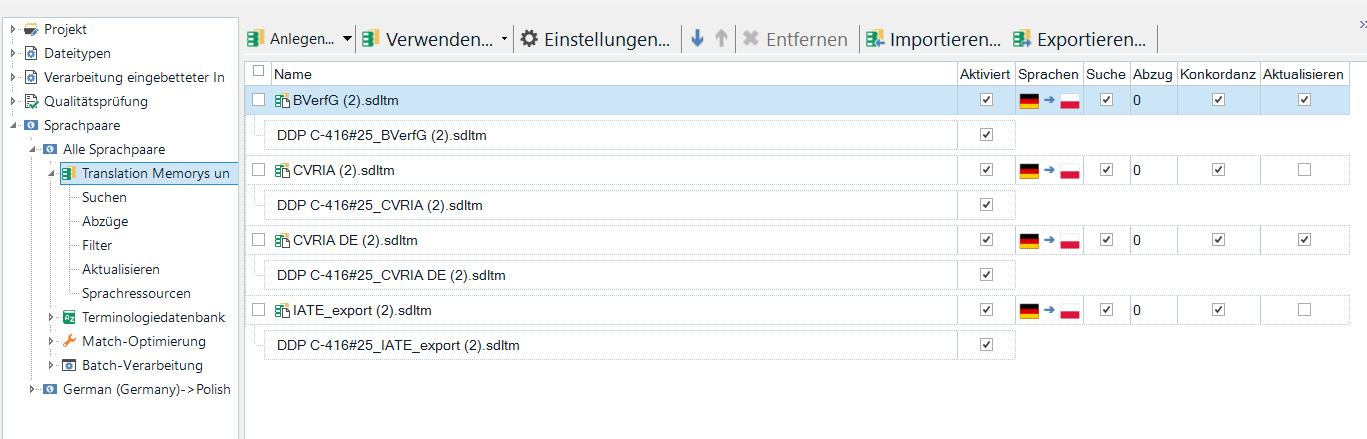
    Here the evidence TMs are activated.

    Trados Studio translation memory management window listing multiple TMs with their activation status, languages, and settings.

    emoji


    Generated Image Alt-Text
    [edited by: RWS Community AI at 11:41 AM (GMT 1) on 14 Jul 2025]
  •  

    A couple of things come to mind with this info:

    1. You are actually looking for a concordance result (presumably since that screenshot might see a 30-40% match... or something like that... which is obviously below the threshold you are working with) and not a lookup.
    2. You are working with Project TMs, so the path to the TM for normal translation work will not be the same and neither will the content of the TMs.

    I tried to mock this up and get these results:

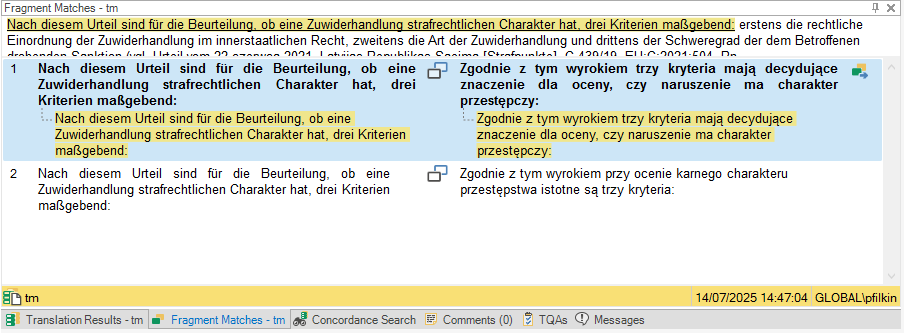
    Fragment Matches (if you have this enabled):

    Fragment Matches window showing German text with its Polish translation. Two matches are displayed with highlighted text and match percentages.

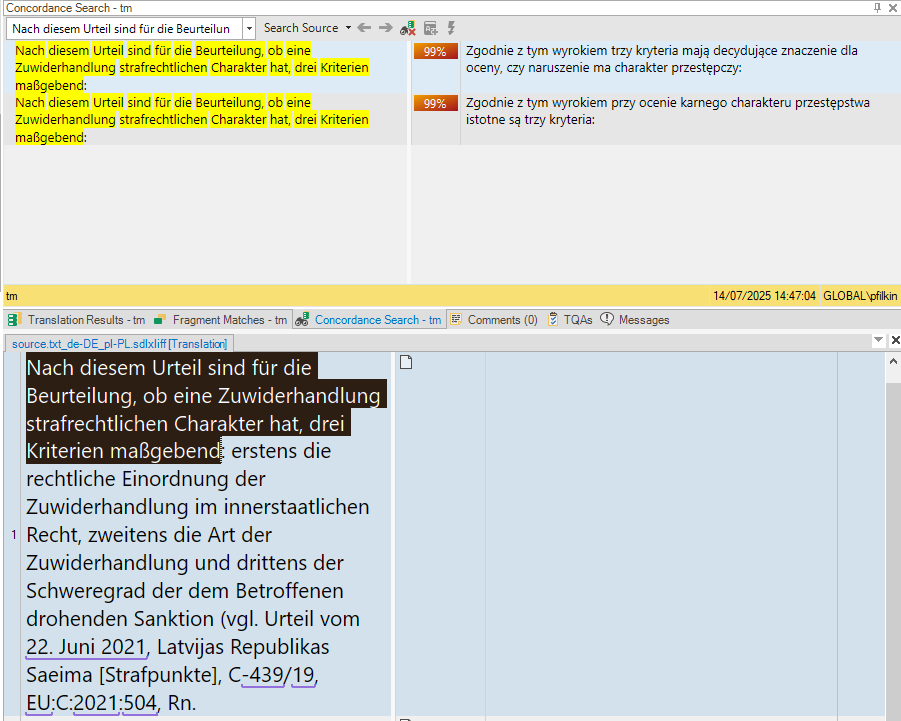
    Concordance Matches:

    Concordance Search window showing German text with its Polish translation. Two matches are displayed with 99% match percentages and highlighted text.

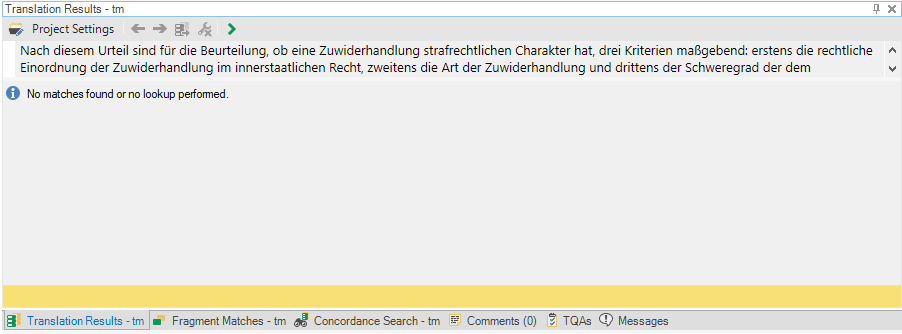
    Normal lookup:

    Translation Results window showing German text with no matches found or lookup performed message.

    I lowered my threshold to 30% and still didn't get a match so I reckon it's even lower than that!

    Now, you have detached your lookup windows so I can't see any other lookups but I think the lack of a Translation Result with normal lookup is expected.

    Does this help at all?

    Paul Filkin | RWS

    Design your own training!
    You've done the courses and still need to go a little further, or still not clear? 
    Tell us what you need in our Community Solutions Hub

    emoji


    Generated Image Alt-Text
    [edited by: RWS Community AI at 12:57 PM (GMT 1) on 14 Jul 2025]