Unable to import the ST4_language_xml.sdlftsettings in Trados Studio 2024

Hello

I have Trados Studio 2024 and we have just started using Schema ST4. I was able to import the filtetype settings for Schema ST4 and translate the first document, but now I need to import the ST4_language_xml settings file and I get this error message:
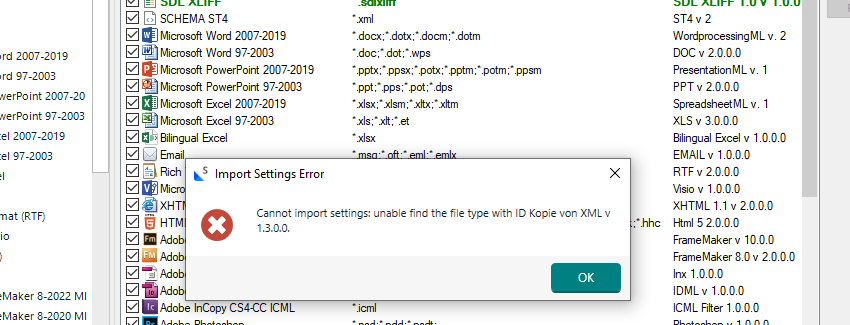
Error message in Trados Studio: 'Cannot import settings: unable to find the file type with ID Kopie von XML v 1.3.0.0.' displayed over a list of file type settings.

Quanos, the provider from ST4, says this is a Trados problem. So, can anyone please help?

Thanks a lot,

Christina


Generated Image Alt-Text
[edited by: RWS Community AI at 1:35 PM (GMT 1) on 27 Jun 2025]

emoji
Parents
  •  

    Your file type list already contains Schema ST4. Why do you want to import the settings again?

    _________________________________________________________

    When asking for help here, please be as accurate as possible. Please always remember to give the exact version of product used and all possible error messages received. The better you describe your problem, the better help you will get.

    Want to learn more about Trados Studio? Visit the Community Hub. Have a good idea to make Trados Studio better? Publish it here.

    emoji
  • Hi Jerzy

    Sorry, I wasn't accurate enough. The ST4_language_xml is a specific type of XML that has all the metadata and background information for a particular language. Its structure is different from the ST4 xml file, which is used for translating the actual document.

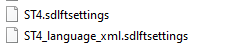
    Screenshot showing two files: ST4.sdlftsettings and ST4_language_xml.sdlftsettings, listed in a file explorer window.

    I was able to import the first file (ST4.sdlftsettings) and translate the document. But I need to import the second file (ST4_language_xml.sdlftsettings) to be able to translate the language-specific contents and metadata as well. 

    I have Trados Studio 2024 Professional  - 18.0.1.2259.

    emoji


    Generated Image Alt-Text
    [edited by: RWS Community AI at 2:14 PM (GMT 1) on 27 Jun 2025]
  •  

    I understand. Who has created the file type in question? It is based on old xml file type settings, which are no longer supported by Trados Studio. You might however try to create a new file type and import this FT settings in the 3rd step.

    _________________________________________________________

    When asking for help here, please be as accurate as possible. Please always remember to give the exact version of product used and all possible error messages received. The better you describe your problem, the better help you will get.

    Want to learn more about Trados Studio? Visit the Community Hub. Have a good idea to make Trados Studio better? Publish it here.

    emoji
  •  

    If you have been provided with an sdlftsettings file do you know what version of Trados Studio it was created for?  Based on the error message it suggests it was created using the old XML format that is no longer available in the 2024 version.  The old and new have run together for many versions so users have had plenty of opportunity to upgrade them... eventually they need to be upgraded and with the 2024 release that available time is gone.

    So your options are these... probably:

    1. ask whoever created the settings file for you to prepare one for the 2024 XML 2.0 version.
    2. create your own based on the actual xml file you have to translate.

    Paul Filkin | RWS

    Design your own training!
    You've done the courses and still need to go a little further, or still not clear? 
    Tell us what you need in our Community Solutions Hub

    emoji
  • Thank you, Paul!

    I have never had this problem before because this is the very first Schema ST4 document that I had to translate. All other XML files worked perfectly.

    I'll get in touch with Quanos and see if they can prepare a settings file for the 2024 XML 2.0 version.

    Thanks again for your help

    emoji
Reply Children