Translate


Hi,
I keep getting an error message with 'The TYPO3L10N element is not declared' when I try to upload a new XML into Studio 2019.
Can anyone help??
Thanks,
Lisa


Hi,
I keep getting an error message with 'The TYPO3L10N element is not declared' when I try to upload a new XML into Studio 2019.
Can anyone help??
Thanks,
Lisa
What's the error message?
Paul Filkin | RWS
Design your own training!
You've done the courses and still need to go a little further, or still not clear?
Tell us what you need in our Community Solutions Hub

You could try turning off all the validation checks on the "XML: Any v 2.0.0.0" filetype you are trying to use if you just want to get at the translatable text. Or try adding the schema to the validation section for this filetype. Or if you want to create a proper filetype for it then create a custom XML and provide all the appropriate parser rules, and validation requirements.
The problem just seems to be that you are validating the XML before opening it, but have not provided the schema to allow this to happen.
You can send me the XML if that's appropriate and I can take a look for you and then hopefully give you more appropriate instructions... pfilkin at sdl dotcom
Paul Filkin | RWS
Design your own training!
You've done the courses and still need to go a little further, or still not clear?
Tell us what you need in our Community Solutions Hub

You could try turning off all the validation checks on the "XML: Any v 2.0.0.0" filetype you are trying to use if you just want to get at the translatable text. Or try adding the schema to the validation section for this filetype. Or if you want to create a proper filetype for it then create a custom XML and provide all the appropriate parser rules, and validation requirements.
The problem just seems to be that you are validating the XML before opening it, but have not provided the schema to allow this to happen.
You can send me the XML if that's appropriate and I can take a look for you and then hopefully give you more appropriate instructions... pfilkin at sdl dotcom
Paul Filkin | RWS
Design your own training!
You've done the courses and still need to go a little further, or still not clear?
Tell us what you need in our Community Solutions Hub
Thanks for sending me the file. I could not reproduce this problem with 2022 or 2024 so I have to install and licence 2019... took me a little while to do this! Had to use an offline activation for the first time in 20-years!!
In 2019 I can reproduce the problem you have. Unchecking the validation doesn't help as I get a different error like that I cannot resolve. So, seeing as this was probably an early version of the AnyXML v2 you are using I disabled it and used the old XML filetype. That worked. It's not particularly clean, but then I think even with the XML2 it's not clean either and you would be better off with a custom XML to work with this.
But in the absence of that you can work with it, you just need to copy source to target for many of the texts or filter stuff and lock them. Things like number only segments, urls, odd strings etc.
So, just go to File -> Options -> File Types and uncheck the "XML2: Any XML" filetype:
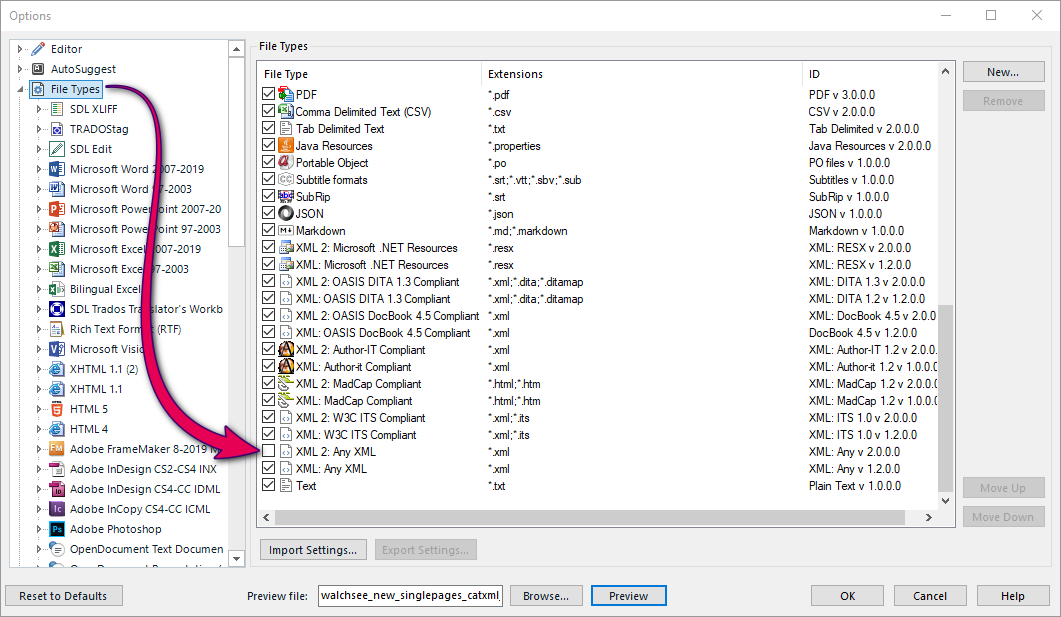
Then try to create your project again. This works ok for me.
Paul Filkin | RWS
Design your own training!
You've done the courses and still need to go a little further, or still not clear?
Tell us what you need in our Community Solutions Hub


Success! Thank you so much for that - I've finally got the file open!!!

Lisa