Problems with path for autosave

Dear Colleagues,

I work with Trados Studio 2022 and work most of the time on my PC. I also have a version on my Laptop and now have the problems that everytime I want to Save my project with STRG+S, Trados just closes down. When I go to "File-Save", I get an error message that there is no access to C://....autosave which is a path/folder on OneDrive. Does anybody have an idea how I can solve this problem?

Thank you and kind regards

Ina

emoji
Parents
  • It's a problem with synchronization. I tried a number of solutions and Studio (I use 2021) kept crashing.

    I ultimately decided to pause One Drive while I was working and then un-pause it. I also disabled autosave while working. I just SAVE AS, like I used to and just update it in my pc or save to Dropbox or even Google drive. It's just better to go analog sometimes.

    OneDrive is the root of the problem here, not Trados.

    emoji
  • Thank you for your answer. It is not the best solution, but I have also deactivated the Autosave function. I would like to have the autosaved data in a file that is not on OneDrive, but I cannot find where I can indicate the path where I want to autosave.

    Kind regards

    Ina

    emoji
  •  

    I cannot find where I can indicate the path where I want to autosave.

    There is no way to change this setting in Trados Studio.

    Which Trados Studio 2022 build you have? It should be 17.2.12.19268. If it’s not, please upgrade. I mention it because the actual Autosave folder is %appdata%\Trados\Trados Studio\Studio17\AutoSave (in the past, it was somewhere in the Documents special folder).

    The path above is a folder I believed it's not synced by OneDrive. I may be wrong, because I have OnDrive disabled.

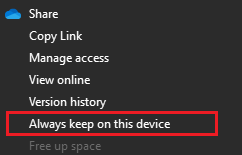
    In case the folder is synced by OneDrive, you need to disable OneDrive somehow. Like me, disabling OneDrive altogether, or setting the Autosave folder to be always on your PC:

    Context menu with the option 'Always keep on this device' highlighted in red.

    emoji


    Generated Image Alt-Text
    [edited by: RWS Community AI at 10:49 AM (GMT 1) on 5 Jun 2025]
Reply
  •  

    I cannot find where I can indicate the path where I want to autosave.

    There is no way to change this setting in Trados Studio.

    Which Trados Studio 2022 build you have? It should be 17.2.12.19268. If it’s not, please upgrade. I mention it because the actual Autosave folder is %appdata%\Trados\Trados Studio\Studio17\AutoSave (in the past, it was somewhere in the Documents special folder).

    The path above is a folder I believed it's not synced by OneDrive. I may be wrong, because I have OnDrive disabled.

    In case the folder is synced by OneDrive, you need to disable OneDrive somehow. Like me, disabling OneDrive altogether, or setting the Autosave folder to be always on your PC:

    Context menu with the option 'Always keep on this device' highlighted in red.

    emoji


    Generated Image Alt-Text
    [edited by: RWS Community AI at 10:49 AM (GMT 1) on 5 Jun 2025]
Children
No Data