Inconsistent text in cleaned files after cleaning sdlxliff

Hello everyone,

I have been experiencing a recurring issue that I would like to report. I currently work with Trados Studio 2022 Professional. When I receive a translated package, the text in the bilingual sdlxliff file appears to be perfectly fine and correctly translated. However, after performing the cleanup process, the cleaned file sometimes displays additional or different text that is not present in the bilingual sdlxliff.

To investigate this, I opened the sdlxliff file in an open-source code editor (such as Visual Studio Code) and found that this unexpected text is embedded in the code between the tag <target> and <mrk mtype="seg" mid="1"> where in fact no text should occur. This text is not visible in SDL Studio during translation but somehow gets included during the cleanup.

This inconsistency is quite concerning, as it makes me uncertain about the final deliverables. I always assume that the text in the bilingual sdlxliff should match the final cleaned files, and it should not be possible for additional text to be inserted between these tags.

Some screenshots to illustrate this issue below:

Screenshot of the bilingual 
sdlxliff :

Screenshot of Trados Studio showing bilingual sdlxliff file with two rows: 'Specifications-Folder' and 'Contains-battery', with corresponding translations.

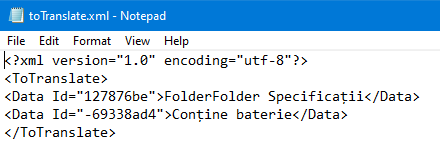
Screenshot of the cleaned file:

Screenshot of Notepad displaying XML file content with two data entries: 'FolderFolder Specificatii' and 'Contine baterie'.

Screenshot of the bilingual file opened in Visual Studio Code:

Screenshot of Visual Studio Code showing sdlxliff file content with a target tag containing unexpected text: 'Folder Specificatii'.

Has anyone else encountered this issue? Is there a known solution or a setting that might be causing this? I would appreciate any insights or recommendations to resolve this.

Thank you in advance for your help!

Kind regards,
Katrien.


Generated Image Alt-Text
[edited by: RWS Community AI at 1:28 PM (GMT 1) on 19 May 2025]
emoji
Parents Reply
  • Dear Paul,

    Thanks again for your response and for taking the time to look into this.

    I’ve reviewed the video, and indeed, when I retranslate the source file on my end, I get the same result as you. However, that’s not where the issue lies. The project was created with my Studio version but the translations I received were part of a return package from my suppliers. Yesterday, I asked my supplier to manually re-translate the file and resend it to me, and I got the same unexpected result: additional text appears in the target file, even though it is not present in the bilingual sdlxliff.
    It’s a fairly straightforward xml file, and I honestly don’t understand what could be going wrong here. For your reference, I asked and my supplier is working with SDL Trados Studio Professional 2015.
    This is something I really want to look into, as I find it quite alarming to feel this level of uncertainty about the translations we’re delivering. What worries me most is that I discovered the issue purely by coincidence. We would normally assume that the bilingual file in Studio and the cleaned output would be identical, but unfortunately, that doesn’t seem to be the case.

    I’m attaching both the project and the return package from the supplier. Would you be willing to take a closer look based on those files please?
    I’d really appreciate your help.

    testproject.zip2474.test.zip

    emoji
Children