Merging TMs with different Character-based-concordance-search settings

Hi everyone,

I work with Trados Studio 2017 and I would like to merge several TMs into one big master TM.

Unfortunately, some TMs were created with the option “Enable character-based concordance search” flagged, whereas for others that option was not flagged.

I have already tried to merge two TMs having different settings for that option (“Enable character-based concordance search” flagged and not flagged) and it seemed to work (I obtained another TM without any error message).

My question is: if I merge several TMs having different settings for this option, will I encounter problems in the future when I will use the master TM obtained? I would not like to face a major problem in the middle of a translation.

Which Concordance-search method will be used?

Or have you any suggestions to work around this problem?

I thought of recreating the TMs by importing them from the sdlxliff files or from the alignment results, but I have many TMs and I would prefer to use the ones I already have.

Thanks in advance for the attention and for any help,

best regards

Ester

emoji
Parents
  •  

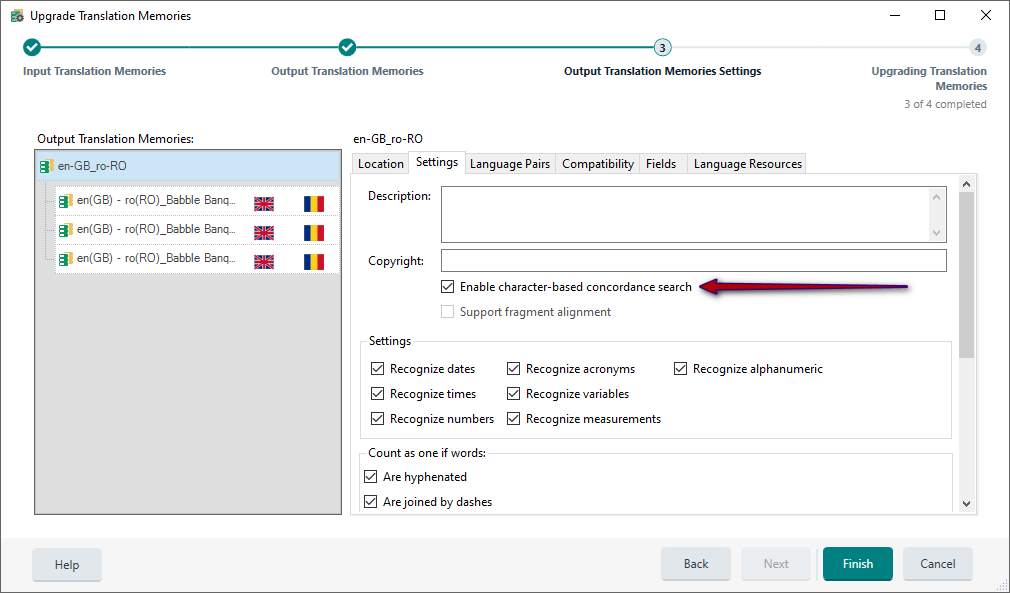
    Great question!  The answer depends on how you are merging the TMs.  If you are exporting one and importing into the other, then the settings on the importing TM will take precedence.  If you are merging them using the Upgrade routine then you need to make sure this setting is in place when you do the merge:

    Screenshot of the Upgrade Translation Memories window in Trados Studio, showing the Output Translation Memories tab with settings for en-GB to ro-RO. A red arrow points to 'Enable character-based concordance search' checkbox.

    So it's not really a problem, just a question of making sure you take the right approach when you merge.

    Paul Filkin | RWS

    Design your own training!
    You've done the courses and still need to go a little further, or still not clear? 
    Tell us what you need in our Community Solutions Hub

    emoji


    Generated Image Alt-Text
    [edited by: RWS Community AI at 8:07 AM (GMT 1) on 1 Sep 2025]
Reply
  •  

    Great question!  The answer depends on how you are merging the TMs.  If you are exporting one and importing into the other, then the settings on the importing TM will take precedence.  If you are merging them using the Upgrade routine then you need to make sure this setting is in place when you do the merge:

    Screenshot of the Upgrade Translation Memories window in Trados Studio, showing the Output Translation Memories tab with settings for en-GB to ro-RO. A red arrow points to 'Enable character-based concordance search' checkbox.

    So it's not really a problem, just a question of making sure you take the right approach when you merge.

    Paul Filkin | RWS

    Design your own training!
    You've done the courses and still need to go a little further, or still not clear? 
    Tell us what you need in our Community Solutions Hub

    emoji


    Generated Image Alt-Text
    [edited by: RWS Community AI at 8:07 AM (GMT 1) on 1 Sep 2025]
Children
No Data