 Translate


- Is is possble to export an additional file, i.e. another format than the source file, xliff or bilingual review file?


- Is is possble to export an additional file, i.e. another format than the source file, xliff or bilingual review file?
"Probability score": 0.9
"Question improvement suggestion": Please specify the version of Trados Studio you are using and the type of file you want to export.
In the meantime, based on the information you have provided, here is a suggested answer to your question:
Yes, it is possible to export an additional file in a different format than the source file in Trados Studio. You can export a bilingual review file, which is a Word document that contains both the source and target text. Here are the steps to do this:
Step 1: Open your project in Trados Studio.
Step 2: Go to the "Files" view.
Step 3: Select the files you want to export.
Step 4: Right-click on the selected files and choose "Export for External Review".
Step 5: Choose the location where you want to save the exported file and click "Save".
This will create a bilingual Word document that you can send for review.
Please note that the ability to export in other formats like xliff depends on the specific version of Trados Studio you are using and the type of file you are working with.
I hope this answer addressed your question. If not, please reject the answer, add the question improvement suggestion information, and click the RWS Community AI checkbox on the right to try again.
RWS Community AI
Trados Studio is not designed as a file converter, but some conversions are possible. Do you want to tell us what you want to convert into which format?
Daniel


You can export SDLXLIFF using the command "Advanced Save - Save Copy As".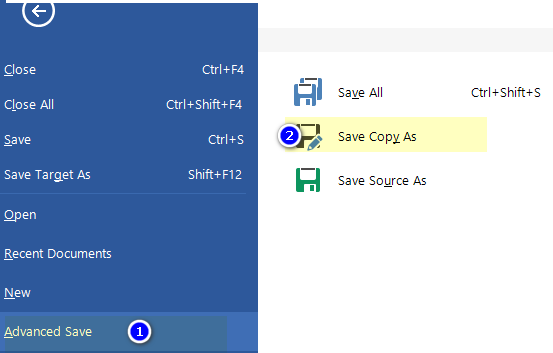
And for a bilingual review, use the Batch Task "Export for bilingual review".


The two other conversion (export) options that come to mind are Excel and two types of vanilla XLIFF, both using free apps from the AppStore. Excel does not permit re-import of an altered file, XLIFF does.
Since most questions were about JSON source files, I wonder what these should be converted into, and why?
