abbreviations

Hi, with all the possible help of chatgpt, specifying my Trados version (Trados Studio 2024 - 18.0.0.1013) I can not find the way to include new abbreviations to be regognized in source language.
I can only find 'predeterminados' and no way to create a new template. Can you please help me out?

Many thanks

Roland

emoji
Parents
  •   

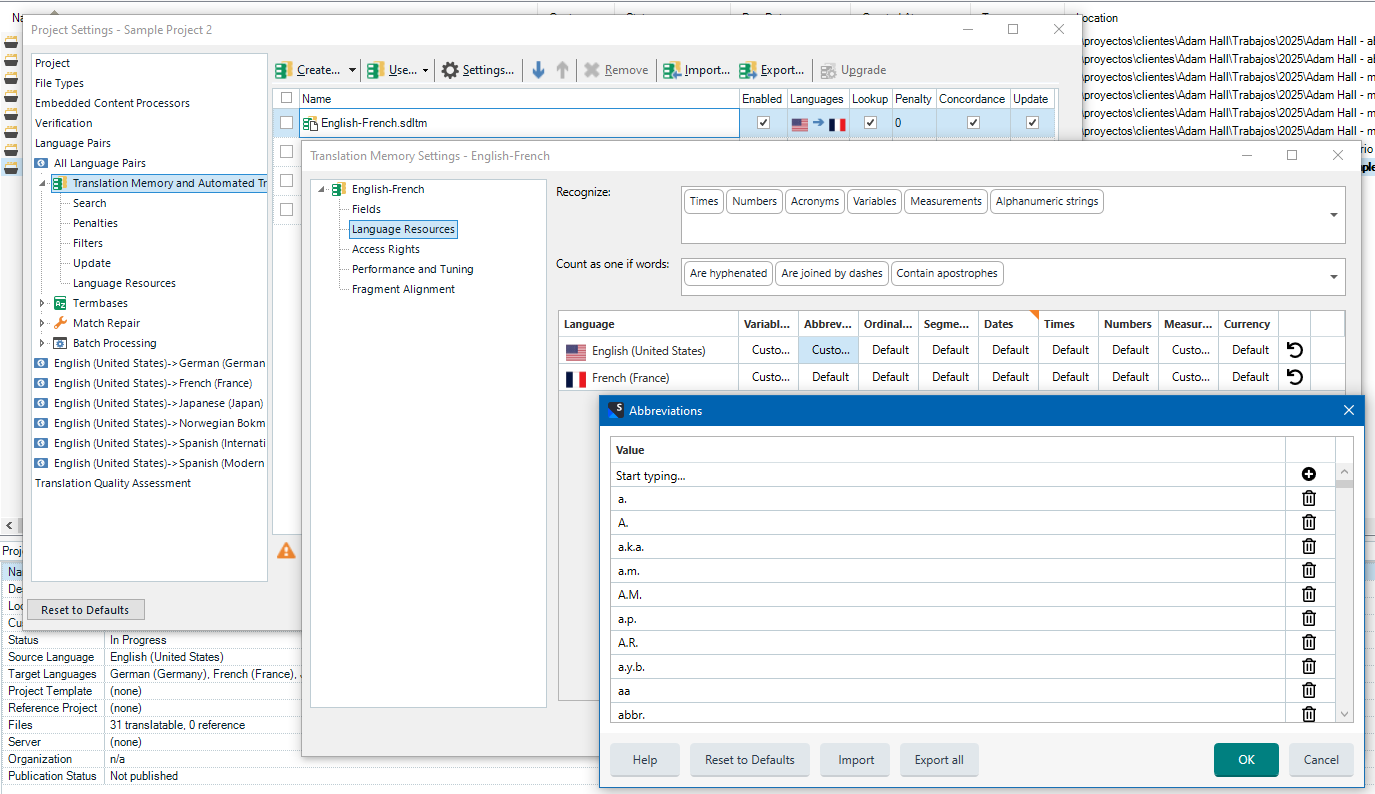
    You need to go to the TM itself via Project Settings (as shown below in the screenshot) or in the Translation Memories view:

    Trados Studio Project Settings window showing Translation Memory and Automated Translation options, with English-French TM settings and Abbreviations dialog open.

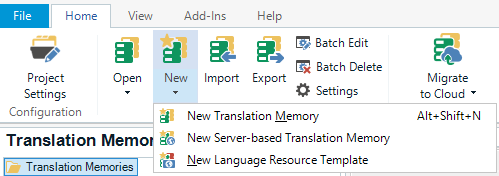
    To create a template, in Translation Memories view, select New in the ribbon > New Language Translation Memory:

    Trados Studio Translation Memories ribbon menu with options for New Translation Memory, New Server-based Translation Memory, and New Language Resource Template.

    To get help, I’d recommend to press F1 key anywhere in Trados Studio, type abbreviations, for example, and you will be provided with links. You can navidate through the extensive help from RWS.
    emoji


    Generated Image Alt-Text
    [edited by: RWS Community AI at 1:19 PM (GMT 1) on 12 May 2025]
Reply
  •   

    You need to go to the TM itself via Project Settings (as shown below in the screenshot) or in the Translation Memories view:

    Trados Studio Project Settings window showing Translation Memory and Automated Translation options, with English-French TM settings and Abbreviations dialog open.

    To create a template, in Translation Memories view, select New in the ribbon > New Language Translation Memory:

    Trados Studio Translation Memories ribbon menu with options for New Translation Memory, New Server-based Translation Memory, and New Language Resource Template.

    To get help, I’d recommend to press F1 key anywhere in Trados Studio, type abbreviations, for example, and you will be provided with links. You can navidate through the extensive help from RWS.
    emoji


    Generated Image Alt-Text
    [edited by: RWS Community AI at 1:19 PM (GMT 1) on 12 May 2025]
Children
No Data