
Problem saving in Studio

When I try to save my project in Studio I it shuts down and when I open it again I get this error message:
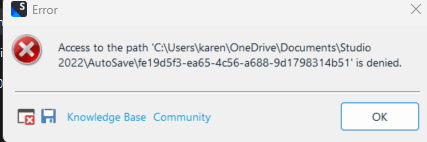
Error dialog box with a red cross icon indicating 'Access to the path C:UserskarenOneDriveDocumentsStudio2022AutoSavee19d53f5-ea65-4c56-a688-9d17983145b1' is denied.' with Knowledge Base and Community buttons and an OK button. 

I thought it was because of One Drive so I paused syncing as advised but it is still occurring.


Generated Image Alt-Text
[edited by: RWS Community AI at 2:52 PM (GMT 0) on 10 Mar 2025]

emoji
Parents
  •  

    Please delete the folder listed here and all other folder in the AutoSave path you may find. Then move your Documents folder out of OneDrive. This should solve your problems.

    _________________________________________________________

    When asking for help here, please be as accurate as possible. Please always remember to give the exact version of product used and all possible error messages received. The better you describe your problem, the better help you will get.

    Want to learn more about Trados Studio? Visit the Community Hub. Have a good idea to make Trados Studio better? Publish it here.

    emoji
Reply
  •  

    Please delete the folder listed here and all other folder in the AutoSave path you may find. Then move your Documents folder out of OneDrive. This should solve your problems.

    _________________________________________________________

    When asking for help here, please be as accurate as possible. Please always remember to give the exact version of product used and all possible error messages received. The better you describe your problem, the better help you will get.

    Want to learn more about Trados Studio? Visit the Community Hub. Have a good idea to make Trados Studio better? Publish it here.

    emoji
Children
