How to open all these tiny sdlxliff files in one go?

A client created a project with many folders that all contain one sdlxliff file. How can I open them all in one go? The files are in the XML folders inside the folder "imagesToTranslation".
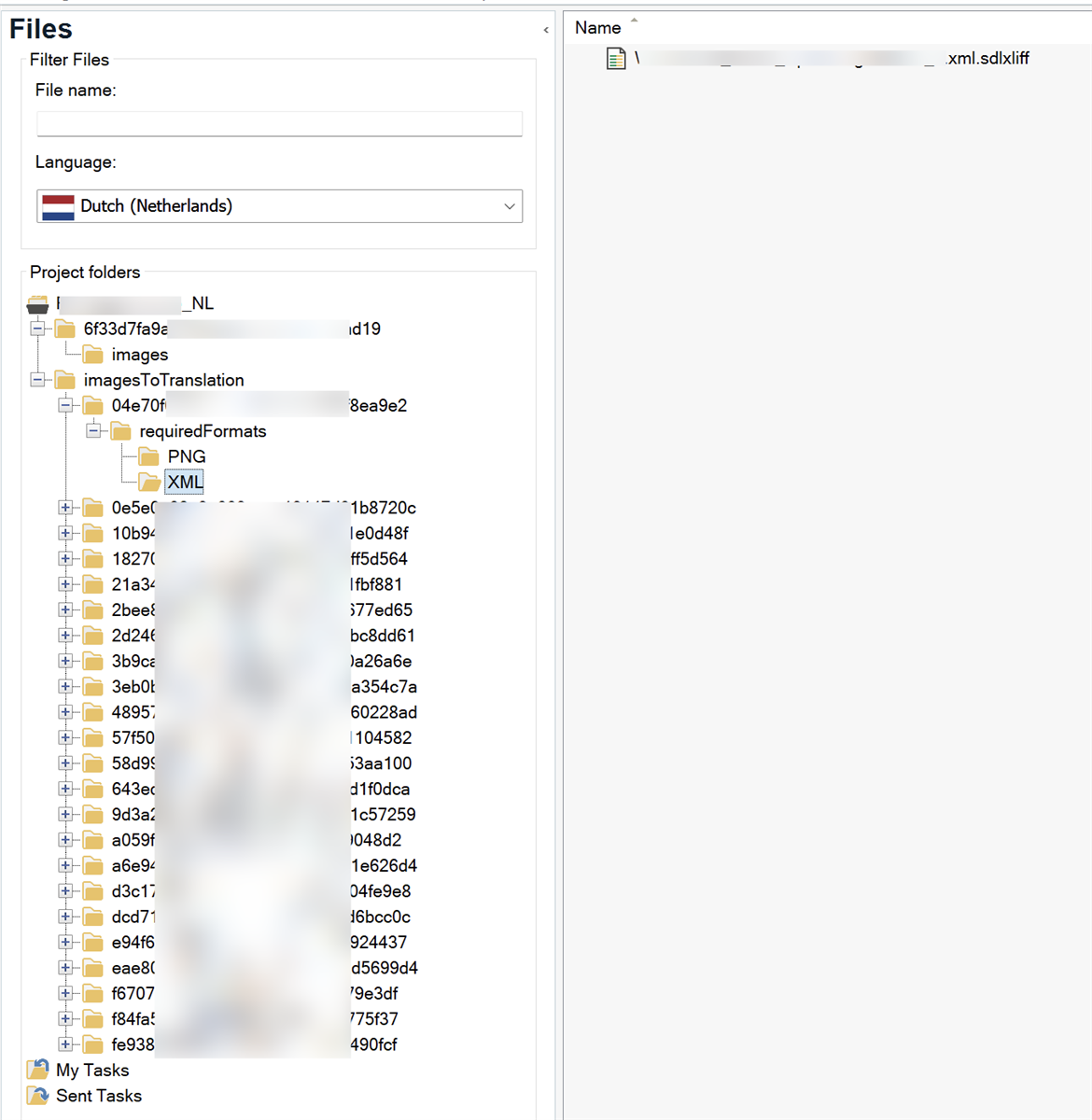
Screenshot of Trados Studio interface showing the Files view with a filter applied. The left pane displays a project structure with folders, highlighting the 'imagesToTranslation' folder expanded to show 'XML' subfolder containing multiple sdlxliff files. The right pane shows a selected sdlxliff file.


Generated Image Alt-Text
[edited by: RWS Community AI at 9:31 AM (GMT 0) on 8 Mar 2025]

emoji
Parents
  •  

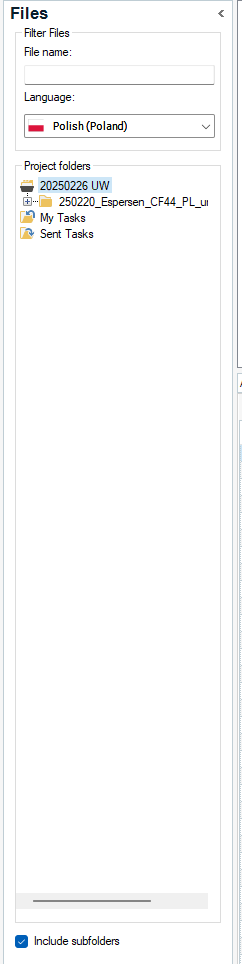
    Just activate this small option:

    Screenshot of Trados Studio's Files view with a filter section above and project folders listed below. Language is set to Polish (Poland). Folders shown include '20250226 UW' and '250220_Espersen_CF44_PL_u' with subfolders 'My Tasks' and 'Sent Tasks'. 'Include subfolders' option is checked.

    This will show all files as would they be in the root folder, regardless their real location. Now you can select as many files as you wish and open them in virtual merge.

    _________________________________________________________

    When asking for help here, please be as accurate as possible. Please always remember to give the exact version of product used and all possible error messages received. The better you describe your problem, the better help you will get.

    Want to learn more about Trados Studio? Visit the Community Hub. Have a good idea to make Trados Studio better? Publish it here.

    emoji


    Generated Image Alt-Text
    [edited by: RWS Community AI at 9:34 AM (GMT 0) on 8 Mar 2025]
Reply
  •  

    Just activate this small option:

    Screenshot of Trados Studio's Files view with a filter section above and project folders listed below. Language is set to Polish (Poland). Folders shown include '20250226 UW' and '250220_Espersen_CF44_PL_u' with subfolders 'My Tasks' and 'Sent Tasks'. 'Include subfolders' option is checked.

    This will show all files as would they be in the root folder, regardless their real location. Now you can select as many files as you wish and open them in virtual merge.

    _________________________________________________________

    When asking for help here, please be as accurate as possible. Please always remember to give the exact version of product used and all possible error messages received. The better you describe your problem, the better help you will get.

    Want to learn more about Trados Studio? Visit the Community Hub. Have a good idea to make Trados Studio better? Publish it here.

    emoji


    Generated Image Alt-Text
    [edited by: RWS Community AI at 9:34 AM (GMT 0) on 8 Mar 2025]
Children
No Data