SDL Studio 2024 Crashes

Studio 2024 (18.0.1.2259) crashes in the middle of editing with the following error. It seems to be related to a quick succession of key entries or trying to page up or down through the file. This happens with regularity but is not reproducible.

Faulting application name: SDLTradosStudio.exe, version: 18.0.1.2259, time stamp: 0xb0f848b3
Faulting module name: ntdll.dll, version: 10.0.22621.4391, time stamp: 0xaa58fd70
Exception code: 0xc0000374
Fault offset: 0x000edcdf
Faulting process id: 0x0x5750
Faulting application start time: 0x0x1DB43A545B28204
Faulting application path: C:\Program Files (x86)\Trados\Trados Studio\Studio18\SDLTradosStudio.exe
Faulting module path: C:\WINDOWS\SYSTEM32\ntdll.dll
Report Id: xxxxxxxx-xxxx-xxxx-xxxx-xxxxxxxxxxxx
Faulting package full name:
Faulting package-relative application ID:

emoji
Parents Reply Children
  • Hi Paul,

    Here is an example of the crash. I am enclosing the banner, the xml error file and the log.

    At the time it happened I had imported a bilingual file after review, and was reopening in the editor. There was another file already open in the editor (this seems to be always the case when the crash occurs). Let me know if you need more information.SLD Crash.zip

    emoji
  • Hi Paul,

    Here is an instance of the error I was mentioning. At the time, I was importing a bilingual file after review and reopening it in the editor. There was another file open in the editor already (this always seems to be the case when this error happens). I will attach the log file, error banner and xml error file in a separate reply. You can still do some things after the error happens, but you cannot close the application unless you kill it in the Task Manager.

    Let me know if you need more information.

    Thanks,

    Tomas

    emoji
  • Hi Paul,

    Here is an instance of the error I was mentioning. At the time, I was importing a bilingual file after review and reopening it in the editor. There was another file open in the editor already (this always seems to be the case when this error happens). I will attach the log file, error banner and xml error file in a separate reply. You can still do some things after the error happens, but you cannot close the application unless you kill it in the Task Manager.

    Let me know if you need more information.

    Thanks,

    Tomas

    emoji
  • Hi Paul,

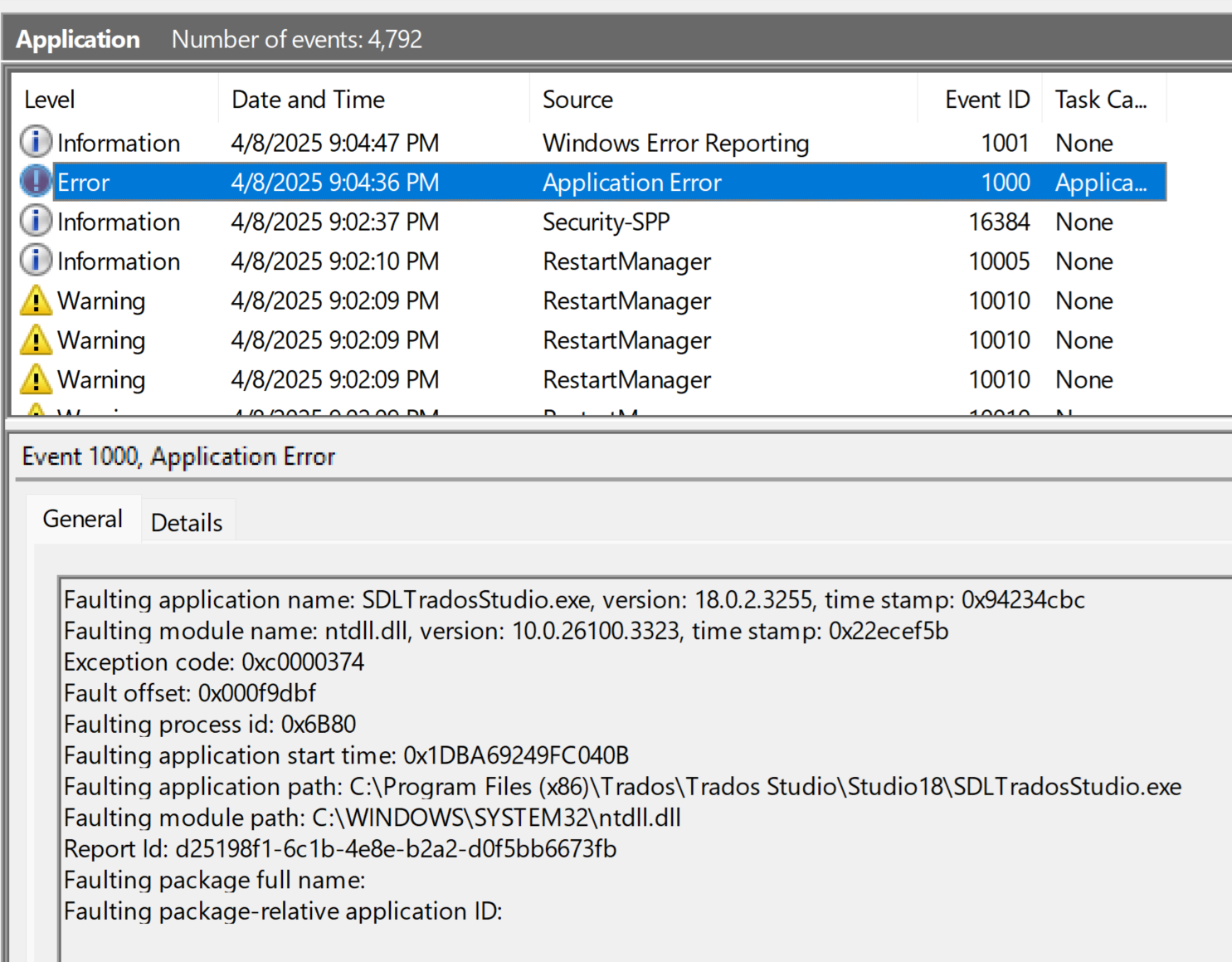
    Here is an outright crash in the middle of editing a file. The log file is empty.

    I am enclosing the entry from the event viewer.

    Screenshot of Windows Event Viewer showing an Application Error with Event ID 1000 for SDLTradosStudio.exe. Error details include faulting module ntdll.dll and exception code 0xc0000374.

    emoji


    Generated Image Alt-Text
    [edited by: RWS Community AI at 1:16 AM (GMT 1) on 9 Apr 2025]