
QA Checkers 3.0 : How do I setup punctuation to ACCEPT Non-breaking space before colon (:)

Everytime I'm working on a translation from ENG to FR_canadian, I get a warning or an error regarding SPACE before colon. As you probably know, the non-breaking space is a mandatory rule to respect when writing in French. Whatever I click or unclick in these settings, I still receive it. I was thinking this specified line/box "Verification for French (spaces are voluntary) was about that. Is there a way to set this to get the NBSP accepted before the colon? Thanks for any advice or workaround solving this!
Trados Studio 2024 (v. 18.0.1.2259)
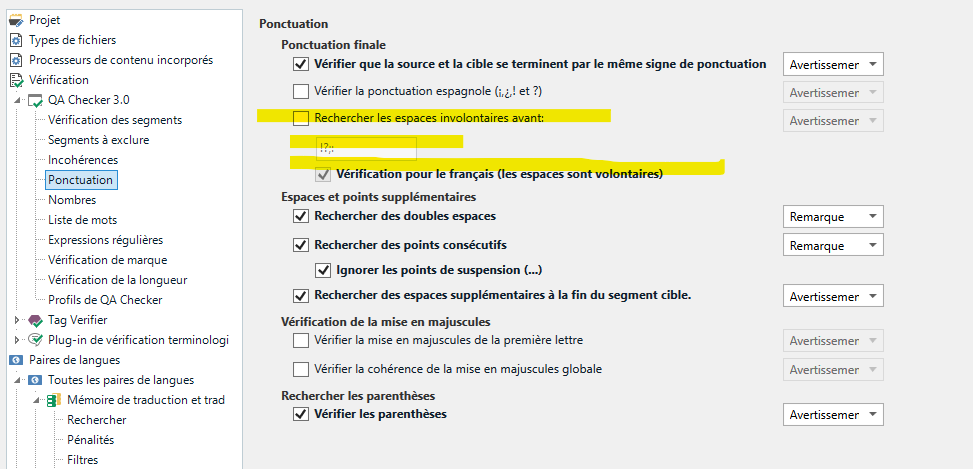
Screenshot of Trados Studio 2024 QA Checker 3.0 settings showing options for punctuation verification with a highlighted section for 'Verification pour le francais (les espaces sont volontaires)' indicating spaces are voluntary before punctuation in French.


Generated Image Alt-Text
[edited by: RWS Community AI at 2:51 PM (GMT 0) on 20 Nov 2024]

emoji
Parents
  • The problem has not been solved and looks very specific to French Canadian punctuation. In my case, Project Settings does not offer any setting about this. I found the above settings in File-Options-Verifications-QA Checkers 3.0-punctuation. The problem is that I don't understand this punctuation setting : Search involuntary spaces. Whatever I choose (including colon, or not, ticking or unticking boxes like "verification for French (spaces are voluntary)", it does not work. Is that something that programers of the FR version have forget to set? I don't know. But it is VERY ANNOYING. Disappointed

    emoji
  •   

    Where do you change this setting? I strongly suppose you are doing this via File -> Options. Please forget this way completely and change this setting always only via Project Settings. Please read this for reason: https://multifarious.filkin.com/2012/12/18/tea-and-settings/

    To avoid this problem in the future, change the appropriate setting in any project template used via File -> Setup -> Project templates. Please note, that this setting is available in "All language pairs" and in your language pair (English to French).

    _________________________________________________________

    When asking for help here, please be as accurate as possible. Please always remember to give the exact version of product used and all possible error messages received. The better you describe your problem, the better help you will get.

    Want to learn more about Trados Studio? Visit the Community Hub. Have a good idea to make Trados Studio better? Publish it here.

    emoji
Reply Children
No Data
