AutoSuggest - suggestions no longer inserted by pressing Enter

Since about one month, suggestions are no longer inserted into the translation segment when pressing Enter (they do appear, but they are not applied). I was using Trados Studio 2022. As I was planning on switching to 2024, I put up with it, but I now installed Trados Studio 2024 (18.0.1.2259), and the same issue occurs. I checked if AutoSuggest is enabled, and it is, so that doesn't cause the problem.

Does anyone have any idea what could be the cause of this?

emoji
Parents
  •  

    Just confimed that AutoSuggest works in Trados Studio 2024, same build as yours.

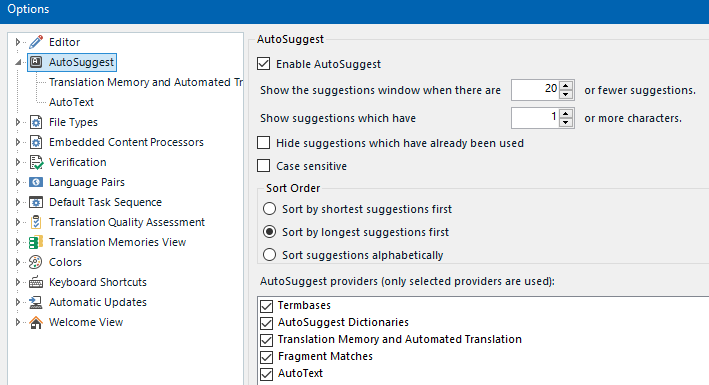
    Please check your settings here (the screeshot below shows the Default settings):

    Screenshot of Trados Studio 2024 AutoSuggest settings. 'Enable AutoSuggest' is checked. Options for 'Show suggestions window when there are 20 or fewer suggestions' and 'Show suggestions which have 1 or more characters' are visible. 'Term bases', 'AutoSuggest Dictionaries', 'Translation Memory and Automated Translation', 'Fragment Matches', and 'AutoText' are selected.

    If it still doesn’t work, please insert a screnshot with your settings and explain exactly what you did, but didn’t work.

    emoji


    Generated Image Alt-Text
    [edited by: RWS Community AI at 7:31 AM (GMT 0) on 31 Oct 2024]
  • Thank you for your answer.

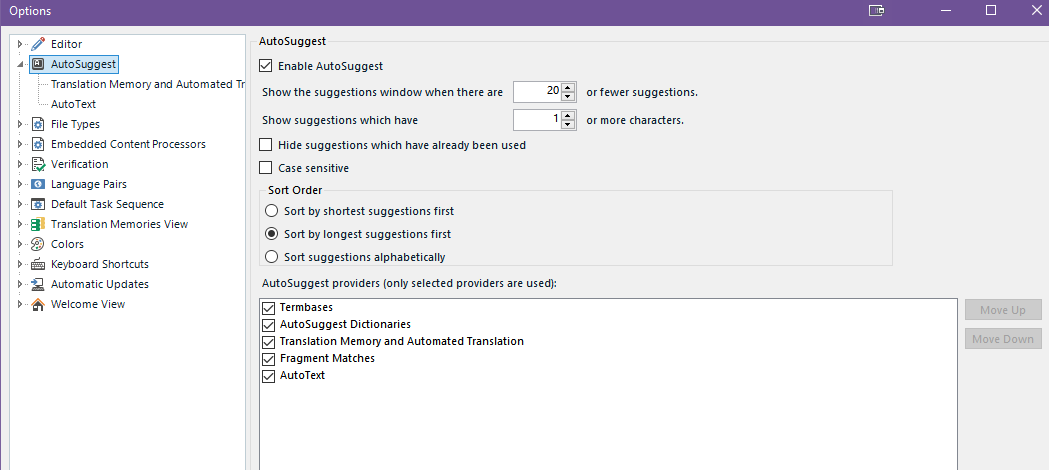
    Unfortunately, my settings match those in your screenshot exactly, so that is not the issue.

    Trados Studio AutoSuggest options window showing 'Enable AutoSuggest' checked with various settings for suggestions display and providers like TermBases and AutoText.

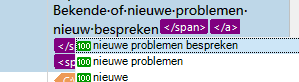
    When I'm typing, I get AutoSuggest words, like I should, either from the TB or the TM.

    Close-up of Trados Studio interface with AutoSuggest dropdown displaying overlapping text suggestions, indicating a possible display issue.

    I believe that in the past, when I pressed Enter at this point, the highlighted suggestion was inserted in my translation segment. Now, when I press Enter, nothing happens. When I click it, nothing happens. I either need to double click the suggestion to insert it, or type it myself. I have no idea why pressing Enter stopped working.

    emoji


    Generated Image Alt-Text
    [edited by: RWS Community AI at 8:37 AM (GMT 0) on 31 Oct 2024]
  •  

    My test with AutoSuggest was with a term in MultiTerm. I think I’ve never seen one of those 100% matches, and I wonder why… Anyway, I can’t even try to repro your issue. Maybe another colleague?

    A couple of questions:

    • Do the arrow keys (↑ and ↓) let you to move through the AutoSuggest list?
    • Does it work for terms from the termbase (as it worked for me)?
    • Does it work in any other case?
    emoji
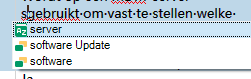
  • The same issue occurs with terms from the termbase:

    Screenshot of Trados Studio showing a partial view of the interface with a focus on the termbase entries, including items labeled 'server', 'software Update', and 'software'.

    I've also tried if there is a difference between projects from WorldServer and projects I made myself, using different TMs, but the issue occurs in all cases.

    Moving through the list with the arrow keys DOES work.

    emoji


    Generated Image Alt-Text
    [edited by: RWS Community AI at 11:48 AM (GMT 0) on 31 Oct 2024]
  •  

    Could you confirm you are working with PC or a Mac?

    Let’s see if other colleagues have something to say here, because I’m running out of ideas…

    emoji
  • I work with Windows 10 on a PC.

    Thank you for the time you spent on this, I appreciate it!

    emoji
  •  

    Two thoughts cross my mind:

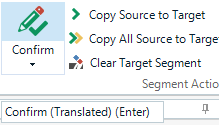
    1. check that the profile you are using isn't using "Enter" as the shortcut for confirming segments.  Easy way to check is to look at the icon for confirming in the ribbon where the shortcut is also displayed.
    2. Have a look at other software you might be running that is conflicting with that shortcut... maybe even something like AutoHotKey where you set the Enter key to do something else perhaps?  Or maybe some dictionary software that runs while you work with Trados Studio.  Just examples, take a good look at what else you have running.

    Paul Filkin | RWS

    Design your own training!
    You've done the courses and still need to go a little further, or still not clear? 
    Tell us what you need in our Community Solutions Hub

    emoji
  • Thank you, Paul.
    1. Yes, the profile I'm using does use "Enter" to confirm a segment. However, that was always the case, also back in the days when inserting the AutoSuggests did work. The tool always "understood" that when an AutoSuggest term was highlighted, Enter was meant to insert the term, not to confirm the segment. And even now, it does still understand that, as it still doesn't confirm the segment when AutoSuggest is showing (it does when it has disappeared). To double-check this, I temporarily changed the shortcurt for confirming segments. That did not solve the issue.

    2. I'm starting to think that that must be the problem. AutoHotKey would be my first guess, and since I don't even use that, I decided to simply remove it entirely. That didn't help. I also removed a few other tools that I wasn't using, but were running in the background. That hasn't solved the issue. I'm afraid my IT knowledge is too poor to dare remove or deactivate anything else, and I have no idea what could have changed about a month ago.

    Another strange thing that is happening, is what occurs after using the Find and Replace function (Ctrl+F). After using this, F4 no longer copies the source text to the translation segment, while it did so a minute before. At this point, when I press F4, an Information box is shown, saying "Find complete: no matches found." When I restart Trados, F4 functions as it should again, until using Find and Replace again.

    I guess I need to involve an IT person that will be able to check what's happening exactly in real time.

    Thank you for all suggestions, though!

    emoji
  •  

    Try 1, I mean changing the shortcut to confirm segments, but this time restart Trados Studio. And check if both AutoSuggest (with Enter) and confirming (with the new shorcut) work. Let us know the result and then you can change to your usual Enter shorcut to confirm segments.

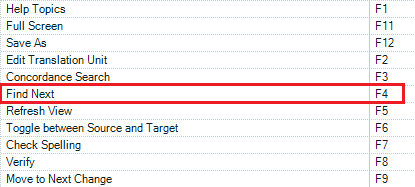
    About the F4 issue, it’s a completely new issue, but I guess you have customised this shorcut as well to copy source to target. By default, F4 is used to find the next searched item (same shortcut as in Microsoft Word):

    Trados Studio menu showing 'Find Next' function assigned to F4 key highlighted in red.

    The default shorcuts to copy source to target are:

    Trados Studio shortcut settings showing 'Copy All Source to Target' assigned to Alt+Shift+Ins and 'Copy Source to Target' without assignment.

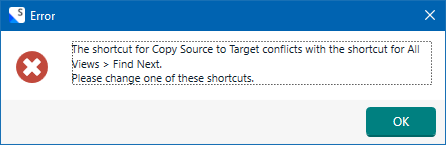
    And I can't set it to F4, because it’s duplicated:

    Trados Studio shortcut settings with an error highlighting 'Copy Source to Target' assigned to F4 in red, indicating a conflict.

    Error dialog box in Trados Studio stating 'The shortcut for Copy Source to Target conflicts with the shortcut for All Views > Find Next. Please change one of these shortcuts.'

    I'm wondering if you edited these settings outside of the user interface provided…

    emoji


    Generated Image Alt-Text
    [edited by: RWS Community AI at 8:04 AM (GMT 0) on 5 Nov 2024]
  •  
    I thought I had restarted Trados when I tried this previously, but I tried again, and yes, now AutoSuggest does work using Enter! And the new shortcut for confirming works as well. So I guess I will have to get used to using a new shortcut to confirm segments... It is odd though that using Enter for both had worked for years up until now...

    And I've never had this issue with F4 before either. Sorry to confuse you with my shortcuts, I think these depend on the user profile (Default, Trados, or SDLX). I'm not sure, but I think I use SDLX, not Default. Back when Studio was introduced, it was recommended for SDLX users to use that profile, so they could keep using the same shortcuts, so that's why mine differ from yours, I think. But I can change my shortcut for Copy Source to Target, thank you for helping me understand why this was happening!

    So, if I can get used to using a new shortcut for confirming segments, this issue is solved! Thank you so much!

    emoji
Reply
  •  
    I thought I had restarted Trados when I tried this previously, but I tried again, and yes, now AutoSuggest does work using Enter! And the new shortcut for confirming works as well. So I guess I will have to get used to using a new shortcut to confirm segments... It is odd though that using Enter for both had worked for years up until now...

    And I've never had this issue with F4 before either. Sorry to confuse you with my shortcuts, I think these depend on the user profile (Default, Trados, or SDLX). I'm not sure, but I think I use SDLX, not Default. Back when Studio was introduced, it was recommended for SDLX users to use that profile, so they could keep using the same shortcuts, so that's why mine differ from yours, I think. But I can change my shortcut for Copy Source to Target, thank you for helping me understand why this was happening!

    So, if I can get used to using a new shortcut for confirming segments, this issue is solved! Thank you so much!

    emoji
Children