Studio 2024 frequent crashes, no use of new features, MS Word spellcheck warning

I was running spellcheck in Trados Studio 2024. Spellcheck was set to operate from MS Word (I have a current MS Office license on PC) and this warning appeared:
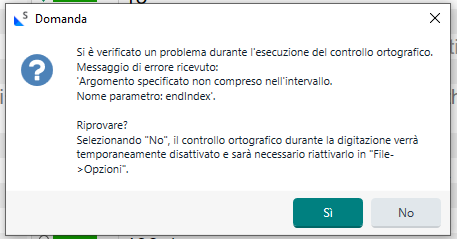
Error message dialog in Italian from Trados Studio spellcheck: 'Specified argument was out of the range of valid values. Parameter name: endIndex'. Options to retry or disable spellcheck.

Project is made up of one idml file and was created by LSP using Studio 2022. All project resources are stored to my local PC.


I installed Studio 2024 a week ago and so far everything was fine with other projects.
While with this one, I had several “Out of memory” warnings, after which I had to close everything and open Studio again or it would not save my changes to the project.
I am not using Language Weaver, Cloud options or none of the new features for 2024 version. TM and TB do not seem to be corrupted as I could work fine for a while and warning is not linked to a specific segment.

Question 1: with this warning, I understand spellcheck while typing is being temporarily disabled and can be re-enabled, but do you know what is triggering this kind of message? (trying to avoid it the next time)

Question 2: May the problem of several OUT OF MEMORY errors be related to the NET version installed on my PC? See below what I have. I have no idea of how to get a higher/later version. I have seen some answers here in the forum just mentioning titles of articles but could not find them. Can anyone help?
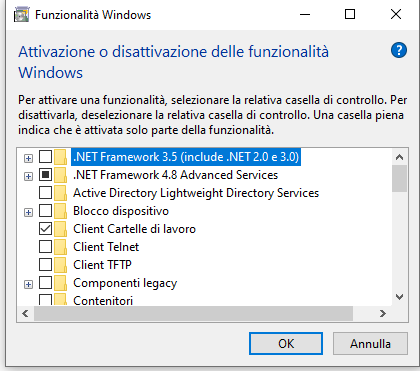
Windows Features dialog showing .NET Framework 3.5 and 4.8 checkboxes, with .NET Framework 3.5 checked and 4.8 unchecked.

Thank you for your help

marina


Generated Image Alt-Text
[edited by: RWS Community AI at 9:20 AM (GMT 1) on 4 Sep 2024]

emoji
Parents Reply Children
  • Hi Paul, I followed your instructions and indeed found that I still had some Studio 2017 folders on my computer. I also deleted all old plugins I could find because they were for older versions of Studio. I also uninstalled Skype app because I noticed it started to have a few problems in the same period.
    After rebooting, I first reinstalled only Trados Studio (no Skype, no Multiterm Desktop) and tried opening the projects with which I had problems. Problems are still there, so I finally reinstalled also the other programs as well. For the moment, I bet I cleared a lot of the old stuff.

    If there's anything else I could try, please advise.

    At any rate, the two problematic projects are now closed. If still have issues with other projects, I will certainly reach out for help and in any case by next year I should get a new laptop and Win 11, maybe that will help too.
    Thank you so much for your help

    emoji
  •  

    At any rate, the two problematic projects are now closed. If still have issues with other projects, I will certainly reach out for help and in any case by next year I should get a new laptop and Win 11, maybe that will help too.

    So we can consider this closed for now?  And if you do have more problems you can create a new thread so it's easier to follow.

    Paul Filkin | RWS

    Design your own training!
    You've done the courses and still need to go a little further, or still not clear? 
    Tell us what you need in our Community Solutions Hub

    emoji