SDL MultiTerm Convert can not convert TBX files to XML (Trados Studio 2022 SR2)

Hello,

We have just installed SR2 for Trados Studio 2022 Professional (Trados Studio 2022 SR2 - 17.2.10.19084) and I do not know if this may be causing some of our issues.

We regularly have TBX files which we need to convert to XML to either create new Termbases or to update existing ones. Today, we noticed that we were unable to convert any TBX files using MultiTerm Convert.

We receive the following message:
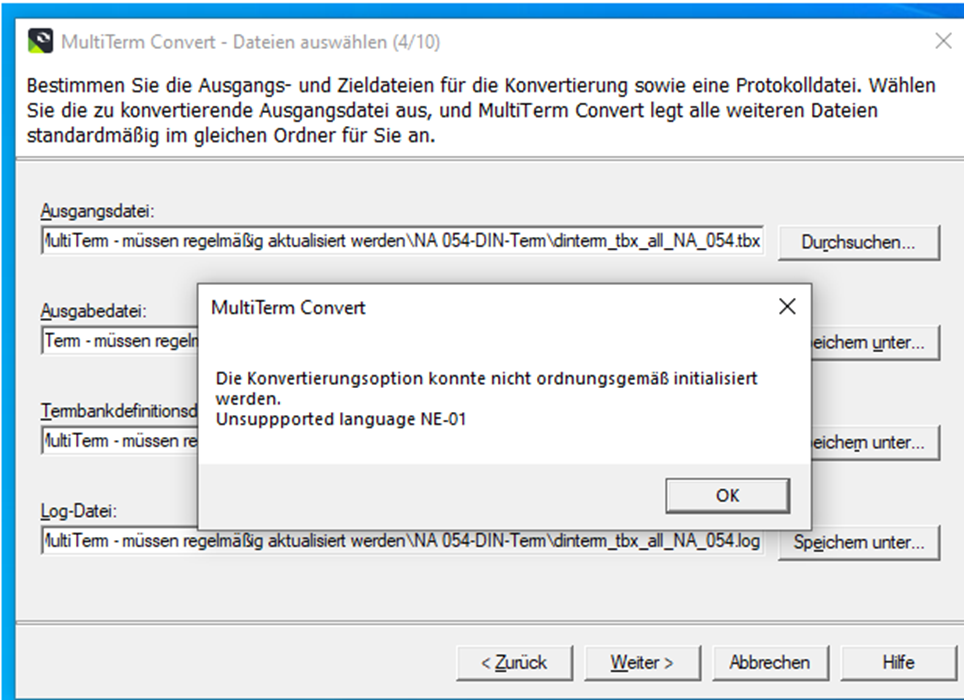
Screenshot of MultiTerm Convert error message: 'Die Konvertierungsoption konnte nicht ordnungsgemaess initialisiert werden. Unsupported language NE-01' with OK button.

"The conversion option cannot be initialised properly. Unsupported language NE-01"

We have tried other TBX files that we know have converted successfully in the past, but to no avail. We also tried conversion from a local drive instead of from Onedrive/Sharepoint; this did not work either.

Have other users had similar issues and can it be a result of installing SR2 for Trados 2022?

Thanks!


I have added a rough translation of the German part of the warning message.
[edited by: Helen Brown at 3:46 PM (GMT 1) on 1 Aug 2024]

emoji
Parents Reply Children
  •  

    Thanks for sending me the small file.  The header of the file is this:

    <!DOCTYPE martif SYSTEM "TBXcoreStructV02.dtd">

    This is Version 2 of the TBX standard and despite being officially available since 2008 I don't believe we support it in MultiTerm.  There is also a version 3 available since 2019 and this definitely isn't supported either.

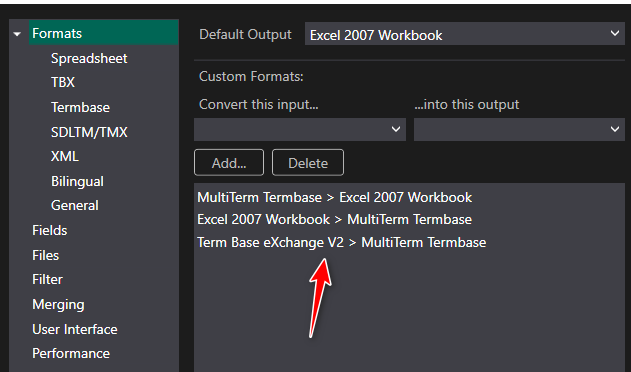
    However, the Glossary Converter supports both these flavours and if you set this up correctly you can convert direct to a Termbase in a couple of clicks:

    Screenshot of the Glossary Converter settings showing the various formats supported and with an arrow pointing to 'Term Base eXchange V2 > MultiTerm Termbase' conversion option.

    I have sent you the Termbase I converted just so you can see and perhaps enhance your ability to get the Glossary Converter installed.

    Paul Filkin | RWS

    Design your own training!
    You've done the courses and still need to go a little further, or still not clear? 
    Tell us what you need in our Community Solutions Hub

    emoji


    Generated Image Alt-Text
    [edited by: RWS Community AI at 6:36 PM (GMT 1) on 20 Aug 2024]
  • Hi,

    I have run almost exactly into the same issue yesterday:

    - TBX file with TBXcoreStructV02.dtd

    - MultiTerm Convert 2022

    - conversion error about "NO-NO" being an unsupported language (although this string does not exist in my TBX file)

    I found an older MultiTerm 2019 Convert installation on an older computer - and here the conversion has worked fine.

    So indeed it seems to be an issue with newer MultiTerm Convert installations, not with TBX 2.0 

    Cheers,

    Christine

    emoji
  •  

    You're right.  I just installed the 2019 version and indeed it does work.  I'll log it with support and if they agree I'll get share the bug number here.

    Is there a reason why it's important to use MT Convert for this as opposed to the Glossary Converter?  Helps with prioritisation.

    Paul Filkin | RWS

    Design your own training!
    You've done the courses and still need to go a little further, or still not clear? 
    Tell us what you need in our Community Solutions Hub

    emoji
  • Hi Paul,

    thanks a lot!

    Well, for complex TBX files, I usually try both (Glossary Converter and MultiTerm Convert):
    None of them works perfect in my case, but looking at the 2 results helps me to identify which additional tweaks (via regex in Notepad++) are needed.

    One advantage of MultiTerm Convert is that it collects the picklist values from the TBX import file and includes (at least some of) them in the xdt. As far as I know, Glossary Converter does not offer this option - or have I simply overlooked it(?)

    Cheers

    Christine

    emoji
  • The Glossary Converter does collect picklist values, unless they are already defined. Let's say you have a picklist field called Status. Check the list of fields in the settings for a Status field. If it is not there, create it and set the content type to picklist and leave the list of values empty. If it already exists, do same tests.

    When you now covert a tbx file that contains Status fields, they are stored in the Field settings. The next conversion will not collect values, since they are already there. If you have multiple sources that have a Status field, with different values, you'll have to clear the stored values. Hmmm, maybe it would be useful to have the option to add to, keep or overwrite existing values...

    Changing Field Properties (2)

    Cheers, Gerhard

    emoji