
Termbase viewer extremely small

I am a 2021 SDL Trados Freelancer Pro user and I am using Parallels to run Win 11. Since forever, I have been having issues with the termbase viewer size  being very small, whereas the selected term is bigger. 

I have just installed the trial version of 2022 but the issue persists. 
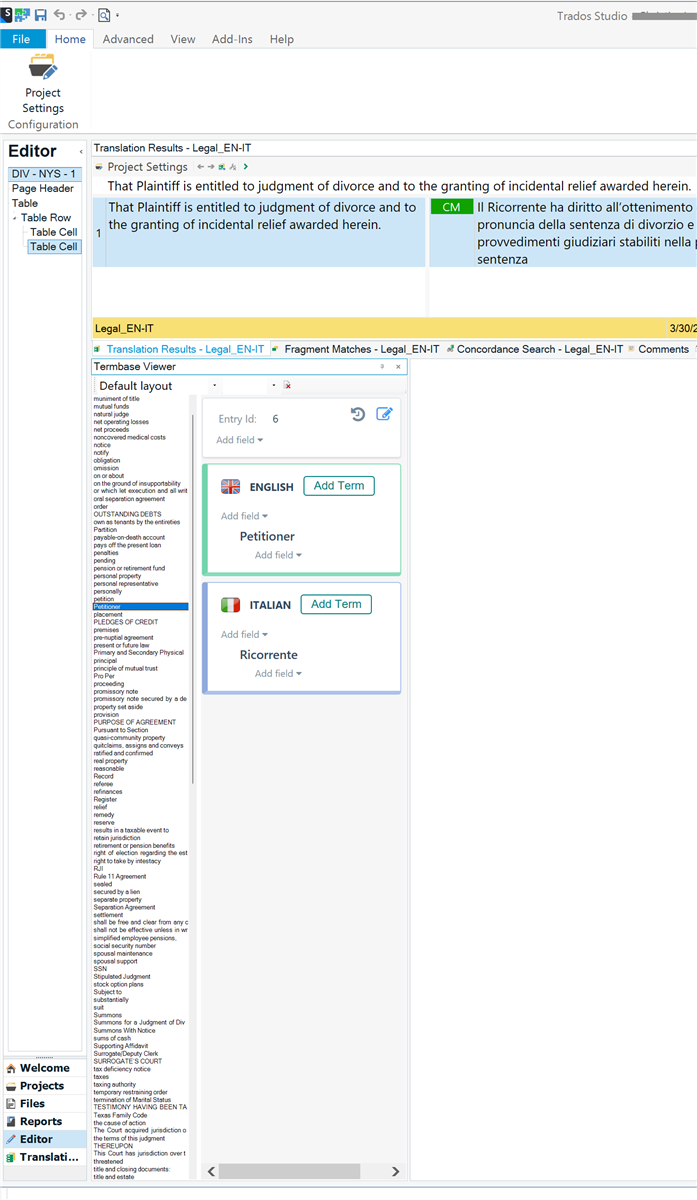
Screenshot of Trados Studio interface showing the Editor with a translation project open. The Termbase Viewer pane is displayed with a small font size for the term list, while the selected term 'Petitioner' in English and 'Ricorrente' in Italian is displayed in a larger font size.


Generated Image Alt-Text
[edited by: Trados AI at 2:47 AM (GMT 1) on 31 Mar 2024]

emoji
Parents
  • I know this question is already 2 years old, but I encountered a similar problem today (list of terms okay, but source and target terms were tiny), and I found an okay-ish solution which hasn't been mentioned yet.

    Potential solution: In the term base view, you can change the "Default layout" in the drop-down menu. Doing so changed the size of the text for the source and target terms, and some views allowed me to use "Ctrl+mouse wheel" to change the size.

    Leaving this here in case it helps someone else.

    emoji
Reply
  • I know this question is already 2 years old, but I encountered a similar problem today (list of terms okay, but source and target terms were tiny), and I found an okay-ish solution which hasn't been mentioned yet.

    Potential solution: In the term base view, you can change the "Default layout" in the drop-down menu. Doing so changed the size of the text for the source and target terms, and some views allowed me to use "Ctrl+mouse wheel" to change the size.

    Leaving this here in case it helps someone else.

    emoji
Children
No Data