Term recognition does not work in certain termbases after latest update

Hi All,

A few days ago I updated Trados and Multiterm to the latest verstions: TradosStudio2022SR2_17.2.10.19084 and MultiTermDesktop2022_17.2.3.2795

Now, term recognition inside Trados editor seems to not work with certain termbases but in other projects the same termbases seem to work OK.

Reorganizing the termbase does not seem to produce the desired effect in this case.

I understand that the information is not enough as supplied but any suggestions are welcome.

Best regards,

PTs

emoji
Parents Reply Children
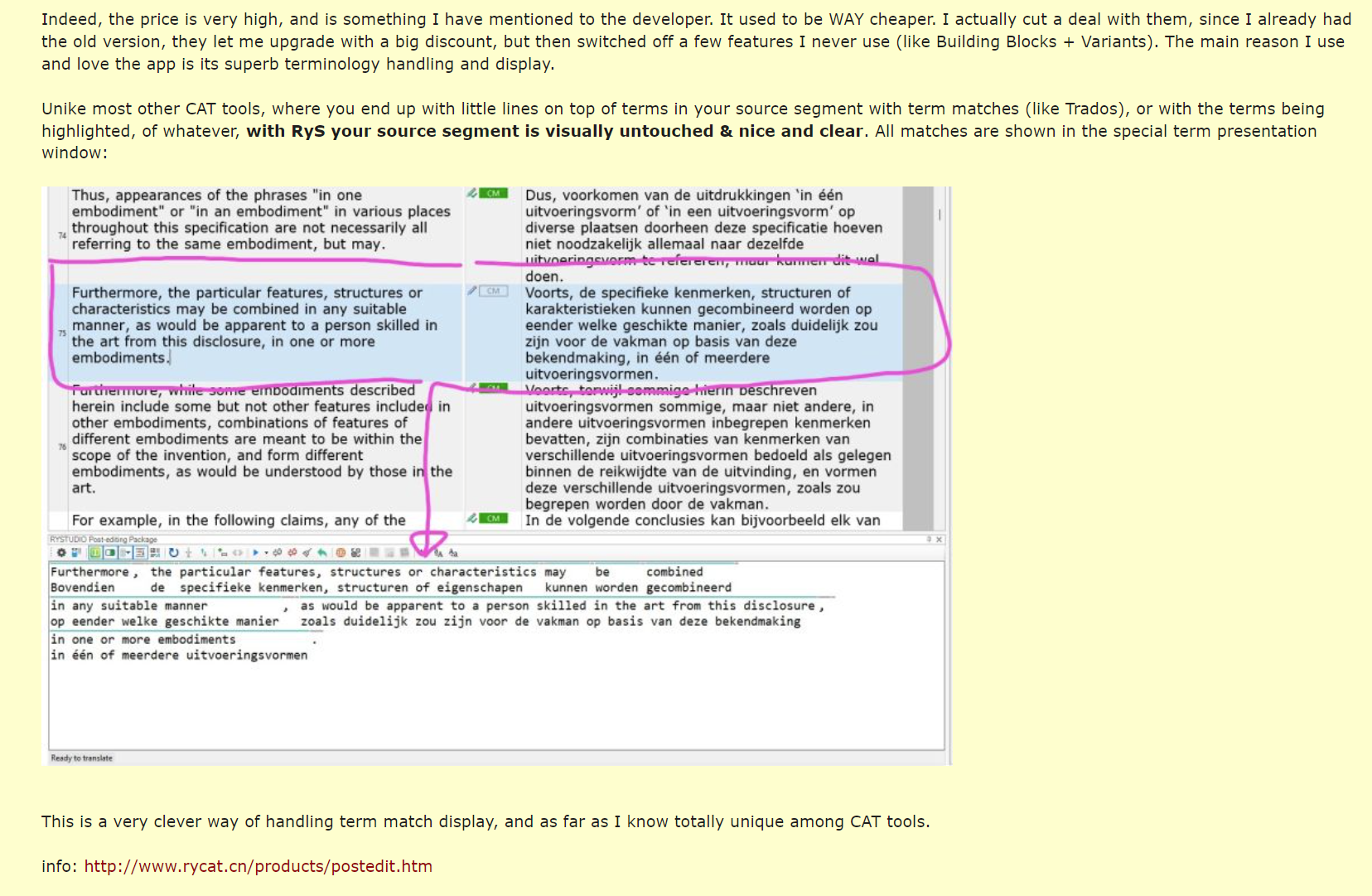
  • I am currently using the very clever alternative term recognition solution in this app: "RYSTUDIO Post-editing Package". https://appstore.rws.com/Plugin/135. It works with gigantic termbases and is rock solid. Terms are added instantaneously and if they are in the termbase, they are always shown. It also has a much better way of showing you which terms are actually in yr termbase. The app used to be much cheaper but I made a deal with the developer and have the latest version at a reduced price, with some features removed. All I need/want is the term recognition functionality.

    Screenshot of Trados Studio with RYSTUDIO Post-editing Package showing a text segment with term matches highlighted. The source segment is clear, with term matches displayed in a special term presentation window.

    emoji


    Generated Image Alt-Text
    [edited by: RWS Community AI at 5:06 PM (GMT 1) on 18 Jul 2024]
  •  

    Thanks for sharing that. What went under a bit was that the much maligned Word preview of Studio is so much better now -.it seems. I must confess I never had problems with it in the first place, but I also don't usually handle Word documents.

    The terminology app has some really clever features, creating an interlinear translation it seems.I think terminology will be hugely more important in the future, because LLMs are great, but they are so fuzzy, and when you need precision they have great drawbacks. That is where terminology comes in, and I do hope RWS will invest in this.

    I don't have issues with terms not being recognized, but I would wish for better UX. Maybe RWS can start a task force, similar to a beta group, where we can contribute to such a development. That would be cool.

    Speaking of "cool": Your computer seems to be a fire-breathing dragon judging by the background noise. We've got a guy in IT how switched to liquid cooling and it is virtually inaudible. I just moved offices so I don't have that issue anymore, but our graphics designers have air-cooled machines and whenever they start raytracing or something similar you think there's an airplane taking off. So, liquid-cooled machines are both cool and quiet. I can recommend it.

    emoji
  • Ha ha, not sure what all that noise it, but it isn't my laptop. Sounds like the mic picked up the internal sounds of my laptop, and road noises outside my house. I think my newer videos are better as I now use an external USB mic instead of the built in one in my laptop. Like this one: https://www.youtube.com/watch?v=0cMP_qBOUZ8&t=123s

    I used to have a water cooled desktop system, which I loved! However, for other reasons, I much prefer working on a (good) laptop, and no one has managed to squeeze a water cooling system into a laptop yet.

    But, yeah, they really need to work on their (unreliable) terminology systems since terminology is so important. For example, in my main line of work as a patent translator I'd even say that 90% of my work is terminology. Any old idiot (or machine) can translate running text. It's the key terms that need to be researched and translated (consistently) with great care.

    emoji
  • Indeed; Apparently there are still problems. Terms with two letters and an ampersand are not recognized in the Term Recognition window. I had created an assistance ticket for it and received the following response:

    The issue is indeed a product defect that is reproducible in the latest released Studio version as well (2024), logged under no. CRQ-20974. I will try to escalate the resolution of this product defect, but I cannot guarantee anything. Unfortunately, I cannot help further at the moment.

    emoji