
Where do I enter the API key for AI Professional?

I feel like this must be a stupid question, but I still couldn't answer it by googling and searching the community ...

Inspired by Patrick Hartnett's blog post (https://community.rws.com/product-groups/trados-portfolio/trados-studio/b/weblog/posts/unleash-the-power-of-translation-with-ai-professional-plugin-for-trados-studio?CommentId=xxxxxxxx-xxxx-xxxx-xxxx-xxxxxxxxxxxx), I'm trying to test the AI Professional plugin.

I've specifically for this taken out a ChatGPT subscription in the place where the highlighted link took me. This was sucessful, my credit card was charged and I copied an API key from my account. But now what? Where do I enter it? That, unfortunately wasn't covered in Patrick's video and it is not obvious, either.

The OK button in the Settings window below is greyed out.

Thanks in advance for pointing me in the right direction.
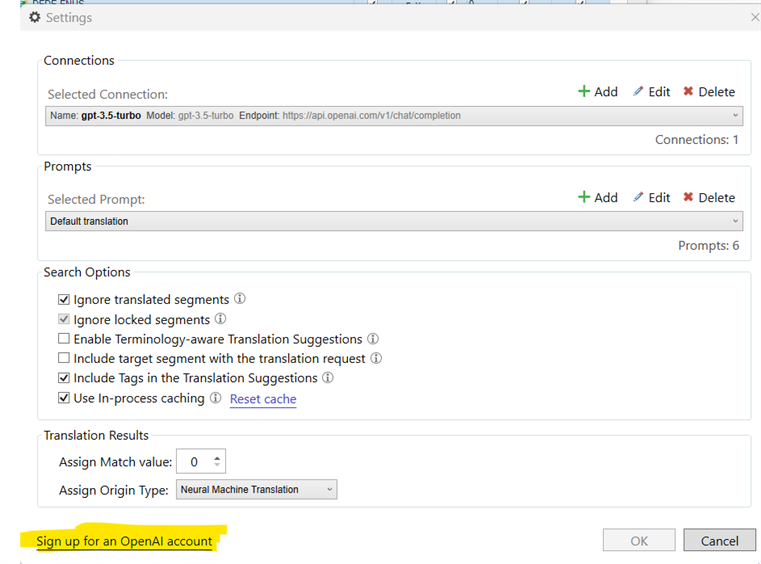
Trados Studio settings window showing Connections and Prompts sections with a selected connection named 'gpt-3.5-turbo' and a default prompt. The OK button is greyed out at the bottom.


Generated Image Alt-Text
[edited by: Trados AI at 11:54 AM (GMT 0) on 23 Feb 2024]

emoji
Parents
  •  

    Try editing the selected connection.

    Paul Filkin | RWS

    Design your own training!
    You've done the courses and still need to go a little further, or still not clear? 
    Tell us what you need in our Community Solutions Hub

    emoji
  • Great big facepalm! I knew it was a stupid question! Slight smile As always, thanks a lot, !

    emoji
  • Paul, you are so eager to help, as always! No words are enough to express my gratitude for all these explanations!

    You are absolutely right, we have no option but to get way more technical than we would like to...very true.

    API Key: I added this since this is most likely what you meant. 

    Yes, you read my mind. Because to me, an API key is just a password, similar to those used for Trados license activation, for example. And in case of Deepl Translation Provider, this API key is the password used in the plugin developed by the RWS team, isn´t it? This is where the question comes from: API keys are used to "open" plugins...that connect Trados to a paid suscription... you know, what I mean? All passwords are called API keys these days. And maybe they are, to a greater or lesser extent:)

    Back to AI Pro plugin:

    a) Open AI (chat GPT, free version) worked with the previous plugin. Can it be connected using the AI Pro? Ok, it´s a "basic" resource, cannot be trained. But as a free MT toll it ca be used, as far as I can understand.

    b) Azure AI Translator. Without fine-tuning, without terminology-aware option. Can it be connected and used as a MT resource with a free (trial) Azure account?

    I keep studying your answer (and reading extra info) , so may send more questions later...Thank you sooooo much, Paul!

    emoji
  •  

    All passwords are called API keys these days.

    No they are not.  An API Key is exactly what I told you.  A password, such as the ones I use to log onto my computer, login to Google in my chrome browser, login to Office 365, login to Amazon to buy things etc. are not API Keys.  They are simply passwords that are used to help identify you to your account somewhere.

    a) Open AI (chat GPT, free version) worked with the previous plugin. Can it be connected using the AI Pro? Ok, it´s a "basic" resource, cannot be trained. But as a free MT toll it ca be used, as far as I can understand.

    You understand wrong.  Even the old one had limitations using it for free, and to get access to GPT-4 which is the one everyone wants you definitely needed to have added your credit card details.  You should forget everything you think was possible in terms of free AI!  When working with the APIs you must have a paid account.  Nothing is free!  You only have to look at all the posts in these forums from other users who thought the same thing and when they could not make it do what they wanted the solution was always to set up a paid account.

    b) Azure AI Translator. Without fine-tuning, without terminology-aware option. Can it be connected and used as a MT resource with a free (trial) Azure account?

    Maybe... but only until you have used up the free credit you are given.  Once that's gone you have to pay.  Nothing is free!

    Paul Filkin | RWS

    Design your own training!
    You've done the courses and still need to go a little further, or still not clear? 
    Tell us what you need in our Community Solutions Hub

    emoji
  •  

    In fact what I said here isn't strictly true!! 

    You should forget everything you think was possible in terms of free AI!  When working with the APIs you must have a paid account. 

    You could build your own AI LLMs using something like Hugging Face for example and then build your own plugin for Trados Studio.  You'd have to pay for developer resource to do all of that but once you had it using AI would be free... but only as good as the models you built, and as reactive as the platform supporting them etc.

    Most likely not really a solution for you, but worth noting before someone corrects me!

    Paul Filkin | RWS

    Design your own training!
    You've done the courses and still need to go a little further, or still not clear? 
    Tell us what you need in our Community Solutions Hub

    emoji
  •  

    One other thing... you have such an interest in AI I wonder why you have not used it to get answers to some of your questions?  One thing is for sure, ChatGPT is very good, especially with a paid account, at answering questions around the things you are asking about... and a lot more!  You could even use TradosAI for some of your questions.  But good to create a new thread for this instead of posting onto the end of a thread that already has a verified answer.

    Paul Filkin | RWS

    Design your own training!
    You've done the courses and still need to go a little further, or still not clear? 
    Tell us what you need in our Community Solutions Hub

    emoji
  • Oh, Paul, I did! Of course, I did! Before bothering you, I tried to figure it out by myself...I guess, I need time to process...and learn more on the topic. As for the new thread, looks like everyone knows and understands everything, everyone but me. So I thought it was of no interest to other forum users.

    "Even the old one had limitations using it for free, and to get access to GPT-4 which is the one everyone wants you definitely needed to have added your credit card details." - Could it have been GPT 3.5? I swear I gave no credit card details, but it worked....and it gave results, many of them very similar to those given by deepL...with some extra explanations. Then it gave lots of "too many requests" error messages, probably because it was a free version.

    Ok, so I just forget that first ecounter with Chat GPT and focus on the today´s options. Paid ones, term-aware (that would be great)...the issue is the cost, but as far as I can understand, there is no huge initial investment, suscription in Azure can be cancelled anytime...

    I see myself reading about AI during the weekend... Face palm

    emoji
  •  

    I swear I gave no credit card details, but it worked

    I have no doubt... but then:

    it gave lots of "too many requests" error messages, probably because it was a free version.

    Exactly.  In AI Professional we tried to provide more info to point people to the OpenAI documentation to learn more about this stuff.  But the solution in terms of how you get the AI is exactly the same in both plugins.  AI Professional just has more features.

    Paul Filkin | RWS

    Design your own training!
    You've done the courses and still need to go a little further, or still not clear? 
    Tell us what you need in our Community Solutions Hub

    emoji
  • Hi, Paul. Thank you for your helpful answers. I have a question, hope you can help me. Can I connect AIProfessional directly to an OpenAI fine tuned model? Thanks

    emoji
  •  

    Better to create a new thread for new questions.

    Can I connect AIProfessional directly to an OpenAI fine tuned model?

    However, the answer is no.  But in the new 2024 version you will be able to do that.  The updated plugin is being tested at the moment.

    Paul Filkin | RWS

    Design your own training!
    You've done the courses and still need to go a little further, or still not clear? 
    Tell us what you need in our Community Solutions Hub

    emoji
  • Hi Paul,PT 

    thank you for your replies. I bought a LLM subscribtion at OpenAI (USD 20/month) but SDL Trados 2024 still does not accept any API keys generated.
    Error: To many requests.

    emoji
  • Hi Yulia, 

    GPT and OpenAI are two different resources. I had this same issue, too.

    emoji
Reply Children
No Data

