 Translate


I often find myself doing multiple search & replace of the same words again and again in pre-translated segments and I'm thinking there's got to be a way to automate that somewhow, perhaps using a script. Any ideas?


I often find myself doing multiple search & replace of the same words again and again in pre-translated segments and I'm thinking there's got to be a way to automate that somewhow, perhaps using a script. Any ideas?
Hello,
Absolutely, Trados Studio has a feature that can help you with this. It's called "MultiTerm Replace" and it allows you to replace multiple terms in one go. Here's how you can use it:
Step 1: Open your project in Trados Studio.
Step 2: Go to the "Review" tab.
Step 3: Click on "Search" in the "Editing" group.
Step 4: In the "Search" dialog box, click on the "Replace" tab.
Step 5: Enter the term you want to find in the "Search for" box.
Step 6: Enter the term you want to replace it with in the "Replace with" box.
Step 7: Click on "Add to List". This will add the pair to the list of terms to be replaced.
Step 8: Repeat steps 5 to 7 for all the terms you want to replace.
Step 9: Once you've added all the terms, click on "Replace All".
This will replace all instances of the terms in the list throughout your project. Please note that this feature is case-sensitive, so make sure to enter the terms exactly as they appear in your text.
I hope this helps! If you have any other questions, feel free to ask.
Best regards,
RWS Community AI


Excuse me, say what?!
I'm not seeing "Editing" in the Review tab, but I do have it in my Home tab:

I'm not seeing "Search", and Find and Replace simply open the normal Find/Replace window:
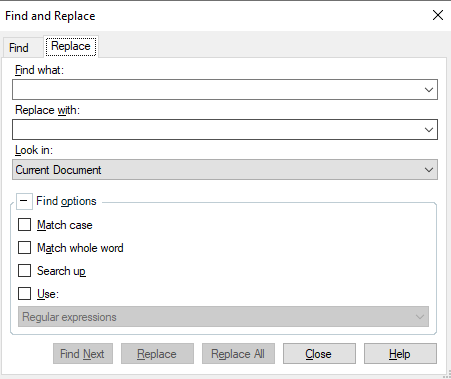
Not seeing an "Add to list" option here.
Can someone help me out? It sounds like an interesting feature.


Yes... I think this is a good example of the TradosAI hallucinating a little!
I reckon the best way to tackle this wold be with an AutoHotkey Script as you could then easily edit the list whenever you needed and trigger the search & replace to either work with a shortcut against a segment, or even via the standard replace all dialogue... although this would be asynchronous and possibly a little slow. But still better than a manual chore.
Otherwise it would make a neat plugin. That would be the fastest and most reliable way to handle it. There did used o be something like this on the appstore but the developer charged for it, and also stopped supporting it quite some years ago. I actually don't think it would be that difficult to do either... if a developer has time and motivation to do it :-)
Paul Filkin | RWS
Design your own training!
You've done the courses and still need to go a little further, or still not clear?
Tell us what you need in our Community Solutions Hub
Thanks for the reassurance! 
Would a script like that would maybe work directly in the pretranslated sdlxlff files themselves, say in a text editor? Or would that corrupt the file?
Would a script like that would maybe work directly in the pretranslated sdlxlff files themselves, say in a text editor?
Yes... it's only a text file so you can edit an sdlxliff as you like.
Or would that corrupt the file?
Only if you break the integrity of the sdlxliff. So typically we never recommend editing the sdlxliff files directly since there are no controls managing what you can and cannot do. But if you're careful, and know what you're doing, then anything is possible.
But I'll stress... it's not recommended! Much better to use the API and then you are less likely to break things
Paul Filkin | RWS
Design your own training!
You've done the courses and still need to go a little further, or still not clear?
Tell us what you need in our Community Solutions Hub

Thanks Paul! I think such a script or plug-in would be useful to a lot of people! Incorporating such functionality to the existing search & replace dialog would also be a neat feature, as long as you could maintain lists (say, by saving them and calling them up from a drop-down when needed) and edit them as necessary. That said, have a wonderful weekend!
I spent a little time last night to create such a script... maybe it'll be useful for you? I put it into the AI Enabled forum because I only managed to do this using ChatGPT to help! If you need it changed you know what to do :-)
Paul Filkin | RWS
Design your own training!
You've done the courses and still need to go a little further, or still not clear?
Tell us what you need in our Community Solutions Hub
Absolutely fantastic, great work! I've bookmarked the page and will give it a go when I get some free bandwidth. It looks very straightforward, and I really like how you can choose the files that you want to apply - that's a very nice touch.
I'm guessing that case sensitivity would have to be considered in the tabbed lists? AFAIK, Studio doesn't have the ability to handle that "intuitively" (WorldServer can do this, i.e. changing syntax -> rules would also change Syntax -> Rules). So syntax->rules AND Syntax->Rules just in case.
I'm guessing that case sensitivity would have to be considered in the tabbed lists?
Yes. I guess you could make it smarter... but I'm not going to ;-) I think a smarter solution would be better as a plugin, or being built into the core product. Maybe this will give someone the idea now we can all see how useful this could be.
Paul Filkin | RWS
Design your own training!
You've done the courses and still need to go a little further, or still not clear?
Tell us what you need in our Community Solutions Hub

Absolutely brilliant! This is exactly what I had in mind when I posted initially, but there's no way I could have come up with a script like this. Thanks so much for spending time on this; much appreciated! The only problem for me is that I can get it going up to the drop-down list with the Ctrl+Alt+H shortcut, but then nothing happens. Everything just stops. Not sure how I could fix this.
Absolutely brilliant! This is exactly what I had in mind when I posted initially, but there's no way I could have come up with a script like this. Thanks so much for spending time on this; much appreciated! The only problem for me is that I can get it going up to the drop-down list with the Ctrl+Alt+H shortcut, but then nothing happens. Everything just stops. Not sure how I could fix this.
The only problem for me is that I can get it going up to the drop-down list with the Ctrl+Alt+H shortcut, but then nothing happens.
ok - so I have a few questions:
I also noted that it is quite sensitive to spaces in the paths, use of an ampersand in the paths. I didn't spend any time attempting to handle that... rather I simplified the paths ;-) Certainly the potential for a problem
Paul Filkin | RWS
Design your own training!
You've done the courses and still need to go a little further, or still not clear?
Tell us what you need in our Community Solutions Hub
Also...
Not sure how I could fix this.
Use ChatGPT!
Paul Filkin | RWS
Design your own training!
You've done the courses and still need to go a little further, or still not clear?
Tell us what you need in our Community Solutions Hub
Hi Paul. Yes to all. Actually, when I close the window (which I wasn't doing when I wrote my earlier comment), it does cycle through all the replacements, but nothing gets changed in the target column.
What are the paths to your files?
Paul Filkin | RWS
Design your own training!
You've done the courses and still need to go a little further, or still not clear?
Tell us what you need in our Community Solutions Hub
The script file, settings file and replacements file are all in C:\AHK scripts\
File names?
Paul Filkin | RWS
Design your own training!
You've done the courses and still need to go a little further, or still not clear?
Tell us what you need in our Community Solutions Hub

Dropdown_Search_Replace.ahk
settings.txt
CFM_replacements.txt
Also what version of Trados Studio and what operating system.
Gives you some idea of just how much error handling the development team need to put into every single small thing they build!! Also explains whey it always works on "my computer"!
Paul Filkin | RWS
Design your own training!
You've done the courses and still need to go a little further, or still not clear?
Tell us what you need in our Community Solutions Hub
Trados Studio 2022 SR1 - 17.1.6.16252
Windows 11 Home 10.0.2261 Build 22621
Can it have something to do with where my trados files are located? Again, I can see the S&R box cycling through all the replacements in my replacement file, but nothing gets changed in the target column. Looks like we're very close, but...
I tried to replicate your setup as follows... all good:
However...
On point 1. I guess you could check the labelling I used for the search, replace and replace all button using AHK's Window Spy? I used these:
Edit2
Edit1
WindowsForms10.BUTTON.app.0.ea119_r8_ad19
In that order. I can't think why these would change, but probably worth checking.
Paul Filkin | RWS
Design your own training!
You've done the courses and still need to go a little further, or still not clear?
Tell us what you need in our Community Solutions Hub

