 Translate


Those technical diagrams are killing me, everytime! Sometimes I got a PDF, sometimes I got a PNG...
I want to solve this from the begining... ! Any ideas?


Those technical diagrams are killing me, everytime! Sometimes I got a PDF, sometimes I got a PNG...
I want to solve this from the begining... ! Any ideas?

Hi Paul ,
WOW! That is a HACK!
Only problem is, if we filter out strings that don't contain Chinese character, the Japanese character (Hiragana/Katakana) will also be excluded.
The blue part below also need to be translate.
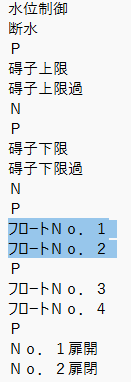
And by doing your way, this part will not be show in Trados.
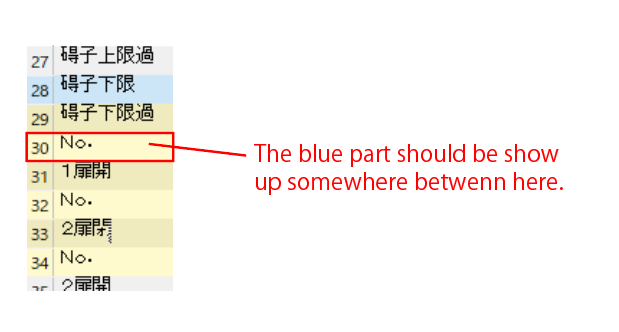
Maybe there is a way can also preserve those Japanese characters?

You can do this by amending the inline tag as follows:
^[^\u3400-\u4DBF\u4E00-\u9FFF\uF900-\uFAFF\u30A0-\u30FF]+$
A brief explanation for anyone who may want to do something similar... at least an explanation of the unicode parts:
\u3400-\u4DBF, \u4E00-\u9FFF, \uF900-\uFAFF : These are Unicode ranges for Chinese characters. Including these in the negated character set means the regular expression will not match lines that contain Chinese characters.
\u30A0-\u30FF : This is the Unicode range for Japanese Katakana characters. Including this in the negated character set means the regular expression will not match lines that contain Japanese Katakana characters.
It seems to work quite well for me...
Paul Filkin | RWS
Design your own training!
You've done the courses and still need to go a little further, or still not clear?
Tell us what you need in our Community Solutions Hub

You did mention this:
the Japanese character (Hiragana/Katakana) will also be excluded
I didn't exclude Hiragana as I don't think there were any in your file. But if you need it for other files add this to the expression I gave you earlier:
\u3040-\u309F
Paul Filkin | RWS
Design your own training!
You've done the courses and still need to go a little further, or still not clear?
Tell us what you need in our Community Solutions Hub

So if I want to preserve texts that contain Chinese/Hiragana/Katakana, my expression should be:
^[^\u3400-\u4DBF\u4E00-\u9FFF\uF900-\uFAFF\u30A0-\u30FF\u3040-\u309F]+$
Is that right?
So if I want to preserve texts that contain Chinese/Hiragana/Katakana, my expression should be:
^[^\u3400-\u4DBF\u4E00-\u9FFF\uF900-\uFAFF\u30A0-\u30FF\u3040-\u309F]+$
Is that right?
Correct. At least that seems to do the trick. Let me know how you get on?
Paul Filkin | RWS
Design your own training!
You've done the courses and still need to go a little further, or still not clear?
Tell us what you need in our Community Solutions Hub
Perfect! I got what I wanted, at least this time...! Since I didn't use TranslateCAD, my txt files don't contain strings like ##000001##.
I wonder if I use TranslateCAD, and get a txt file contains those #0000001# strings, will this expression also exclude those strings?
This expression means it includes CJK and Hiragana/Katakana only, so I don't need to add an extra expression such as ^#+\d+#+$, right?

Like anything related to regex there is no one size fits all. Better to see a sample file and try it before concluding that.
Paul Filkin | RWS
Design your own training!
You've done the courses and still need to go a little further, or still not clear?
Tell us what you need in our Community Solutions Hub

Maybe too late by now, but if you're still working with these filetypes this might be interesting for you?
https://appstore.rws.com/plugin/483
Paul Filkin | RWS
Design your own training!
You've done the courses and still need to go a little further, or still not clear?
Tell us what you need in our Community Solutions Hub