 Translate


Those technical diagrams are killing me, everytime! Sometimes I got a PDF, sometimes I got a PNG...
I want to solve this from the begining... ! Any ideas?


Those technical diagrams are killing me, everytime! Sometimes I got a PDF, sometimes I got a PNG...
I want to solve this from the begining... ! Any ideas?
Rui ,
You have here how to deal with AutoCAD files:
http://noradiaz.blogspot.com/2015/09/translating-autocad-drawings.html
The free version will let you extract the first 50 words of the DXF file and hopefully is enough for you.
You have also https://www.translatortools.net/products/transtools/autocad-translation
You can try also the tool mentioned here: Translating Autodesk formats in SDL Trados Studio
As mentioned in the Ideas section, there are no plans to create a plugin for AutoCAD files:
Plugin for autocad
I guess the PDF and PNG files have been created via AutoCAD and are useful references to know the context while translating the DXF file.


Hi Jesús Prieto
Sorry to I reply in this old post again.
I have tried some similar methods, convert my some of pdf files to txt files. Then, I got some errors at the inline tags setting.
I tried to write some RE to exclude some patterns from translation, like this:
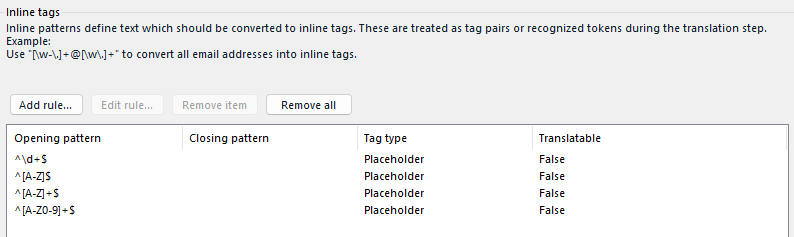
and when I try to finish create new project, I got lots of errors:

Here are one of the error's detail.:
<SDLErrorDetails time="2023/06/21 17:22:33">
  <ErrorMessage>Problem during writing internal tags!
Check the definitions of your internal tags.</ErrorMessage>
  <Exception>
    <Type>Sdl.FileTypeSupport.Framework.FileTypeSupportException, Sdl.FileTypeSupport.Framework.Core, Version=1.0.0.0, Culture=neutral, PublicKeyToken=c28cdb26c445c888</Type>
    <HelpLink />
    <Source>Sdl.FileTypeSupport.Native.RegEx_1_1</Source>
    <HResult>-2146233088</HResult>
    <StackTrace><![CDATA[   at Sdl.FileTypeSupport.Native.RegEx.RegExParser.CompareSearchResultsAtSameIndex(RegExSearchResult& currentSearchResult, RegExSearchResult searchResultCandidate)
   at Sdl.FileTypeSupport.Native.RegEx.RegExParser.RecordSearchResult(RegExSearchResult& currentSearchResult, RegExSearchResult searchResultCandidate)
   at Sdl.FileTypeSupport.Native.RegEx.RegExParser.GetFirstMatchingRule(String processedString)
   at Sdl.FileTypeSupport.Native.RegEx.RegExParser.GetFirstMatchingRuleBeforeMatchEnd(String processedString, Int32 lengthOfTextBeyondEndMatch)
   at Sdl.FileTypeSupport.Native.RegEx.RegExParser.ProcessInternalTags(String& inputText, Match endMatch)
   at Sdl.FileTypeSupport.Native.RegEx.RegExParser.ProcessText(String inputText)
   at Sdl.FileTypeSupport.Native.RegEx.RegExParser.DuringParsing()
   at Sdl.FileTypeSupport.Framework.NativeApi.AbstractNativeFileParser.ParseNext()
   at Sdl.FileTypeSupport.Framework.Integration.FileExtractor.ParseNext()
   at Sdl.FileTypeSupport.Framework.Integration.MultiFileConverter.ParseNext()
   at Sdl.FileTypeSupport.Framework.Integration.MultiFileConverter.Parse()
   at Sdl.ProjectApi.AutomaticTasks.Conversion.ConversionTask.ProcessFile(IExecutingTaskFile executingTaskFile)
   at Sdl.ProjectApi.AutomaticTasks.AbstractFileLevelAutomaticTaskImplementation.Execute()]]></StackTrace>
  </Exception>
  <Environment>
    <ProductName>Trados Studio</ProductName>
    <ProductVersion>Studio17</ProductVersion>
    <EntryAssemblyFileVersion>17.0.6.14902</EntryAssemblyFileVersion>
    <OperatingSystem>Microsoft Windows 11 Home</OperatingSystem>
    <ServicePack>NULL</ServicePack>
    <OperatingSystemLanguage>1041</OperatingSystemLanguage>
    <CodePage>932</CodePage>
    <LoggedOnUser>DESKTOP-9M8MFGA\zhu</LoggedOnUser>
    <DotNetFrameWork>4.0.30319.42000</DotNetFrameWork>
    <ComputerName>DESKTOP-9M8MFGA</ComputerName>
    <ConnectedToNetwork>True</ConnectedToNetwork>
    <PhysicalMemory>8170024 MB</PhysicalMemory>
  </Environment>
</SDLErrorDetails>
Any idea about what this is about? Did I used the wrong RE?

Rui ,
ok, so there is nothing in the TXT that you can take advantage of.
You can find a regex to match those strings you don't want to be extracted and add as many regex rules as needed. The following are examples that you can use:
The regex to match alphanumeric strings such as NGB3 is:
^[A-Z]+\d+$
Add it along the rule you already have as a placeholder and Translatable = False.
Another example is 1A and 20A. If you need them to be extracted, the regex to be added is:
^\d+A$
Another can be CN_GUSW-A1, which can be:
^CN_GUSW-[A-Z]+\d+$
Lines consisting of a single letter:
^[A-Z]$
Lines consisting of only digits:
^\d+$
One last example. If you need to get rid of Japanese-only lines, you can also this rule:
^([一-龯])$
I hope these regexes help you and give you some ideas. As I said, add as many rules as you need.


Perhaps an interesting approach based on what I think I'm seeing here is to create a default regex delimited text filetype, but then use a rule like this as an inline tag:
^[^\u3400-\u4DBF\u4E00-\u9FFF\uF900-\uFAFF]+$
That will filter out all the strings that don't contain Chinese characters so you're left with this:
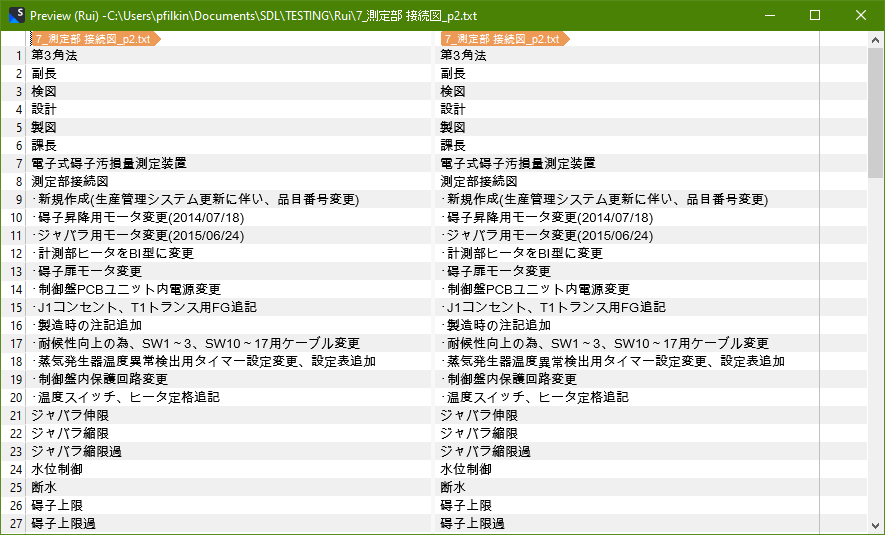
Paul Filkin | RWS
Design your own training!
You've done the courses and still need to go a little further, or still not clear?
Tell us what you need in our Community Solutions Hub
Thank! That's very helpful!
The problem is that since I have more than 100 files like this, there so many patterns of [letters+numbers], it doesn't always use "CN_GUSWxxx". The combination could be any letter, and the "_" (underline mark) or "-"(hyphen) could be anywhere between these letters and numbers.
I really don't want to write all those in regex... :(

Hi Paul ,
WOW! That is a HACK!
Only problem is, if we filter out strings that don't contain Chinese character, the Japanese character (Hiragana/Katakana) will also be excluded.
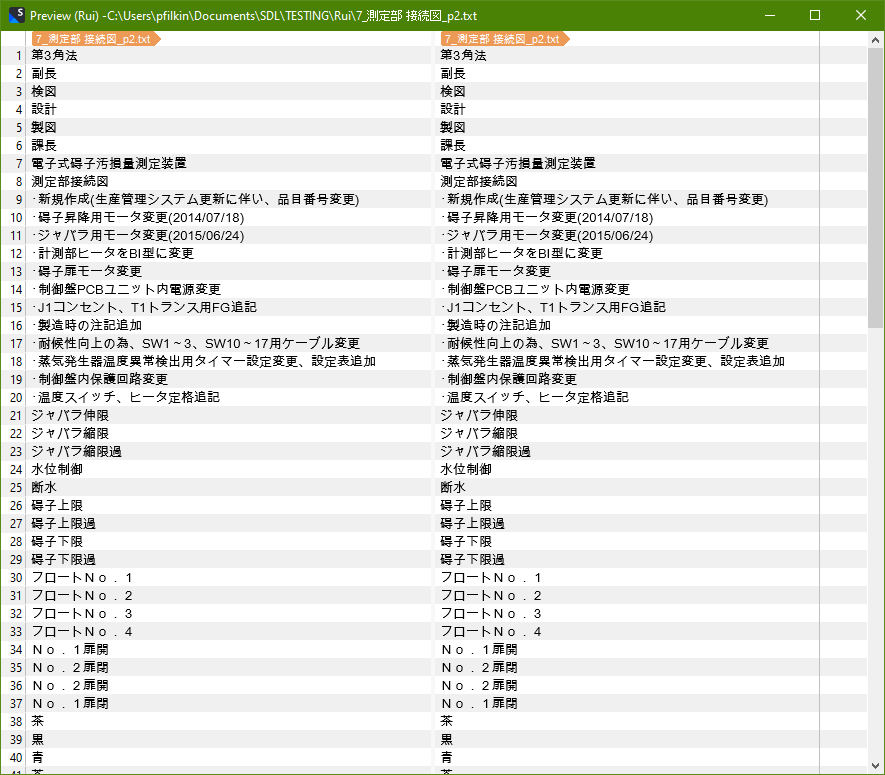
The blue part below also need to be translate.
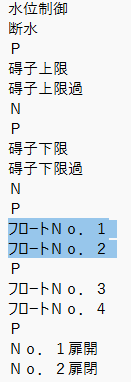
And by doing your way, this part will not be show in Trados.
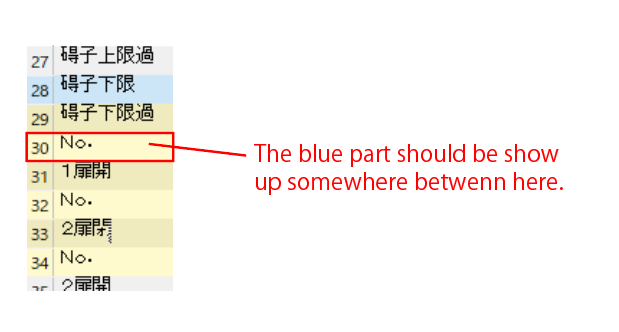
Maybe there is a way can also preserve those Japanese characters?
You can do this by amending the inline tag as follows:
^[^\u3400-\u4DBF\u4E00-\u9FFF\uF900-\uFAFF\u30A0-\u30FF]+$
A brief explanation for anyone who may want to do something similar... at least an explanation of the unicode parts:
\u3400-\u4DBF, \u4E00-\u9FFF, \uF900-\uFAFF : These are Unicode ranges for Chinese characters. Including these in the negated character set means the regular expression will not match lines that contain Chinese characters.
\u30A0-\u30FF : This is the Unicode range for Japanese Katakana characters. Including this in the negated character set means the regular expression will not match lines that contain Japanese Katakana characters.
It seems to work quite well for me...
Paul Filkin | RWS
Design your own training!
You've done the courses and still need to go a little further, or still not clear?
Tell us what you need in our Community Solutions Hub
You did mention this:
the Japanese character (Hiragana/Katakana) will also be excluded
I didn't exclude Hiragana as I don't think there were any in your file. But if you need it for other files add this to the expression I gave you earlier:
\u3040-\u309F
Paul Filkin | RWS
Design your own training!
You've done the courses and still need to go a little further, or still not clear?
Tell us what you need in our Community Solutions Hub
So if I want to preserve texts that contain Chinese/Hiragana/Katakana, my expression should be:
^[^\u3400-\u4DBF\u4E00-\u9FFF\uF900-\uFAFF\u30A0-\u30FF\u3040-\u309F]+$
Is that right?
So if I want to preserve texts that contain Chinese/Hiragana/Katakana, my expression should be:
^[^\u3400-\u4DBF\u4E00-\u9FFF\uF900-\uFAFF\u30A0-\u30FF\u3040-\u309F]+$
Is that right?
Correct. At least that seems to do the trick. Let me know how you get on?
Paul Filkin | RWS
Design your own training!
You've done the courses and still need to go a little further, or still not clear?
Tell us what you need in our Community Solutions Hub
Perfect! I got what I wanted, at least this time...! Since I didn't use TranslateCAD, my txt files don't contain strings like ##000001##.
I wonder if I use TranslateCAD, and get a txt file contains those #0000001# strings, will this expression also exclude those strings?
This expression means it includes CJK and Hiragana/Katakana only, so I don't need to add an extra expression such as ^#+\d+#+$, right?

Like anything related to regex there is no one size fits all. Better to see a sample file and try it before concluding that.
Paul Filkin | RWS
Design your own training!
You've done the courses and still need to go a little further, or still not clear?
Tell us what you need in our Community Solutions Hub
Like anything related to regex there is no one size fits all. Better to see a sample file and try it before concluding that.
Paul Filkin | RWS
Design your own training!
You've done the courses and still need to go a little further, or still not clear?
Tell us what you need in our Community Solutions Hub