Find and Replace not working Studio 2021

Hello,

My Find and Replace has stopped working. I'm running the latest version of Trados Studio 2021 Professional: SR2 - 16.2.9.9198

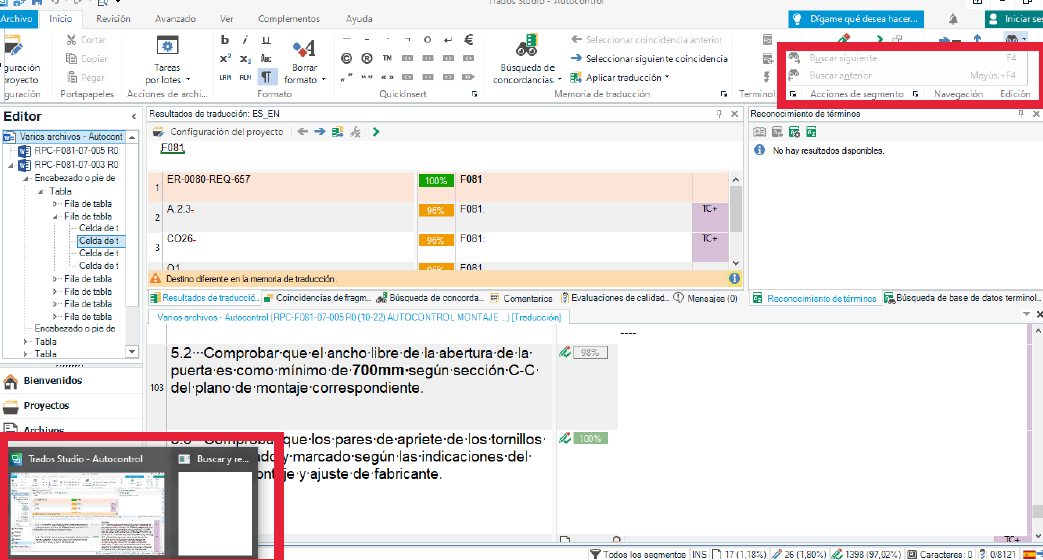
Whenever I click on the Fin icon, or if I use the Ctr + F or Ctr + H shortcuts, I can see that a window opens on the background, but I can't get to it. If I hover over the Studio icon, I can see a Find window, but it's blank and it won't open.

Any idea why this is happening?

Thank you!

Mónica E. de León

emoji
Parents Reply
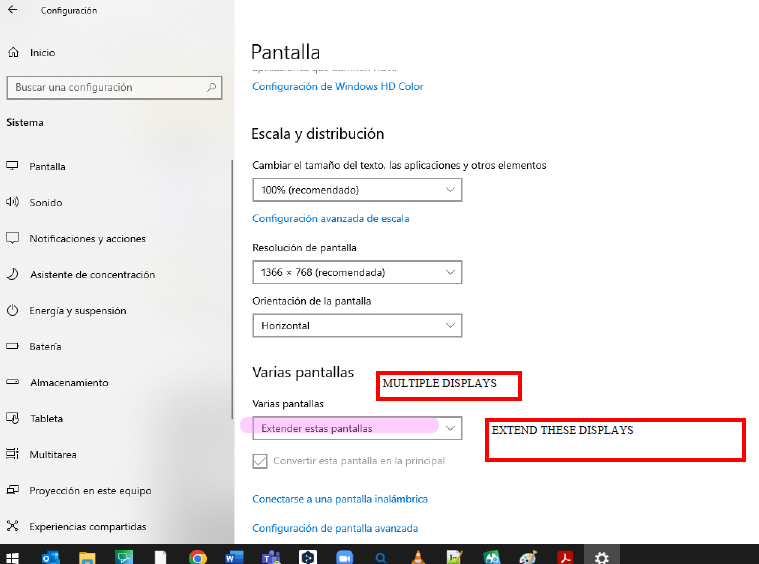
  • In this case I will autoreply (in case there is someone out there with the same problem). Well, actually I was in the "Multiple displays" mode and, even when working woth the laptop only (without connecting the monitor) the options were as follows:

    Screenshot of Windows display settings showing 'Multiple displays' section with 'Extend these displays' option selected.

    And, as a quite curious result, my Studio did not allow me to use the Find and Replace / Search function.

    So, colleagues, if some day you have this kind of problem, firstly, check out your monitor setup. 

    emoji


    Generated Image Alt-Text
    [edited by: Trados AI at 1:17 PM (GMT 0) on 29 Feb 2024]
Children