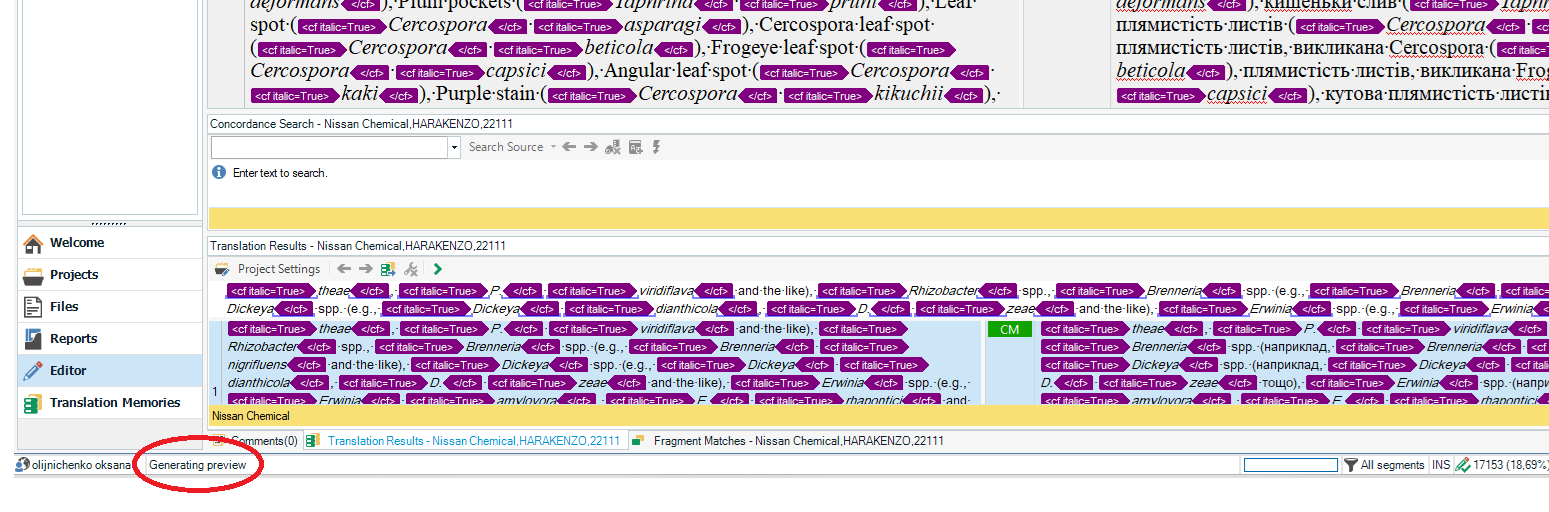
URGENT! RWS, please do provide a solution! How to terminally kill 'Generating Preview'?

This issue has been reported gazillion times, and SDL/RWS never ever provided a solution. So, how can I kill once and for all the Generating Preview s**t?

No matter what this thing is supposed to do, all it does is slow my computer to the freezing point. That's why I need it urgently stopped, blocked, uninstalled, killed and terminally dead once and for all! And I need it NOW! I am terribly late with several projects now, and all I can do is stare at the computer and wait.

Please kindly refrain from replying with threads to similar conversations: none of them provides a solution. Thank you.

I'm using Trados Studio 2021 SR1 - 16.1.8.4404.

emoji
Parents
  • Has anyone found a solution to this problem? I have the same issue with Trados 2021 - the workspace is frozen very often after I press Ctrl+Enter to confirm a segment. It is a project that needs TM update on a server. It has nothing to do with shortcuts, and the preview window is not open. The issue disappears when TM update is inactivated, although working in a local version is not a good option for me.Trados Studio workspace showing translation results with highlighted text and a message at the bottom left reading 'Generating preview'.

    emoji


    Generated Image Alt-Text
    [edited by: RWS Community AI at 8:10 AM (GMT 1) on 14 Oct 2025]
Reply
  • Has anyone found a solution to this problem? I have the same issue with Trados 2021 - the workspace is frozen very often after I press Ctrl+Enter to confirm a segment. It is a project that needs TM update on a server. It has nothing to do with shortcuts, and the preview window is not open. The issue disappears when TM update is inactivated, although working in a local version is not a good option for me.Trados Studio workspace showing translation results with highlighted text and a message at the bottom left reading 'Generating preview'.

    emoji


    Generated Image Alt-Text
    [edited by: RWS Community AI at 8:10 AM (GMT 1) on 14 Oct 2025]
Children
No Data