 Translate


I am using Studio 2021 and I noticed that "CTRL F" does not work.
Please help.
Kind regards
Ivan Bertrand

I am using Studio 2021 and I noticed that "CTRL F" does not work.
Please help.
Kind regards
Ivan Bertrand


Maybe check the obvious first and ensure it's not just displaying the find dialogue on a different screen, or behind your open windows?
Or, perhaps make sure you don't have some keyboard clash within Trados Studio or with some other application you have running?
It would also be useful to know where you are trying to use this feature?
Paul Filkin | RWS
Design your own training!
You've done the courses and still need to go a little further, or still not clear?
Tell us what you need in our Community Solutions Hub

Hi Paul;
I cannot see the CTRL F window appear anywhere.
I tried the CTRL F under Word, and it works fine.
I have to admit that I am at a loss.
I am trying to use this in the home screen (where I usually use his function).
I can see something strange, that is when I type CTRL F, the cursor disappears (as if it was going to a ghost window).
Any idea how to find this window?
Kind regards
Ivan Bertrand
Hi Ali,
Thanks for the help, I do get to the 4 pointed arrow, but still cannot make it appear anywhere.
Regards
Ivan
Ivan Bertrand Paul Filkin Jerzy Czopik
Hi guys,
In order to figure out what Ivan was meaning when he said he could see the Find and Replace window but it was empty, I dragged my Find and Replace window downwards off my screen (not onto one of my other screens) then when I hovered my cursor over the Studio icon in the bottom toolbar, I could still see that the F&R window was open but it was blank as in my image above.
Then, I set about finding out how to bring it back onto the screen and found that if I right-clicked on the blank F&R window, I got the option to 'Move' and with it, a 'Move' icon made up of a horizontal+vertical cross each arm of which had an arrow at the end. I found I could drag this upwards sufficiently to make the full Find and Replace window reappear on the screen.
Maybe this link will lead to instructions that will work for Ivan Bertrand
Fingers crossed
All the best
Ali 
Hi Ali,
I tried but unfortunately it does not work :-(
Have you tried uninstalling and reinstalling?
Hi Ali:
I am in the middle of a very large translation (over 150,000) words and I am a bit scared to do this.
Best
Ivan
Fair enough...
Have you tried to reset Studio as suggested? gateway.sdl.com/.../communityknowledge
_________________________________________________________
When asking for help here, please be as accurate as possible. Please always remember to give the exact version of product used and all possible error messages received. The better you describe your problem, the better help you will get.
Want to learn more about Trados Studio? Visit the Community Hub. Have a good idea to make Trados Studio better? Publish it here.
Hi Jerzy,
Is this procedure safe? Or will I need to reinstall all the apps from the appstore?
Regards
Ivan
Usually you will not need to reinstall the plugins. But even if, the procedure is very safe.
_________________________________________________________
When asking for help here, please be as accurate as possible. Please always remember to give the exact version of product used and all possible error messages received. The better you describe your problem, the better help you will get.
Want to learn more about Trados Studio? Visit the Community Hub. Have a good idea to make Trados Studio better? Publish it here.
OK, let's go back to the instructions I sent regarding the 'Move' icon, when right-clicking on the empty white rectangle that pops up from the bottom toolbar if you hover over the Studio icon...
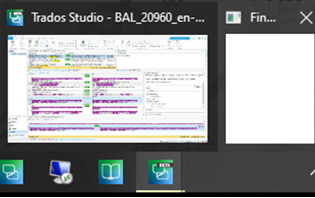
After you right-click on the white rectangle, left click on 'Move' on the context menu then rather than trying to use the cursor, press the appropriate arrow key on your keyboard to move the dialog box back on-screen.
So if the 'Move' icon appears at the top, click the 'down' arrow. If it appears at the bottom, click the 'Up' arrow on your keyboard, left>right or right>left...
All the best,
Ali 

OK, let's go back to the instructions I sent regarding the 'Move' icon, when right-clicking on the empty white rectangle that pops up from the bottom toolbar if you hover over the Studio icon...
After you right-click on the white rectangle, left click on 'Move' on the context menu then rather than trying to use the cursor, press the appropriate arrow key on your keyboard to move the dialog box back on-screen.
So if the 'Move' icon appears at the top, click the 'down' arrow. If it appears at the bottom, click the 'Up' arrow on your keyboard, left>right or right>left...
All the best,
Ali

Just to add to this, you may need to press the appropriate arrow key on your keyboard several times or hold it down until it appears.
Yes, thanks Michael!
