
 Translate



Hi,
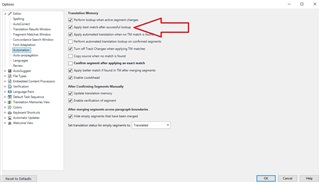
After upgrading to Studio 2021 (SR1, latest version), Studio does not automatically apply best match from TM when I go to a new segment. Even if there are matches in the Translation Results window, they don't get copied into the active segment. If I press Ctrl+T, the best match is inserted - but it should happen automatically. The setting Options > Editor > Automation > "Apply best match after successful lookup" is enabled (see screenshot), so I don't understand why it doesn't happen.
Can anyone help? Thanks in advance!
Generated Image Alt-Text
[edited by: Trados AI at 2:27 AM (GMT 0) on 29 Feb 2024]


