Translate



Hallo to all,
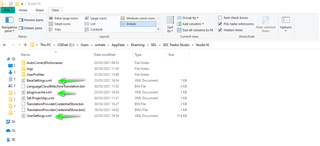
this error message has appeared after I have change view settings. I have run the Repair procedure, but the problem is not solved. I have tried to follow the process below to reset the Studio application, but I am not able to find BaseSettings.xml, Plugincache.xml and UserSettings.xml files on my PC
Solution: Reset SDL Trados Studio and/or SDL MultiTerm to its factory settings
-
For SDL Trados Studio:
- Browse to the relevant directory:
- Windows XP: C:\Documents and Settings\[USERNAME]\Application Data\SDL\SDL Trados Studio\[VERSIONNUMBER]
- Windows 7/8/10: C:\Users\[USERNAME]\AppData\Roaming\SDL\SDL Trados Studio\[VERSIONNUMBER]
- Find and rename/delete the following three files in that directory:
BaseSettings.xmlPlugincache.xmlUserSettings.xml
This will reset SDL Trados Studio to its factory settings.
- Browse to the relevant directory:
I am using Windows 10 Pro 64 bit OS and SDL Studio 2021 SR1
Please help me!