When it populates amounts with dollar signs for example $1,700 automatically changes it to 1,700$. Is there a way to change it? It takes too much work to change it manually, specially when you work with many.
You are currently working on UAT

When it populates amounts with dollar signs for example $1,700 automatically changes it to 1,700$. Is there a way to change it? It takes too much work to change it manually, specially when you work with many.
Auto-localization settings dictate what formats SDL Trados Studio will use during auto-substitution. So you can either decide to switch off auto-substitution of currencies in your TM settings (when deactivating the measurements, this also deactivates the auto-substitution of currencies):

Or you can decide to customize the auto-localization formats. This is a feature introduced in Studio 2021; you can modify the way currencies are handled for a certain language (as well as dates, times, numbers and measurements).
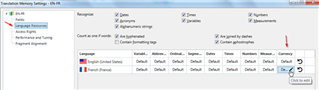
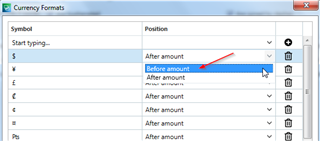
For French, the standard is that a dollar sign comes after the number, but when you click on your TM settings > Language resources, you can change the default settings.


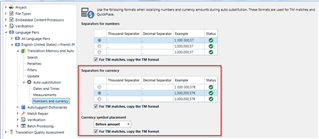
Normally the thousand separator for the French language is a space, but again, this is something you can change, by expanding the settings for your specific language pair, and making the required change in your auto-substitution settings:

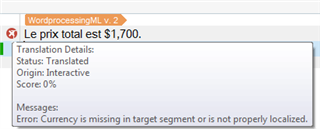
Note that if you ‘go against’ the standards for a certain language, you may get an error message from Studio:

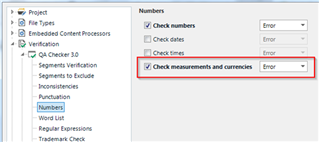
However you can switch off the QA checks for this type of error here:

And of course you can save all these types of custom settings in a project template, so that you don't have to make changes every time...
Auto-localization settings dictate what formats SDL Trados Studio will use during auto-substitution. So you can either decide to switch off auto-substitution of currencies in your TM settings (when deactivating the measurements, this also deactivates the auto-substitution of currencies):

Or you can decide to customize the auto-localization formats. This is a feature introduced in Studio 2021; you can modify the way currencies are handled for a certain language (as well as dates, times, numbers and measurements).
For French, the standard is that a dollar sign comes after the number, but when you click on your TM settings > Language resources, you can change the default settings.


Normally the thousand separator for the French language is a space, but again, this is something you can change, by expanding the settings for your specific language pair, and making the required change in your auto-substitution settings:

Note that if you ‘go against’ the standards for a certain language, you may get an error message from Studio:

However you can switch off the QA checks for this type of error here:

And of course you can save all these types of custom settings in a project template, so that you don't have to make changes every time...