Too small icons (upscaling problem) in High resolution displays using Trados Studio 2021

Hello community, hope you are doing fine.

I am using a Macbook Air 2020 running windows 10 via Bootcamp installation, resolution display 2560 x 1600, and the icons in the menu are too small, they are not comfortable to read. I am aware of a program call "Change Scaling Behavior" via SDL app store, but it hasn't been updated to be compatible with Trados 2021. My screen looks like this.
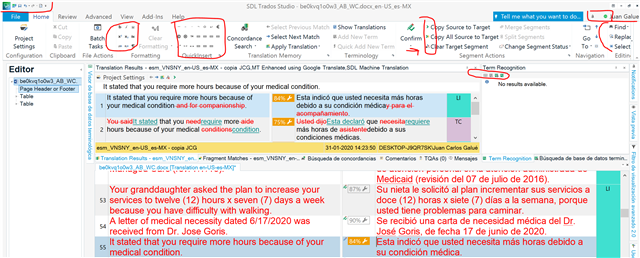
Screenshot of Trados Studio interface with small menu icons and text, red circles highlighting the issue, and a red arrow pointing to the 'Tell me what you want to do' search bar.

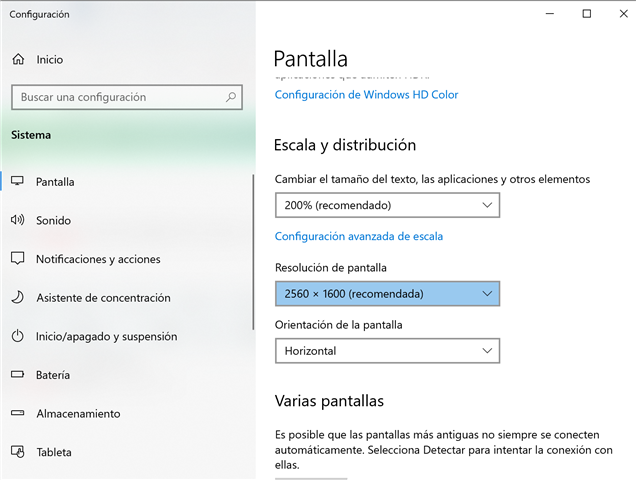
Screen setting:

Windows display settings showing 'Escala y distribucion' at 200% (recommended) and screen resolution at 2560 x 1600 (recommended) with the orientation set to horizontal.

This is a well known problem and still there hasn't been a built-in solution to it. Please, help me out with this one. Thank you very much in advance.


Generated Image Alt-Text
[edited by: Trados AI at 1:16 PM (GMT 0) on 29 Feb 2024]

emoji
Parents Reply
  • Hello Paul, thank you for your answer. I downloaded the app and applied the changes, and in deed the icons are larger like they used to be when I was using my old laptop, but this is not an elegant solution because now everything is pixelated, larger but blurry, so you can't take advantage of the beauty of a high resolution display (my display is 13'' but Retina display). Will there be any update for the SDL Trados 2021 itself? I think that we deserve that, taking into account that this is an expensive software. I love Trados to be honest, but I am sure the team can do better because high resolution displays are more common these days and there will be more customer affected by this problem. Thank you.

Children
  • Of course I don't disagree with you at all.  I tested the solution on my wifes laptop as she has a very nice machine with a hi-res display.  I experienced the same as you, so it's not the best but at least usable.

    This solution is only a workaround while the dev teams get around to completing the entire application and ensuring it's fully supportive.  The approach they have taken, and continue to take, is to tackle each component and make the necessary changes when they are working on that part of the software as this seemed the best way to tackle this while still progressing other work.

    I will discuss this with the teams again ensure your voice is heard.

    Paul Filkin | RWS

    Design your own training!
    You've done the courses and still need to go a little further, or still not clear? 
    Tell us what you need in our Community Solutions Hub

  • Thank you for your understanding, hope the dev team can come up with a solution soon, taking into account based on the related topics on this community, that this a well known issue since a few years ago. I will wait for the right solution then. Have a nice day.

  • Hello, I have exactly the same problem with a brand new Dell Inspiron 16 Plus.

    These brand new machines run 4K natively with monster speed and they need apps be shown with a better icon set. The development team should simplify the process, just with a library of icons ready for different resolutions. Let's hope Trados 2022 or 2023 find a solution. By the way, Memsource editor has exactly the same problem.

    emoji