Translate



DeepL Translator Provider is installed and enabled, and shows up in Studio 2017 under "Translation Results" but in the box below it says "No matches found"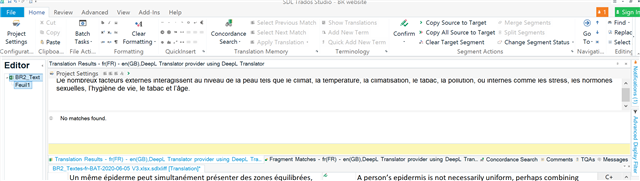
Generated Image Alt-Text
[edited by: Trados AI at 9:34 PM (GMT 0) on 28 Feb 2024]

You are currently working on UAT

DeepL Translator Provider is installed and enabled, and shows up in Studio 2017 under "Translation Results" but in the box below it says "No matches found"
Hello helene tammik ,
Please first log into Studio (top right- Signin) and install all updates (Studio and Plugins).
Now reopen the project and see if this makes a difference.
If not, please remove the plugin and reinstall the latest version -https://appstore.sdl.com/language/app/deepl-translation-provider/847/
Now restart your machine/Studio and see if the problem is now resolved.
Oana Nagy | QA Engineer | RWS Group

Thank you Steven, after going through this process several times I finally got there :-)
Yay!

Thanks helene tammik , for letting us know updating solved the issue.
Oana Nagy | QA Engineer | RWS Group

Thank you Helene and Steven, I encountered the exact same issue; updating Trados Studio 2017 fixed it!
Please first log into Studio (top right- Signin) and install all updates (Studio and Plugins).
By the way may be just me, but it was obscure as to how to update Trados Studio,
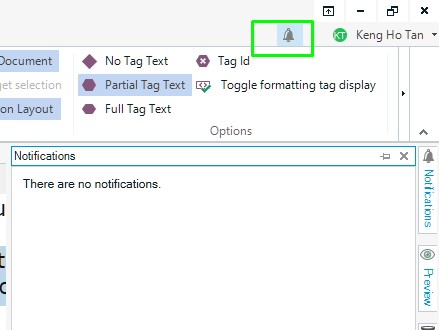
so here's a screenshot for anyone else who might be stuck at how to install all updates like I was.
In your usual Studio page, log in at the top right as Steven mentioned, then click the bell icon as following screenshot – any software updates would then show up
(below screenshot says "There are no notifications" because I've already updated to the latest version of Studio)