Hi, I've downloaded a bilingual Word document and want to hide some tags - even though the text is 'hidden' in Word, it still appears in Trados. Is there anything else that can be done? TIA
You are currently working on UAT

Hi, I've downloaded a bilingual Word document and want to hide some tags - even though the text is 'hidden' in Word, it still appears in Trados. Is there anything else that can be done? TIA
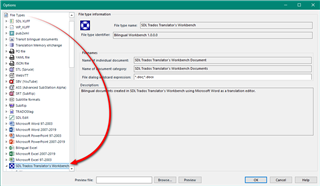
If it's a true bilingual Word file, so from the old Trados Workbench, or possibly Wordfast (although this isn't officially supported), then you need to make sure you use this filetype:

So when you prepare your project ensure that this is above the other word filetypes in the list otherwise you'll probably be using a monolingual word filetype which is why you see all the tags.
Paul Filkin | RWS
Design your own training!
You've done the courses and still need to go a little further, or still not clear?
Tell us what you need in our Community Solutions Hub