Translate



Dear all,
it often happens that a translator needs to translated two separate segments with one sentence. In projects where joining of segments across paragraph marks is possible, this is not a problem. But if the project was not set up in this way, a translator might end up with one segment in the source that has no translation in the target.
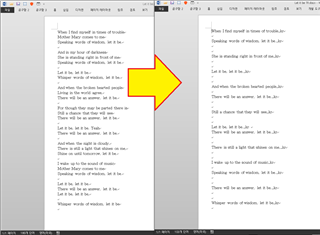
Usually, when a segment is not translated, Studio just keeps the original segment when a document is saved as target.
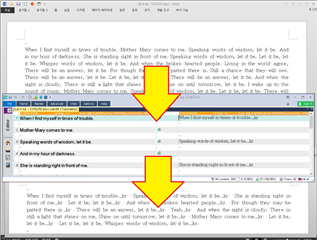
Here is a way how Studio can ignore the segment during translation: set the status to translated or translation accepted (using a right-click on the segment, changing the status).
The segment does not have a translation, but the status is set to something other than edited or not translated.
This prompts Studio to export an empty line (the content of the target line) to the final document.
Might be useful in some cases.
Best regards
Angelik
I just found this out because a translator had unlocked segments that were locked, confirmed them in this way (changing the status) and locked them again. I guess they did it so that the progress of the file would show 100% translated :-)
Now the final file was missing some lines that only contained some markers - and of course the client complained.