 Translate



I don't understand the difference? They seem to do the same thing - return results for partial matches from the TM. Can someone please enlighten me.
Thanks in advance!
You are currently working on UAT

I don't understand the difference? They seem to do the same thing - return results for partial matches from the TM. Can someone please enlighten me.
Thanks in advance!
A concordance search is one of the search windows available for the Editor screen, to look for text strings (such as terms or expressions) in the memory/ies you have open as you work in your SDLXLIFF. Useful and very fast if you highlight the phrase/term and click F3.
Here's a longer description:
Performing a Concordance Search
The results of a concordance search appear in the Concordance Search window.
Here is an explanation of where you make your concordance search settings:
A fragment match, also a search in the translation memory/ies that is retrieved and displayed during translation. The Fragment Matches window displays the results of the fragment matching, when available. Other terms to look up in this context are upLIFT and Match Repair.
Here is an explanation of where you make your fragment match settings:
You can also change the way fragment match works in the Project settings:
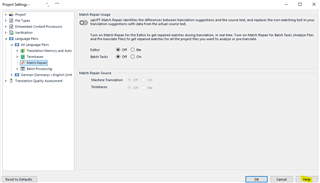
Whenever you don't understand something in Studio or MultiTerm, you can click the 'Help' button which opens a list of options to use to find further information.
It may help to look at the above two in the context of all the windows that are available in the Editor view, here's a list:
Something that may be useful to you:
Demystifying SDL Trados Texts With the SDL Trados Jargon Buster
You can download the Jargon Buster for a glossary of terms and brief explanations plus links to other useful stuff.
I hope I haven't overloaded you with information.
All the best,
Ali 
A concordance search is one of the search windows available for the Editor screen, to look for text strings (such as terms or expressions) in the memory/ies you have open as you work in your SDLXLIFF. Useful and very fast if you highlight the phrase/term and click F3.
Here's a longer description:
Performing a Concordance Search
The results of a concordance search appear in the Concordance Search window.
Here is an explanation of where you make your concordance search settings:
A fragment match, also a search in the translation memory/ies that is retrieved and displayed during translation. The Fragment Matches window displays the results of the fragment matching, when available. Other terms to look up in this context are upLIFT and Match Repair.
Here is an explanation of where you make your fragment match settings:
You can also change the way fragment match works in the Project settings:
Whenever you don't understand something in Studio or MultiTerm, you can click the 'Help' button which opens a list of options to use to find further information.
It may help to look at the above two in the context of all the windows that are available in the Editor view, here's a list:
Something that may be useful to you:
Demystifying SDL Trados Texts With the SDL Trados Jargon Buster
You can download the Jargon Buster for a glossary of terms and brief explanations plus links to other useful stuff.
I hope I haven't overloaded you with information.
All the best,
Ali

Hi Ali,
Thank you for the quick response! So am I right in thinking that a concordance search has to be performed manually, i.e. you have to actually choose a word or phrase to perform the concordance search on whereas, in contrast, the fragment match function AUTOMATICALLY performs a search for you of words/phrases if the TM does not return any matches?
I know how to perform them and use them, I just don't really understand the difference in their function - as surely a fragment match would match any phrases or parts of sentences, as would a concordance search. They both return results for partial matching...
I'm still not entirely sure for what kind of situation each function is best used.

I just don't really understand the difference in their function - as surely a fragment match would match any phrases or parts of sentences, as would a concordance search.
I'd think about them like this:
Concordance search - returns a match from the source OR the target depending on what you search in and will only match a part of the translation unit found in your TM. It does not identify the translation for the match, or the original source for the match... it only highlights what it found and gives you a fuzzy match for that result.
Fragment matching - these fragments are generated from your TM and added to your TM as proper translation units. So you have a source and a matching target translation available to you. This means you can place these subsegment matches into your translation with a keyboard shortcut or via autosuggest. The fragments can also be used to repair a fuzzy match coming from your Translation Memory to improve it.
Paul Filkin | RWS
Design your own training!
You've done the courses and still need to go a little further, or still not clear?
Tell us what you need in our Community Solutions Hub

Thank you Paul Filkin for that excellent explanation 
To add to Paul's excellent explanation...
So am I right in thinking that a concordance search has to be performed manually
- a concordance search can also take place automatically if you have this item ticked in your settings:
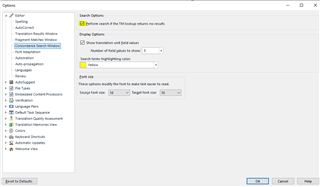
It may seem strange that two sort of similar functions coexist but the concordance search has been around for a lot longer than fragment alignment.
All the best,
Ali 

That's super helpful, Thank you Paul.
Hi Ali,
Yes I do have the concordance search to take place automatically now. Thank you!
You're very welcome.
Always glad to help,
Ali