You are currently working on UAT 

Studio 2017 concordance search fail

Hello everybody,

I have a problem with the concordance search within Trados Studio 2017.

I can't get the concordance results of my TM, in the relevant box I get this error message:
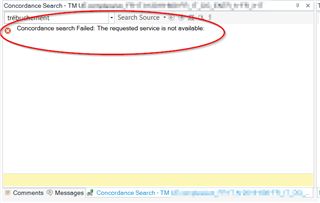
Screenshot of Trados Studio 2017 showing an error message in the concordance search box stating 'Concordance search failed: The requested service is not available.'

Have you got perhaps any idea on how to solve that issue?

I have encountered two (quite important, in my opinion) problems in the last two days. Is there perhaps something wrong with the last update (I have installed it yesterday)? My current software version is 14.1.10018.54792 and I run it on a Windows 7 PC.

Davide


Generated Image Alt-Text
[edited by: Trados AI at 7:24 PM (GMT 0) on 28 Feb 2024]

emoji
Parents
  • Hello ,

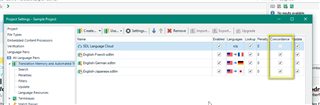
    Have you checked the project settings to ensure the Concordance is enabled on each TM within the project?

    Trados Studio Project Settings window showing Translation Memory & Automated Translation settings with Concordance search enabled for English-German and English-Japanese pairs.

    Then check the following-

    File>Options > Editor > Concordance Search Window >Perform search if the TM lookup returns no results

    File >Options >Language Pairs > All Language Pairs > Translation Memory & Automated Translation > Search > Concordance match values

    Project Settings > Language Pairs > All Language Pairs > Translation Memory & Automated Translation > Search > Concordance match values

    If there are still issues- can you check a different project please using a different TM?

    Does this work?

    Oana Nagy | QA Engineer | RWS Group

    emoji


    Generated Image Alt-Text
    [edited by: Trados AI at 7:24 PM (GMT 0) on 28 Feb 2024]
Reply
  • Hello ,

    Have you checked the project settings to ensure the Concordance is enabled on each TM within the project?

    Trados Studio Project Settings window showing Translation Memory & Automated Translation settings with Concordance search enabled for English-German and English-Japanese pairs.

    Then check the following-

    File>Options > Editor > Concordance Search Window >Perform search if the TM lookup returns no results

    File >Options >Language Pairs > All Language Pairs > Translation Memory & Automated Translation > Search > Concordance match values

    Project Settings > Language Pairs > All Language Pairs > Translation Memory & Automated Translation > Search > Concordance match values

    If there are still issues- can you check a different project please using a different TM?

    Does this work?

    Oana Nagy | QA Engineer | RWS Group

    emoji


    Generated Image Alt-Text
    [edited by: Trados AI at 7:24 PM (GMT 0) on 28 Feb 2024]
Children
  • Hello

    thank you for your prompt reply. I have gone through the points you have mentioned and:

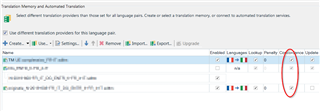
    1. "Concordance is enabled on each TM within the project" 
      Yes except for a cloud TM I don't use:
      Trados Studio screenshot showing Translation Memory & Automated Translation settings with a red error icon next to a cloud TM.

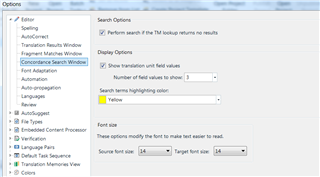
    2. "File>Options > Editor > Concordance Search Window >Perform search if the TM lookup returns no results""

      I see this:

      Trados Studio Options menu screenshot displaying Editor settings with Concordance Search Window options.
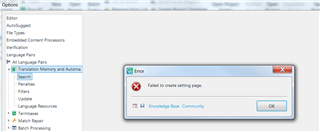
    3. "File >Options >Language Pairs > All Language Pairs > Translation Memory & Automated Translation > Search > Concordance match values"

      I get this error message (its details are attached to this reply, see "File-ooptions-failed to create setting page 2019-12-05.sdlerror.xml"):
      Error message in Trados Studio stating 'Failed to create setting page' with a Knowledge Base Community button.
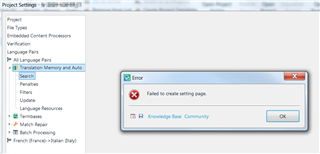
    4. "Project Settings > Language Pairs > All Language Pairs > Translation Memory & Automated Translation > Search > Concordance match values"

      I get this error message (details are attached to this reply, see "project settings- failed to create setting pane.sdlerror.xml"):
      Error message in Trados Studio Project Settings stating 'Failed to create setting page' with a Knowledge Base Community button.

    5. "If there are still issues- can you check a different project please using a different TM?"

      I have opened an old project I have translated a few days ago and I encounter the same issue.

    <SDLErrorDetails time="05/12/2019 14:39:15">
      <ErrorMessage>Failed to create setting page.</ErrorMessage>
      <Exception>
        <Type>System.Reflection.TargetInvocationException, mscorlib, Version=4.0.0.0, Culture=neutral, PublicKeyToken=b77a5c561934e089</Type>
        <HelpLink />
        <Source>mscorlib</Source>
        <HResult>-2146232828</HResult>
        <StackTrace><![CDATA[   at System.RuntimeTypeHandle.CreateInstance(RuntimeType type, Boolean publicOnly, Boolean noCheck, Boolean& canBeCached, RuntimeMethodHandleInternal& ctor, Boolean& bNeedSecurityCheck)
       at System.RuntimeType.CreateInstanceSlow(Boolean publicOnly, Boolean skipCheckThis, Boolean fillCache, StackCrawlMark& stackMark)
       at System.RuntimeType.CreateInstanceDefaultCtor(Boolean publicOnly, Boolean skipCheckThis, Boolean fillCache, StackCrawlMark& stackMark)
       at System.Activator.CreateInstance[T]()
       at Sdl.Desktop.Platform.Settings.SettingsPageReference`1.Initialize()
       at Sdl.Desktop.Platform.Implementation.Settings.AbstractSettingsHost.EnsurePageInitialized(ISettingsPageReference r)
       at Sdl.Desktop.Platform.Implementation.Settings.AbstractSettingsHost.GetInitializedPage(ISettingsPageReference r)
       at Sdl.Desktop.Platform.WinForms.SettingsUIControl._tree_AfterActivate(Object sender, NodeEventArgs e)]]></StackTrace>
        <InnerException>
          <Type>Sdl.Desktop.Platform.Services.ServiceNotAvailableException, Sdl.Desktop.Platform, Version=5.0.0.0, Culture=neutral, PublicKeyToken=c28cdb26c445c888</Type>
          <HelpLink />
          <Source>Sdl.Desktop.Platform</Source>
          <HResult>-2146233088</HResult>
          <StackTrace><![CDATA[   at Sdl.Desktop.Platform.Implementation.Services.GlobalServiceContext.GetService[T]()
       at Sdl.TranslationStudio.ProjectManagement.Settings.TranslationMemorySearchSettingsPage..ctor()]]></StackTrace>
        </InnerException>
      </Exception>
      <Environment>
        <ProductName>SDL Trados Studio</ProductName>
        <ProductVersion>14.0.0.0</ProductVersion>
        <EntryAssemblyFileVersion>14.1.10018.54792</EntryAssemblyFileVersion>
        <OperatingSystem>Microsoft Windows 7 Ultimate </OperatingSystem>
        <ServicePack>Service Pack 1</ServicePack>
        <OperatingSystemLanguage>1040</OperatingSystemLanguage>
        <CodePage>1252</CodePage>
        <LoggedOnUser>PC-dave7\dave7</LoggedOnUser>
        <DotNetFrameWork>4.0.30319.42000</DotNetFrameWork>
        <ComputerName>PC-DAVE7</ComputerName>
        <ConnectedToNetwork>True</ConnectedToNetwork>
        <PhysicalMemory>3402340 MB</PhysicalMemory>
      </Environment>
    </SDLErrorDetails>
    <SDLErrorDetails time="05/12/2019 14:40:05">
      <ErrorMessage>Failed to create setting page.</ErrorMessage>
      <Exception>
        <Type>System.Reflection.TargetInvocationException, mscorlib, Version=4.0.0.0, Culture=neutral, PublicKeyToken=b77a5c561934e089</Type>
        <HelpLink />
        <Source>mscorlib</Source>
        <HResult>-2146232828</HResult>
        <StackTrace><![CDATA[   at System.RuntimeTypeHandle.CreateInstance(RuntimeType type, Boolean publicOnly, Boolean noCheck, Boolean& canBeCached, RuntimeMethodHandleInternal& ctor, Boolean& bNeedSecurityCheck)
       at System.RuntimeType.CreateInstanceSlow(Boolean publicOnly, Boolean skipCheckThis, Boolean fillCache, StackCrawlMark& stackMark)
       at System.RuntimeType.CreateInstanceDefaultCtor(Boolean publicOnly, Boolean skipCheckThis, Boolean fillCache, StackCrawlMark& stackMark)
       at System.Activator.CreateInstance[T]()
       at Sdl.Desktop.Platform.Settings.SettingsPageReference`1.Initialize()
       at Sdl.Desktop.Platform.Implementation.Settings.AbstractSettingsHost.EnsurePageInitialized(ISettingsPageReference r)
       at Sdl.Desktop.Platform.Implementation.Settings.AbstractSettingsHost.GetInitializedPage(ISettingsPageReference r)
       at Sdl.Desktop.Platform.WinForms.SettingsUIControl._tree_AfterActivate(Object sender, NodeEventArgs e)]]></StackTrace>
        <InnerException>
          <Type>Sdl.Desktop.Platform.Services.ServiceNotAvailableException, Sdl.Desktop.Platform, Version=5.0.0.0, Culture=neutral, PublicKeyToken=c28cdb26c445c888</Type>
          <HelpLink />
          <Source>Sdl.Desktop.Platform</Source>
          <HResult>-2146233088</HResult>
          <StackTrace><![CDATA[   at Sdl.Desktop.Platform.Implementation.Services.GlobalServiceContext.GetService[T]()
       at Sdl.TranslationStudio.ProjectManagement.Settings.TranslationMemorySearchSettingsPage..ctor()]]></StackTrace>
        </InnerException>
      </Exception>
      <Environment>
        <ProductName>SDL Trados Studio</ProductName>
        <ProductVersion>14.0.0.0</ProductVersion>
        <EntryAssemblyFileVersion>14.1.10018.54792</EntryAssemblyFileVersion>
        <OperatingSystem>Microsoft Windows 7 Ultimate </OperatingSystem>
        <ServicePack>Service Pack 1</ServicePack>
        <OperatingSystemLanguage>1040</OperatingSystemLanguage>
        <CodePage>1252</CodePage>
        <LoggedOnUser>PC-dave7\dave7</LoggedOnUser>
        <DotNetFrameWork>4.0.30319.42000</DotNetFrameWork>
        <ComputerName>PC-DAVE7</ComputerName>
        <ConnectedToNetwork>True</ConnectedToNetwork>
        <PhysicalMemory>3402340 MB</PhysicalMemory>
      </Environment>
    </SDLErrorDetails>


    Generated Image Alt-Text
    [edited by: Trados AI at 7:24 PM (GMT 0) on 28 Feb 2024]
  • Hello

    this is just an update:

    I have removed the global TM I would like to update and tried with a new and empty TM but the same problem is still occurring.

    I am going to try the app "SDL-T Window for Clipboard" (in order to check the TM outside Studio 2017) as a potential temporary workaround to that issue

  • Hello ,

    Where do you have the TM's stored? Perhaps in the cloud somewhere.

    The error seems to suggest that its not possible to connect properly.

    Maybe try moving the TM to your local drive and readding it to the project (reboot your machine first).

    The following article may also help (corrupt settings- Studio reset).

    https://gateway.rws.com/csm?id=kb_article_view&sysparm_article=KB0031290

    Oana Nagy | QA Engineer | RWS Group

  • Hi ,

    I store the TM on one of the internal local drives of my PC  (I have two different internal drives - not just partitions-, say "C" and "D").

    I have preferred to have first a try with Studio reset and it works. I have:

    - exported my "user profile",

    - closed Studio,

    - reset the Studio folder,

    - reopened Studio,

    - reimported my user profile.

    Thank you very much for your support!

    Davide