
 Translate



Hi guys! I would like to uninstall SDL Trados Studio 2019 15.2.4.16.93, but the following error massage blocks uninstalling:
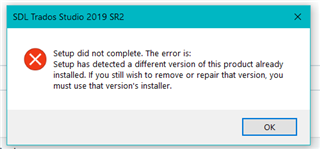
The problem is that the installer I have is SDLTradosStudio2019_SR2_15.2.0.1041. Could I downloads the newest installer or other ideas? I need reinstalling Studio but failed.
Generated Image Alt-Text
[edited by: Trados AI at 7:26 PM (GMT 0) on 28 Feb 2024]



