Is there any way to turn off ALL "clever" add-ons and tweaks and nonsense which the designers have very unfortunately felt they should add to this 2019 edition? I want to turn them off completely, get rid of them, destroy them, disable them totally.
You are currently working on UAT

Is there any way to turn off ALL "clever" add-ons and tweaks and nonsense which the designers have very unfortunately felt they should add to this 2019 edition? I want to turn them off completely, get rid of them, destroy them, disable them totally.
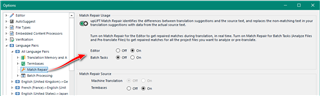
A) Fuzzy match repair
Project Settings - Language Pairs - All Language Pairs - Match Repair - Turn everything off
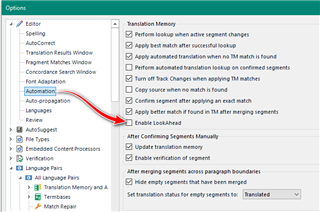
B) It has occurred to them, you just have to familiarize yourself with the software features. It's called LookAhead.
Options - Automation - Enable LookAhead
Disabling fuzzy match repair might also help a little with the lookup speed.
There are about 300 aspects of SDL 2019 which make it unfit for the description "software" or "software application", let alone one which anyone should ever be expected to pay money for.
I'm already relishing the next 297!
One aspect I have noticed (a new feature in 2019 it would appear), is that it tries to be "clever" in ways which are a most unfortunate design choice. I have noticed that sometimes, if it spots that a segment is pretty much identical to one in memory it will actually now insert stuff, "scraped" from the new source segment, into the proposed translation.
I guess you're referring to Match Repair? Just turn it off or even use the original match:

Quite apart from the fact, of course, that an application with even a slight hint of professional development behind it would be looking up, in a different thread, the matches for the next few segments (S+1, S+2, S+3...) after segment S even as the user is in the process of translating segment S. But, duh, never occurred to them I spose!!! ;-(
Turn it off...

PS re the "Tags" box below. Is any mod or administrator of this forum aware that clicking in this box actually makes the screen with all the description disappear, thus losing all one's description if one hasn't copied to clipboard (I had)? I use Firefox 70 x64 with various add-ons including Adblock Ultimate. This shouldn't be happening. Presumably this forum is run by SDL itself. True to form... !
Nice! You are a real pleasure to try and help.
I suggest you do two things:
Paul Filkin | RWS
Design your own training!
You've done the courses and still need to go a little further, or still not clear?
Tell us what you need in our Community Solutions Hub
Nora has already pointed you in the right direction.
As for the rest of your post: this is nothing but moaning.
It's like in the real life. You buy a new phone, it has new features. You get an OS update and your things are thrown bottom up. But the vast majority of these phones loves the changes. If you don't like sport cars, don't buy Ferrari. But if you then buy a Ford Fiesta, do not expect it to go in less than 4 seconds from zero to 60.
In the other topic you mention Paul and myself tried to convince you to use better methods, but you refused. Your choice, but in fact Studio is able to autopropagate properly written numbers. But it works only, if the number format in both languages is kept as expected. Making numbers to alphanumerics (ie. adding the € to number like 1.000.000 EUR to €1,000,000) renders this feature unusable. This is really that simple.
_________________________________________________________
When asking for help here, please be as accurate as possible. Please always remember to give the exact version of product used and all possible error messages received. The better you describe your problem, the better help you will get.
Want to learn more about Trados Studio? Visit the Community Hub. Have a good idea to make Trados Studio better? Publish it here.
Thanks for these suggestions.
I was told by Jerzy in that other thread (community.sdl.com/.../sdl-2019-auto-substitution-of-numbers-not-working) that LookAhead is not a good idea (doesn't work well?) and should only be used on a less powerful machine.
But you recommend it so I'll try it along with the other things.
No she didn't. She just told you what the option was.
Lookahead is great when working interactively with machine translation or other remote resurces as it reduces the wait while Studio talks to the server. If you're not doing this then turn it off.
Paul Filkin | RWS
Design your own training!
You've done the courses and still need to go a little further, or still not clear?
Tell us what you need in our Community Solutions Hub
Lookahead is great when working interactively with machine translation or other remote resurces as it reduces the wait while Studio talks to the server. If you're not doing this then turn it off.
And, as with anything else, read the Help to understand what it does and to see if it's what you want/need.
This part is particularly important:
Thanks Paul.
My view that SDL is unspeakably dreadful as an application is pretty well-informed. It's really in a class of its own, and I've felt that way ever since I had the misfortune to encounter Trados of the old style about 20 years ago.
I'm now developing my own FOSS app which will do pretty much everything SDL does, and given time it'll be able to do much more and better. Just to give you a couple of examples: it is absolutely unbelievable that, given that SDL and Trados have been around so long, and have been raking in so much money year after year after decade after decade, not just from users but from most "corporate" translation companies...
- 1. concordance searching still does not work using Lucene indices, using stemming and so forth (see Apache Lucene). It also appears that Lucene indexing is not used for fuzzy matching either.
- 2. that even now I am obliged to use the mouse for mnemonic menus which just don't work: I can't give you an example right now because I'm booted into Linux. But I'm referring to menus where it *appears* you are able to go Alt-N (or whatever) and then follow on exclusively with the keyboard... and these simply don't work - for many commands I'm actually *obliged* to use the mouse, a bit: a sure sign of amateurish app development.
- 3. that even now after all these years you still, as a user, get error failure messages which should never be presented to the user but instead logged for technical analysis (e.g. things like "Object is not referenced as an object" ...)
- 4. SDL software, all of it, is what I refer to as "legacy code". By that I mean code that has not been developed exclusively using Test-Driven Development. It is unthinkable that properly tested code would ever have led to a Service Pack (about a year ago) in which regex Search-and-Replace was inadvertently hobbled.
Re FOSS CAT tools: it's a great shame about Omega T (e.g. still seemingly not being able to handle things like markup at all adequately, and still having an unacceptably clunky UI). From my testing of it Omega T is also unable to handle gigantic TMs, of the kind I use.
Re Linux/Windoze. I despise Windoze pretty much on a par with SDL. There are only two apps now keeping me on the Dark Side: SDL and Dragon Dictation software. For this reason I only boot to 'Doze when I'm doing translations.
For example, there's no reason why SDL couldn't offer Linux versions as well as 'Doze. They offer a Mac version, and Mac OS has obviously been (in my opinion) leeching off Linux since its inception.
Re SDL manuals. I have in the past tried to look at what passes for the SDL manuals, online somewhere. I found them to be as appalling badly put together as the application itself: virtually unreadable, obviously not designed by anyone with adequate technical writing skills. The entire organisation is amateurish from top to bottom.
Hi Jerzy,
Nope. I understood about the use of regex filters the moment you told me about this. I now use it. I'm using it as a workaround as well as for more routine stuff. The point is you don't need to tell me 5 times what I pick up on the first time. Actually I'm pretty much a "power user" of regexes, which is one reason I was so disgusted when the SP of a year ago inadvertently hobbled regex search-and-replace.
Secondly, you *appear* once again to be confusing things: I believe I have identified a fault in the A.T. functionality in my set up, where currency quantities are concerned. I asked you to look at Paul's video from the other thread. I'm not really going to repeat this: my app currently doesn't work like his does.
The next step in ascertaining this would be to uninstall my app and then install from fresh. I intend to do that some time soon.
My issues with SDL are in fact well-informed. Given the 10s of millions of $ this corporation has raked in over the past decade this application should be superb, it should be cross-platform, including *nix, and it should also expose some of its internal functionality to forking and reconfiguration (i.e. by making some internals FOSS). Instead of which it is a heap of dysfunctional amateurish legacy code.
The "new bells and whistles" of SDL 2019 pretty much just go to prove my point, I'm afraid.
My view that SDL is unspeakably dreadful as an application is pretty well-informed. It's really in a class of its own, and I've felt that way ever since I had the misfortune to encounter Trados of the old style about 20 years ago.
Of course you're entitled to your opinion. But if you really came here for help, or to share your wisdom on what could be done better, perhaps you could try and stick to just that and not fill the thread with so much opinionated negative commentary. It's hard to pull out the value in your criticism, and I'm sure there is some in there, when you don't.
Paul Filkin | RWS
Design your own training!
You've done the courses and still need to go a little further, or still not clear?
Tell us what you need in our Community Solutions Hub
Thanks. So if I understand you, the results when using Lookahead in a normal session will not be as good as if you don't use it??
That begs the question: So why would lookahead functionality not be routine then? I.e. while the user is cogitating on segment S the machine/app has nothing to do and might as well be looking ahead at the next segments, doing fuzzy matching, and getting ready to "serve up" the next results when the user moves on to S+1, S+2, etc... ?