

You are currently working on UAT 

Error Message "Could not find a part of the path" when importing Studio packages in SDL Studio 2019

Hello,

since the update to SDL Trados 2019, we have sometimes the problem, that we can't import Studio packages and receive the following error:
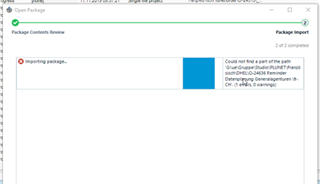
Error message during package import in SDL Trados Studio 2019 showing 'Could not find a part of the path' with a file directory path and '0x0' error code.

This happens with all different builds from SDL Trados Studio 2019, but it is possible to open the same Studio package with SDL Trados Studio 2017.

Is this something anyone already had and figured out how to solve this?

Would be happy to get any help.

Best regards,

Daniel Ganz


Generated Image Alt-Text
[edited by: Trados AI at 7:14 PM (GMT 0) on 28 Feb 2024]

emoji
Parents
  • Thanks for sending me your package.  I can of course reproduce this and the only workaround is this:

    1. Change the package to a zip file by editing the file extension
    2. Extract the sdlproj
    3. Open in a text editor (Notepad++ for example)
    4. Go to the GeneralProjectInfo node
    5. Delete the last space character from the name attribute
      Screenshot of Trados Studio error message indicating a bug with reference LG-21157, with a workaround involving changing file extensions and editing the sdlproj file.
    6. Save the changes
    7. Add the sdlproj back to the zip file
    8. Change the zip file back to an sdlpackage by editing the file extension

    This is a bug and it is now logged with our reference LG-21157.

    Regards

    Paul

    Paul Filkin | RWS

    Design your own training!
    You've done the courses and still need to go a little further, or still not clear? 
    Tell us what you need in our Community Solutions Hub

    emoji


    Generated Image Alt-Text
    [edited by: Trados AI at 7:14 PM (GMT 0) on 28 Feb 2024]
Reply
  • Thanks for sending me your package.  I can of course reproduce this and the only workaround is this:

    1. Change the package to a zip file by editing the file extension
    2. Extract the sdlproj
    3. Open in a text editor (Notepad++ for example)
    4. Go to the GeneralProjectInfo node
    5. Delete the last space character from the name attribute
      Screenshot of Trados Studio error message indicating a bug with reference LG-21157, with a workaround involving changing file extensions and editing the sdlproj file.
    6. Save the changes
    7. Add the sdlproj back to the zip file
    8. Change the zip file back to an sdlpackage by editing the file extension

    This is a bug and it is now logged with our reference LG-21157.

    Regards

    Paul

    Paul Filkin | RWS

    Design your own training!
    You've done the courses and still need to go a little further, or still not clear? 
    Tell us what you need in our Community Solutions Hub

    emoji


    Generated Image Alt-Text
    [edited by: Trados AI at 7:14 PM (GMT 0) on 28 Feb 2024]
Children
