 Translate



Hello,
I cannot add a visio file to a project. The following error message is displayed: Input string was not in a correct format.
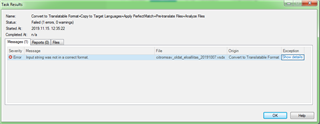
Any help is appreciated.
Sandor
Generated Image Alt-Text
[edited by: Trados AI at 7:10 PM (GMT 0) on 28 Feb 2024]

You are currently working on UAT

Hello,
I cannot add a visio file to a project. The following error message is displayed: Input string was not in a correct format.
Any help is appreciated.
Sandor
What language are you using in your regional settings if not Russian... English or another one? Worth sharing that information in case other languages are affected.
Have you tried opening the file as a single file project? So don't run it through the project wizard.
Can you share the file?
Paul Filkin | RWS
Design your own training!
You've done the courses and still need to go a little further, or still not clear?
Tell us what you need in our Community Solutions Hub

I use Hungarian. I also tried English, to no avail.
When opening the file as a single file project, the same error message appears.
Well, when I try to share (upload) the file, "error" is displayed.

Well, when I try to share (upload) the file, "error" is displayed.
Either zip it first, or email to me directly - pfilkin@sdl.com
Don't forget if you do post it in this thread it's available for everyone to see.
Paul Filkin | RWS
Design your own training!
You've done the courses and still need to go a little further, or still not clear?
Tell us what you need in our Community Solutions Hub
I"ve sent it to you by e-mail.
I"ve sent it to you by e-mail.
Thanks for sending me the visio file. I don't have any problems with this file. Please check the following:
1. If you are adding to a project created froma package you received then make sure you have added any updated or new filetypes in the project settings.
2. If you created the project yourself please check your project templates and make sure they are newly created with the latest version of the software.
Paul Filkin | RWS
Design your own training!
You've done the courses and still need to go a little further, or still not clear?
Tell us what you need in our Community Solutions Hub
I use the latest version of Trados Studio 2019. Now I created two new projects using the Default and SDL Trados project templates. The same error happens. 