 Translate



Hello,
I cannot add a visio file to a project. The following error message is displayed: Input string was not in a correct format.
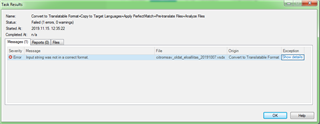
Any help is appreciated.
Sandor
Generated Image Alt-Text
[edited by: Trados AI at 7:10 PM (GMT 0) on 28 Feb 2024]

You are currently working on UAT

Hello,
I cannot add a visio file to a project. The following error message is displayed: Input string was not in a correct format.
Any help is appreciated.
Sandor
Hello Sandor Juhasz ,
Maybe the following Gateway article will help resolve this -
https://gateway.rws.com/csm?id=kb_article_view&sysparm_article=KB0031111
Oana Nagy | QA Engineer | RWS Group

Hello Steven,
I've already found and tried this article but it doesn't solve the problem.
Hello Sandor,
We have to save them down as a .vdx, then use the file settings on the open exchange app (however, we did have an issue where it didn't recognize the file type, so we had to go into the settings file and make sure it had a full stop between * and vdx). However, I don't know if this solves your issue.
Best of luck to you.
Best, Mindy
Hello Sandor,
We have to save them down as a .vdx, then use the file settings on the open exchange app (however, we did have an issue where it didn't recognize the file type, so we had to go into the settings file and make sure it had a full stop between * and vdx). However, I don't know if this solves your issue.
Best of luck to you.
Best, Mindy
Hello Mindy,
To be frank, I don't understand what I should do.
Sandor
