You are currently working on UAT

RWS Community
You are currently working on UAT
Hello Noradej Peamwaiprib ,
My first suggestion would be to ensure that you have selected a font that is supported for the specific languages and see if this helps.
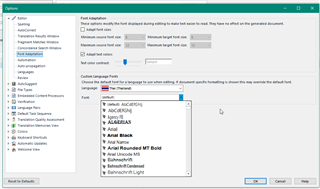
and select the following option-
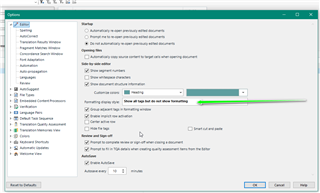
Does this help?
If not please create a test file -
we only need a couple of segments so you can omit any sensitive/confidential data) and attach here in the community and we can take a look.
Oana Nagy | QA Engineer | RWS Group


Thank you for your reply. An example is "95 °C to 140 °C" in the English source. In the Editor, this phrase is shown correctly, but when I generate a bilingual review Word file, it shows "95<194/>C to 140<201/>C". I tried changing Options as you mentioned (the chosen font for US-English is "Symbol"), but the problem still exists.
that is Normal, called Tags
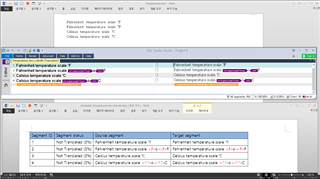
sometime they (it) uses different format and SDL Trados Studio use Tags unless the character is Unicode

Thank you for your reply. In my Editor, it shows "°C" as in your segment 3. However, when I genereated a bilingual review Word file, it shows instead tags as in your segment 4. In fact, it doens't even show the circle (degree symbol), it shows just tags and C as in "95<194/>C to 140<201/>C". It's even worse for Greek letters, for which nothing but tags were shown. You mentioned something about Unicode. How can I adjust my character so that I can obtain the result like your segment 3?
sorry, as Mr. Steven Whale says..
no sample
no solution
the world is complex enough
Regards
Sorry for not providing samples in the first place. I'm not good with technology, so it took me quite sometime. By the way, I can't replicate text without tags like your segment 3 with my newly created test file. There are tags in my Editor now.
This is my source.
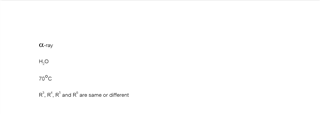
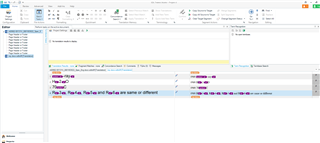
Then, this is my editor.
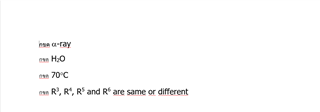
This is my generated target file.
And at last, the problematic bilingual review.
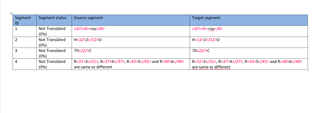
Is it even possible to generate a human-readable bilingual review Word file?

your problem is out of my knowledge
SDL people could help you out, I guess
-and they will show you how to post a sample file not screenshot
Good Luck To You
Your bilingual file for review looks exactly as it is supposed to look.
I'm afraid your problem is actually wrong expectations - you are assuming a functionality which isn't there and never was.
The Bilingual Word for review has a special format where all tags present in the Studio Editor are intentionally included the way they are. It's made on purpose, first to show the tags explicitly to the reviewer, and second to be easily able to import the tags back into Studio... and all that using a standard Word functionality.
I am not sure but, your problem should be "Font something".. but, I do not have any idea about it.
 Translate



