You are currently working on UAT 

Urgent - "Failed to create setting page" in Translation Memory options


I have reinstalled SDL Trados Studio 2019 on my new computer, but I have a massive problem:

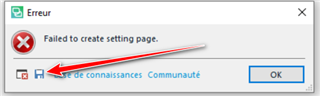
I get the message "Failed to create setting page" when I access the Translation Memory options:

FYI, my TM is on my local drive and I haven't changed the segmentation rules.

Please help me because Trados is unusable!

Thank you.


Error.pdf

Parents
  • Just confirming that whilst your TM is on your local drive it's not synching to dropbox or any other external/cloud location?  That is the most common explanation for this error.  It would be helpful if you clicked on the small disk symbol in the error message, saved the XML message to your desktop and then attached the XML file to your post and not just a PDF:

    Error dialog box in Trados Studio with a red cross icon, displaying the message 'Failed to create setting page.' and an arrow pointing to a disk symbol.

    In the meantime can you try renaming this file and then restart Studio?

    c:\Users\[USERNAME]\AppData\Local\SDL\SDL Trados Studio\15.0.0.0\TranslationMemoryRepository.xml

    If that works until you add your TM back again then you might have to recreate your TM.  If that fails try renaming this folder:

    c:\Users\[USERNAME]\AppData\Roaming\SDL\SDL Trados Studio\15.0.0.0\

    Paul Filkin | RWS

    Design your own training!
    You've done the courses and still need to go a little further, or still not clear? 
    Tell us what you need in our Community Solutions Hub

    emoji


    Generated Image Alt-Text
    [edited by: Trados AI at 6:58 PM (GMT 0) on 28 Feb 2024]
Reply
  • Just confirming that whilst your TM is on your local drive it's not synching to dropbox or any other external/cloud location?  That is the most common explanation for this error.  It would be helpful if you clicked on the small disk symbol in the error message, saved the XML message to your desktop and then attached the XML file to your post and not just a PDF:

    Error dialog box in Trados Studio with a red cross icon, displaying the message 'Failed to create setting page.' and an arrow pointing to a disk symbol.

    In the meantime can you try renaming this file and then restart Studio?

    c:\Users\[USERNAME]\AppData\Local\SDL\SDL Trados Studio\15.0.0.0\TranslationMemoryRepository.xml

    If that works until you add your TM back again then you might have to recreate your TM.  If that fails try renaming this folder:

    c:\Users\[USERNAME]\AppData\Roaming\SDL\SDL Trados Studio\15.0.0.0\

    Paul Filkin | RWS

    Design your own training!
    You've done the courses and still need to go a little further, or still not clear? 
    Tell us what you need in our Community Solutions Hub

    emoji


    Generated Image Alt-Text
    [edited by: Trados AI at 6:58 PM (GMT 0) on 28 Feb 2024]
Children
No Data